- Products
- Learn
- Local User Groups
- Partners
- More

MVP 2026: Submissions
Are Now Open!
What's New in R82.10?
Watch NowOverlap in Security Validation
Help us to understand your needs better
CheckMates Go:
Maestro Madness
Now, this may sound funny to some of you that know me, but here it is:
We are running Security Checkup in our environment and the 15400 all-in-one box that was configured to accept the traffic from the span port, blades enabled and IA configured.
IA is working in terms of seeing AD objects when trying to define roles and we see the logon and logoff events in a SmartLog.
AD query is working with adlog a dc and adlog a q ip returning proper values.
There are, however no user or machine IDs int the rest of the logs.
I am not involved in the hands-on aspects of this project due to rather dramatically expanded responsibilities in my current role, but would like to lend a hand to my guys that are involved with it.
SE that Check Point assigned to the case stated that he has seen this behavior in one more Security Checkup he was running, but that the root cause was never determined.
Another question is this: when running security checkup with all-in-one, does it make sense to have IA configured or is it better to have Identity Logging configured on the box. Is there a case where both should be configured?
Let me know if you have any suggestions.
Thank you,
Vladimir
Nope, that last case was a lab build with multiple components.
This is at my work, where I am not involved with the hands-on operations (yeah, the irony not lost on me 🙂 ).
As it is a Security Checkup in a PAN shop, I can't even open SR for it, so it is up to the VAR and SE assigned to the project.
Hi @Vladimir !
I will explain about how the logging mechanism works, and it might help you with pin pointing the problem.
Indeed the Identity Awareness DB resides on PDP process (where you are typing "pdp monitor..." you see the relevant output).
However, logging mechanism is owned by PEP. It means:
1. Identity sharing is needed in case PDP and PEP are different GWs.
2. The relevant CLI to check the data on the GW is:
# pep show user query cid <IP>
As for Identity Logging, I less prefer this option. It uses the same mechanism of AD query, and require high permissions for the configured admin, and uses WMI. I will recommend using Identity Collector instead.
HTH,
Royi Priov.
@Royi_Priov , thank you, I'll try and see if the # pep show user query cid <IP> will return accurate information.
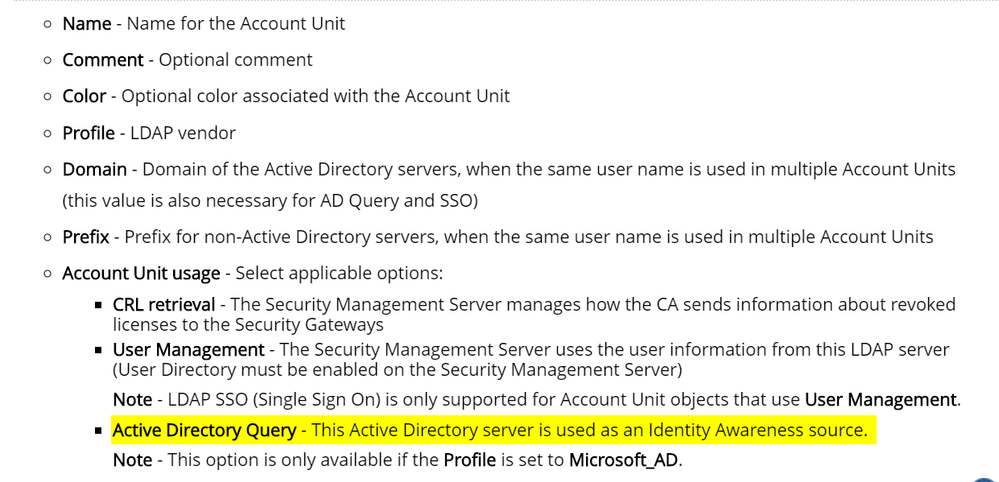
As to Identity Collector, it is still requires LDAP Account Units.:
It looks like you have to use LDAP Account unit for authentication, which requires either Domain Admin account or the one described in sk93938 :
Which gets as back to the AD Query.
Apologies if I am slow to pick this up, but every time I am looking into Identity Collector, I feel like a dog chasing chasing his own tail 🙂
Let me know if, when we are using Identity Collector, a different Account Unit usage parameter should be selected.
Thank you,
Vladimir
LDAP AU is needed for most of the identity sources. Why? because Identity Source provides {user, machine, IP} to the PDP.
However, we are missing the identity groups, which most customers are using for identity based enforcement.
In other words - both AD Query and Identity Collector will provide to PDP only {user, machine, IP} - AD Query will do it with WMI, while IDC will do it with Microsoft API. In both cases, PDP will query the AD (with LDAP) for the identity groups (user groups, machine groups). After this query, the information will be {user, machine, IP, groups} and PDP will be able to calculate the needed access roles for enforcement.
On the other hand, since Identity Logging is not related to enforcement, no LDAP query will be executed for identity groups.
I hope it makes things clear. If not, tag me again 🙂
Royi Priov.
It's been a while since I performed a security checkup, but in my mind I always turned on identity logging only since is what you really want: Users on the report. IA is only to create rules based on identity.
Identity Collector would be a nice option but in most checkups the customer doesn't like to deploy a server for it's purpose.
On large scale checkups try to disable as much system accounts as possible to avoid loss of information.
Please refer to sk113833
Leaderboard
Epsum factorial non deposit quid pro quo hic escorol.
| User | Count |
|---|---|
| 16 | |
| 15 | |
| 7 | |
| 5 | |
| 5 | |
| 5 | |
| 4 | |
| 4 | |
| 4 | |
| 4 |
Tue 16 Dec 2025 @ 05:00 PM (CET)
Under the Hood: CloudGuard Network Security for Oracle Cloud - Config and Autoscaling!Thu 18 Dec 2025 @ 10:00 AM (CET)
Cloud Architect Series - Building a Hybrid Mesh Security Strategy across cloudsTue 16 Dec 2025 @ 05:00 PM (CET)
Under the Hood: CloudGuard Network Security for Oracle Cloud - Config and Autoscaling!Thu 18 Dec 2025 @ 10:00 AM (CET)
Cloud Architect Series - Building a Hybrid Mesh Security Strategy across cloudsAbout CheckMates
Learn Check Point
Advanced Learning
YOU DESERVE THE BEST SECURITY