- Products
- Learn
- Local User Groups
- Partners
- More

The Great Exposure Reset
24 February 2026 @ 5pm CET / 11am EST
CheckMates Fest 2026
Watch Now!AI Security Masters
Hacking with AI: The Dark Side of Innovation
CheckMates Go:
CheckMates Fest
Hi,
May i know how can i setup an Email alert when IPS update is failed using SmartEvent?
Thank you.
See Logging and Monitoring Administration Guide R80.30 p.63ff !
@G_W_Albrecht Thanks, so do you mean there's no default options for it but I need to create an external script instead?
No, you create an SE automatic reaction - look at the long description in Logging and Monitoring Administration Guide R80.30 p.63ff !
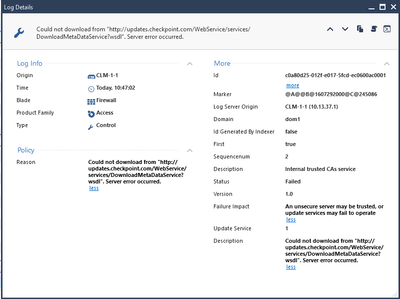
You need to create a custom event and find the logs that describe the failure to upgrade. It's not easy but I found something. Please note that this is the reason I created on my lab and your reason for failure may differ. This is why it's important to see a failure log in your env.
Try to set type Control and description/reason to "Could not download from "http://updates.checkpoint.com/WebService/services/DownloadMetaDataService?wsdl". Server error occurred."
After you're defined this correctly you can add auto-reaction for this.
Yes, that is a more detailed descripton of how to achieve that 8)
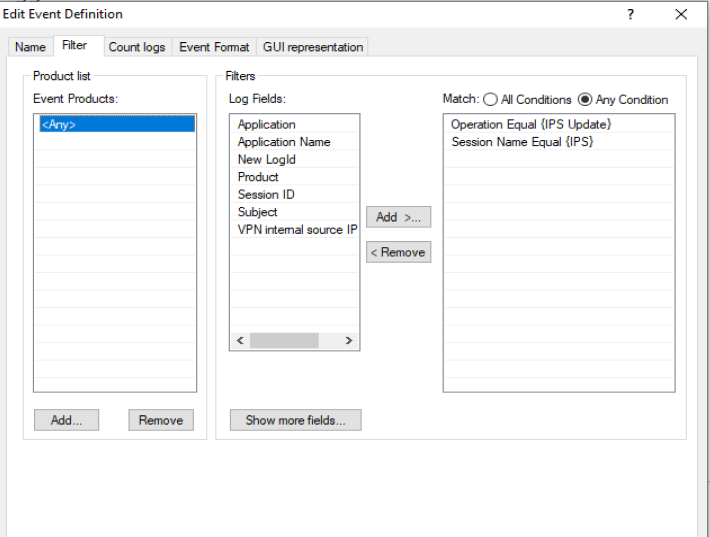
Based on the log that I found, I tried to create the event as below to trigger the event however I didn't receive any email alert for this. Any advice? (checked mail alert configuration is fine)
e?
thanks.
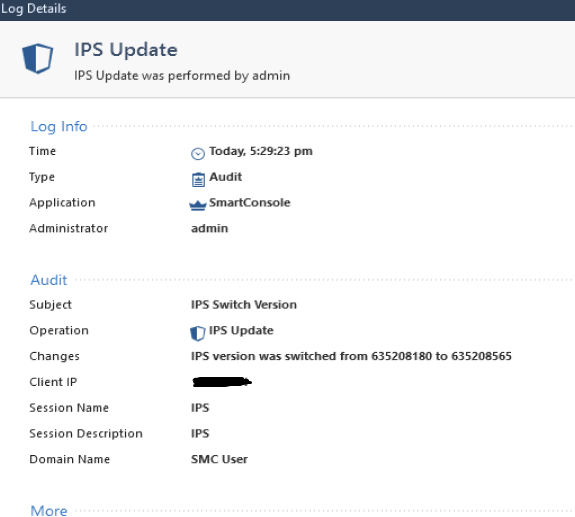
This is for a successful update.
SmartEvent has an issue creating new audit events. If you created it from scratch it won't work. If you want to create an audit event, go to an existing event, right click -> Properties , edit your event and save as a new event.
Thank you Amir but unfortunately it couldn't solve the problem also. I tried to filter "Administrator equal to admin for Any product" only for the customized event but there's no any related email alert.
Any suggestions for the filter settings ?
Thanks.
I suggest going to an existing event, such as 'Check Point administrator login at irregular hours' (under 'Unauthorized Entry'), right click -> properties.
Under <Any>, change the 'Subject Equal' to 'IPS Update' and delete the 'General Information Equal' from filters. Also change radio button to 'Any Condition'.
If this doesn't work you can try same thing with 'Operation' 'IPS Update' instead/in addition to 'Subject Equal'.
Leaderboard
Epsum factorial non deposit quid pro quo hic escorol.
| User | Count |
|---|---|
| 56 | |
| 44 | |
| 16 | |
| 14 | |
| 14 | |
| 11 | |
| 10 | |
| 10 | |
| 9 | |
| 8 |
Thu 12 Feb 2026 @ 05:00 PM (CET)
AI Security Masters Session 3: AI-Generated Malware - From Experimentation to Operational RealityFri 13 Feb 2026 @ 10:00 AM (CET)
CheckMates Live Netherlands - Sessie 43: Terugblik op de Check Point Sales Kick Off 2026Thu 19 Feb 2026 @ 03:00 PM (EST)
Americas Deep Dive: Check Point Management API Best PracticesThu 12 Feb 2026 @ 05:00 PM (CET)
AI Security Masters Session 3: AI-Generated Malware - From Experimentation to Operational RealityFri 13 Feb 2026 @ 10:00 AM (CET)
CheckMates Live Netherlands - Sessie 43: Terugblik op de Check Point Sales Kick Off 2026Thu 19 Feb 2026 @ 03:00 PM (EST)
Americas Deep Dive: Check Point Management API Best PracticesAbout CheckMates
Learn Check Point
Advanced Learning
YOU DESERVE THE BEST SECURITY