- Products
- Learn
- Local User Groups
- Partners
- More

MVP 2026: Submissions
Are Now Open!
What's New in R82.10?
10 December @ 5pm CET / 11am ET
Announcing Quantum R82.10!
Learn MoreOverlap in Security Validation
Help us to understand your needs better
CheckMates Go:
Maestro Madness
Dear colleges hi,
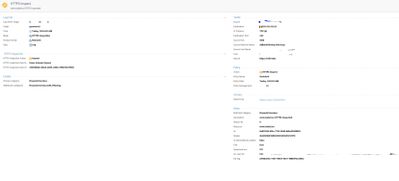
i am facing a strange situation. Cannot login to any site as you can see from the below pictures the destination is not blocked just inspected. This happens to every site i am trying to browse. Please assist! Thank you
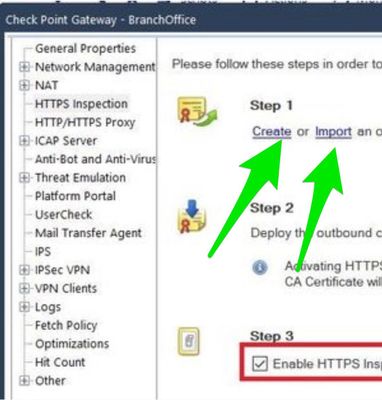
You need to install the root certificate from SMS (SmartConsole) in the browser.
> Gateway & Service > [Gateway] > HTTPS Inspection
Now download the root certificate.
More read here: Performance Tuning Tip - SNI vs. https inspection
Firstly I want to thank you for your clear answer! This is not the issue cause the certificate is already implemented on all workstations via group policy and secondly. I made a test: I create a https bypass rule to a specific destination and the result was the same. Check the below image :I can see the Microsoft Bing search and the Microsoft Bing itself is "secured" but I cant login to any sites.
Would be interesting if the provided certificate is really from your appliance or from original webserver.
What precisely is your HTTPS Inspection policy?
The behavior you’re seeing suggests that the Check Point gateway and the sites you’re connecting to can’t agree on ciphers.
There should be some message in the logs explaining what’s happening.
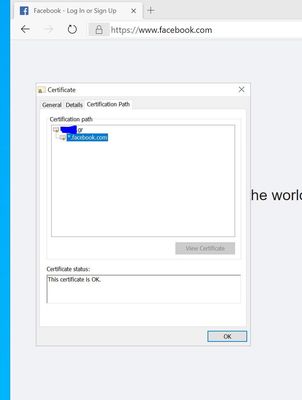
For the sites you are able to connect to, did you validate the TLS certificate to see who signed it?
Probably a good idea to open a TAC case here also.
Please review your symptoms against sk170332
I have made a user group in AD (users interest access). There I add whoever want to have access via checkpoint. The https inspection policy is the below:
our current hotfix is: Check_Point_R80_30_JUMBO_HF_Bundle_T219_sk153152
Below is bypass inspection rule that I am using
I am open about your opinions
I managed to optimize the most but I have an issue eg with Facebook and YouTube URL Filtering.
I have the Social Networking Category & Media Streamers included to General Block Categories but with no success. Https inspection is enabled. Trusted CA are updated.
Users are not listed in the social networking and the media streamers group are able to login on both (facebook,youtube) but images on Facebook are not showing right and videos at YouTube are not loading.
I just saw that the same thing is happening at linkedin.
Marry Christmas to all of you!
check certificate:
Leaderboard
Epsum factorial non deposit quid pro quo hic escorol.
| User | Count |
|---|---|
| 21 | |
| 15 | |
| 7 | |
| 6 | |
| 5 | |
| 5 | |
| 4 | |
| 4 | |
| 4 | |
| 4 |
Fri 12 Dec 2025 @ 10:00 AM (CET)
Check Mates Live Netherlands: #41 AI & Multi Context ProtocolTue 16 Dec 2025 @ 05:00 PM (CET)
Under the Hood: CloudGuard Network Security for Oracle Cloud - Config and Autoscaling!Fri 12 Dec 2025 @ 10:00 AM (CET)
Check Mates Live Netherlands: #41 AI & Multi Context ProtocolTue 16 Dec 2025 @ 05:00 PM (CET)
Under the Hood: CloudGuard Network Security for Oracle Cloud - Config and Autoscaling!About CheckMates
Learn Check Point
Advanced Learning
YOU DESERVE THE BEST SECURITY