- Products
- Learn
- Local User Groups
- Partners
- More

MVP 2026: Submissions
Are Now Open!
What's New in R82.10?
Watch NowOverlap in Security Validation
Help us to understand your needs better
CheckMates Go:
Maestro Madness
In Logs&Monitor, it shows all logs.
Source, Destination, Origin, Blade, Action etc.
The problem is that, Firewall blade does not show full URL address.
For example: source: 192.168.20.1 (local user) destination: 123.123.123.123 (and flag of country).
Like in standard proxies, I want to see this picture:
Source user and Destination URL, and accept or drop action, thats all.
How can I achieve this in CheckPoint?
Thank you!
Note: I tried choosing only URL Filtering blade, it shows Application name it is ok, but it does not show all source users.
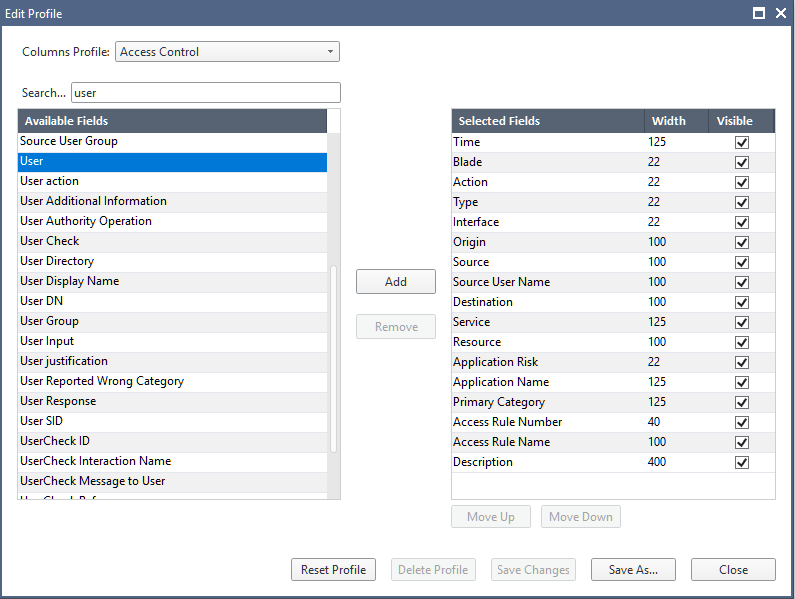
If you want to see custom log entries, edit the current log view profile to include fields you are interested in.
You can do that by right-clicking the column header in the log view and selecting necessary components here:

Provided your IA and IL is configured correctly and if you are logging at "Detailed" level, you should see the both fields in your logs.
I tried adding fields URL, user, Application Name, but all of them are empty.
Which field exactly shows URL?
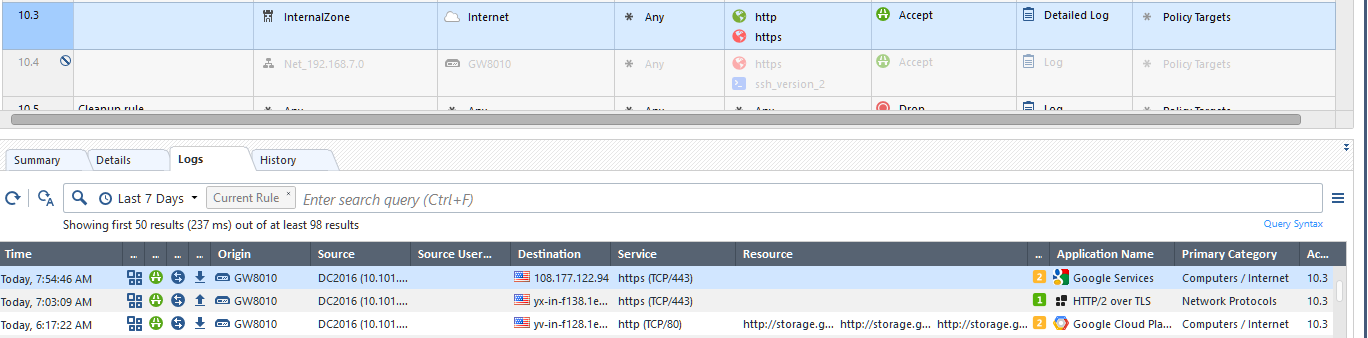
The field that shows URLs is actually called "Resource"

I believe there are two of those with only one actually working right.
The user is identified in the "Source User", if your IA is enabled.
Also, as you can see in the screenshot above, the "Resource" field for "HTTPS" sites are empty in my environment, since I do not have HTTPS inspection enabled.
If I enable HTTPS inspection, most HTTPS sites wont open. How to overcome?
Hi, As far as I understand, you need to enable either extended log or detailed log and HTTPS inspection has to be enabled to see all URLs. To enable HTTPS inspection, you can follow the steps mentioned in sk108202. If you're facing any issues with HTTPS inspection, Please share the issue observed in detail so that we can try to help you on this.
HTH.
You need import the ceertificate of gateway to computers
Em 12 de fev de 2019 02:10, Network M <donotreply@checkpoint.com> escreveu:
CheckMates <https://community.checkpoint.com/?et=watches.email.thread>
Re: How can I see visited websites?
reply from Network M<https://community.checkpoint.com/people/626775d3-fbc7-4ea2-add6-3a422120304e?et=watches.email.thread> in Logging, Monitoring, Reporting, and Event Analysis - View the full discussion<https://community.checkpoint.com/message/39959-re-how-can-i-see-visited-websites?commentID=39959&et=watches.email.thread#comment-39959>
Hello, first of all, you nedd activate the Extended log on that rule where the navigation match...
Leaderboard
Epsum factorial non deposit quid pro quo hic escorol.
| User | Count |
|---|---|
| 20 | |
| 16 | |
| 7 | |
| 5 | |
| 5 | |
| 4 | |
| 4 | |
| 4 | |
| 4 | |
| 4 |
Fri 12 Dec 2025 @ 10:00 AM (CET)
Check Mates Live Netherlands: #41 AI & Multi Context ProtocolTue 16 Dec 2025 @ 05:00 PM (CET)
Under the Hood: CloudGuard Network Security for Oracle Cloud - Config and Autoscaling!Fri 12 Dec 2025 @ 10:00 AM (CET)
Check Mates Live Netherlands: #41 AI & Multi Context ProtocolTue 16 Dec 2025 @ 05:00 PM (CET)
Under the Hood: CloudGuard Network Security for Oracle Cloud - Config and Autoscaling!About CheckMates
Learn Check Point
Advanced Learning
YOU DESERVE THE BEST SECURITY