- Products
- Learn
- Local User Groups
- Partners
- More

MVP 2026: Submissions
Are Now Open!
What's New in R82.10?
10 December @ 5pm CET / 11am ET
Improve Your Security Posture with
Threat Prevention and Policy Insights
Overlap in Security Validation
Help us to understand your needs better
CheckMates Go:
Maestro Madness
Hello,
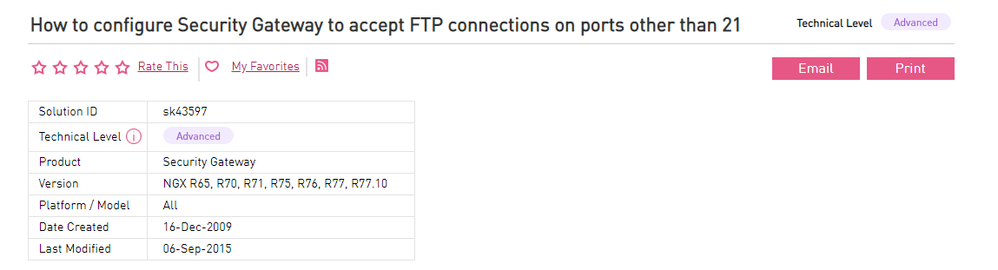
I am looking at how to support FTP on a non-standard port. I found a related SK,but it does not mention and version in the R80 version.
Does anyone have experience with FTP on non-standard ports in R80. Do we still need to apply all the steps in this SK? I would like to avoid having to open up high ports for the FTP data connection. This SK specific mentions having to manually update files on each Security Gateway to configure the Security Gateway to listen to FTP connections on the desired port
Many thanks,
Michael
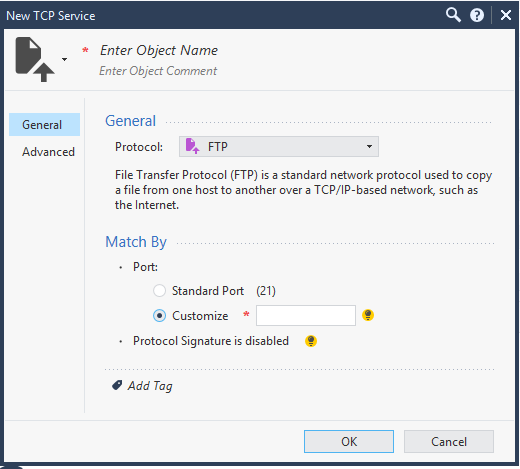
I would start with creating a new TCP service, select FTP protocol and specify a custom port.
I'm pretty sure you don't need to update fwauthd.conf unless you are doing some kind of legacy User/Session/Client authentication for FTP. However an FTP service on a non-standard port needs to be set up correctly so the firewall can properly sniff PORT commands and pinhole open the necessary data ports. This is why FTP control connections (port 21) always go F2F (but the data connections can be accelerated by SecureXL). What you should be able to do is clone the existing FTP service, then edit the name and port number like this:
Use this new service explicitly in your Network rules and you should be good to go.
This sk only shows how to handle this situation using an added Service in Dashboard and a new line in $FWDIR/conf/fwauthd.conf file. Not so hard to try and may work in R80.xx, too.
I would start with creating a new TCP service, select FTP protocol and specify a custom port.
I'm pretty sure you don't need to update fwauthd.conf unless you are doing some kind of legacy User/Session/Client authentication for FTP. However an FTP service on a non-standard port needs to be set up correctly so the firewall can properly sniff PORT commands and pinhole open the necessary data ports. This is why FTP control connections (port 21) always go F2F (but the data connections can be accelerated by SecureXL). What you should be able to do is clone the existing FTP service, then edit the name and port number like this:
Use this new service explicitly in your Network rules and you should be good to go.
Hello All,
It would appear that you would only need to create the custom FTP service. I added a feedback comment to the SK and Checkpoint have come back to say that this SK is not relevant to R80.x. I take this to meant that nothing extra needs to be done beyond the customer service.
Leaderboard
Epsum factorial non deposit quid pro quo hic escorol.
| User | Count |
|---|---|
| 16 | |
| 12 | |
| 9 | |
| 7 | |
| 6 | |
| 6 | |
| 5 | |
| 4 | |
| 4 | |
| 3 |
Thu 04 Dec 2025 @ 12:30 PM (SGT)
End-of-Year Event: Securing AI Transformation in a Hyperconnected World - APACThu 04 Dec 2025 @ 03:00 PM (CET)
End-of-Year Event: Securing AI Transformation in a Hyperconnected World - EMEAThu 04 Dec 2025 @ 02:00 PM (EST)
End-of-Year Event: Securing AI Transformation in a Hyperconnected World - AmericasThu 04 Dec 2025 @ 12:30 PM (SGT)
End-of-Year Event: Securing AI Transformation in a Hyperconnected World - APACThu 04 Dec 2025 @ 03:00 PM (CET)
End-of-Year Event: Securing AI Transformation in a Hyperconnected World - EMEAThu 04 Dec 2025 @ 02:00 PM (EST)
End-of-Year Event: Securing AI Transformation in a Hyperconnected World - AmericasAbout CheckMates
Learn Check Point
Advanced Learning
YOU DESERVE THE BEST SECURITY