- Products
- Learn
- Local User Groups
- Partners
- More

MVP 2026: Submissions
Are Now Open!
What's New in R82.10?
Watch NowOverlap in Security Validation
Help us to understand your needs better
CheckMates Go:
Maestro Madness
Hi
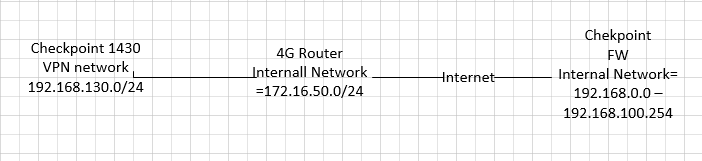
I have configured a VPN tunnel between a 1430 and my central checkpoint Firewall (R80.10).
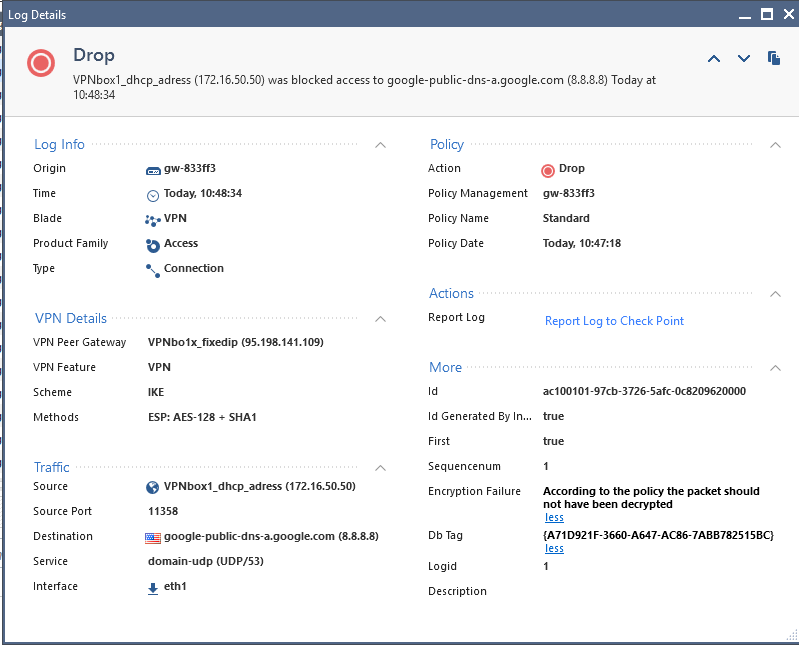
The VPN tunnel is connected but the test packed towards 8.8.8.8 is blocked.

In the fw monitor i get the following
[vs_0][fw_0] eth1:i[68]: 172.16.50.50 -> 8.8.8.8 (UDP) len=68 id=21028
UDP: 58832 -> 53
[vs_0][fw_0] eth1:i[68]: 172.16.50.50 -> 8.8.8.8 (UDP) len=68 id=21029
UDP: 58832 -> 53
[vs_0][fw_0] eth1:i[65]: 172.16.50.50 -> 8.8.8.8 (UDP) len=65 id=21030
UDP: 42110 -> 53
[vs_0][fw_1] eth1:i[68]: 172.16.50.50 -> 8.8.8.8 (UDP) len=68 id=21031
UDP: 58832 -> 53
What policy is it that I need to make changes to?
The 1430 is configured as a Interoperable Device with a fixed IP number of the WAN interface my 4G connection, in the topology i am using the same IP on the External network .

Hi,
Take a look at sk64060 https://supportcenter.checkpoint.com/supportcenter/portal?eventSubmit_doGoviewsolutiondetails=&solut...
I have now this working, I made two changes.
1. On my central FW I changed the VPN Domain to the 172.16.50.X/24 network on the "Interoperable Device"
2. On the 1430 I changed cleared the checkbox for "Disabel NAT for this site" in the VPN settings
.
Why is the 1430 is configured as an Interoperable Device and not as a 1430 ? Do you use local management on it ? That would be rather bad...
At the moment I use local management of the device, during the summer i am going to move to central management.
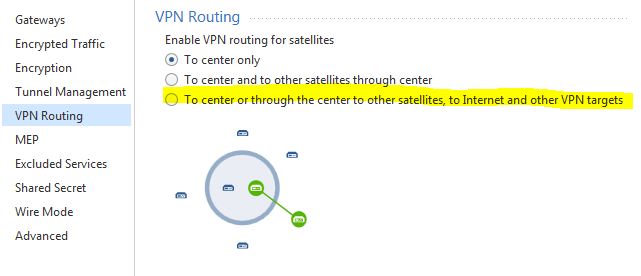
You have an encryption domain issue. The R80.10 doesn't know that 8.8.8.8 is part of its encryption domain. Make sure in the vpn community to change the VPN routing option to be "To center or through center to other satellites, to Internet abd other VPN targets", I'm assuming that you configured the 1430 to route all the traffic in the webui through the R80.10 GW. Make sure you have a Hide NAT rule on the R80.10 GW to hide traffic from behind the 1430 networks to the internet, because the internet should return the traffic to the R80.10 GW.

I noticed in the log the source is 172.16.50.50 after the decryption of the packet is that the external IP of the 1430 are doing Hide NAT behind the 1430 external IP?
Please Make sure to include the 172.16.50.x and the 192.168.130.x networks in smartconsole for the encryption domain of the 1430 device and try to change it to be Externally managed checkpoint device.
That is how it was configuerd on my system, now have it working after making the changes above.
Leaderboard
Epsum factorial non deposit quid pro quo hic escorol.
| User | Count |
|---|---|
| 16 | |
| 15 | |
| 7 | |
| 5 | |
| 5 | |
| 5 | |
| 4 | |
| 4 | |
| 4 | |
| 4 |
Tue 16 Dec 2025 @ 05:00 PM (CET)
Under the Hood: CloudGuard Network Security for Oracle Cloud - Config and Autoscaling!Thu 18 Dec 2025 @ 10:00 AM (CET)
Cloud Architect Series - Building a Hybrid Mesh Security Strategy across cloudsTue 16 Dec 2025 @ 05:00 PM (CET)
Under the Hood: CloudGuard Network Security for Oracle Cloud - Config and Autoscaling!Thu 18 Dec 2025 @ 10:00 AM (CET)
Cloud Architect Series - Building a Hybrid Mesh Security Strategy across cloudsAbout CheckMates
Learn Check Point
Advanced Learning
YOU DESERVE THE BEST SECURITY