- Products
- Learn
- Local User Groups
- Partners
- More

MVP 2026: Submissions
Are Now Open!
What's New in R82.10?
Watch NowOverlap in Security Validation
Help us to understand your needs better
CheckMates Go:
Maestro Madness
Does anyone know a CLI shortcut or any other method for changing the "Install On" gateway for network objects? We are migrating to a new HA cluster and Id really rather not marshal through several hundred objects and change the "Install on" for each.
Thanks
Are you referring to the NAT properties of the Network Objects? Objects themselves, I believe, are "Global" in nature.
The CLI command is something like:
set network name "HR Lan" nat-settings.install-on "BranchOffice" nat-settings.auto-rule true nat-settings.hide-behind gateway
A similar command exists for a host object.
Note that when you modify the nat-settings, you cannot simply specify the gateway, you have to specify other parameters as well, as noted in the API docs: Check Point - Management API reference: set network
R80.x includes find/replace function, which is handy in cases you want to replace all occurrences of a specific object in your policy with another one. Just tested it in R80.20 last week where it worked fine. Changed the install-on field on couple of hundred rules.
Lari,
Can you share examples?
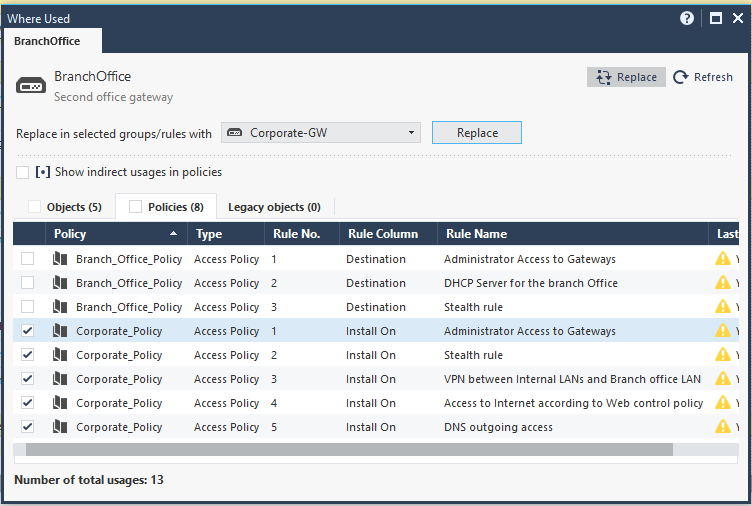
Let's replace a BranchOffice with Corporate-GW in the Install On column of Corporate_Policy.
Right click the Branch-Office gateway in the policy, select Where Used, then select Replace and find the object you want replace the object with (in this example Corporate-GW), select the rules where you want to do the replacement and then simply hit the Replace button.

You can select to replace all occurrences of the object by by clicking the box next to "Policies", which is equivalent to "select all".
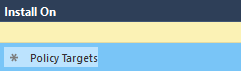
is it possible then to replace back the instance in the policy for "policy targets"?
.
Lari,
Is it possible to remove the "install on" from multiple rules using any method (smartconsole GUI or API), as we can not see the required entry in the list shown in picture(may be because of max display limit in GUI?
Thanks for your help in advance.
In the "where used" window we can't see more then 500 entries in policies tab hence I can not select the required entries (because those are not displayed in the list) from specific policy package where I would like to remove the particular gateway from "Install On" section.
Leaderboard
Epsum factorial non deposit quid pro quo hic escorol.
| User | Count |
|---|---|
| 20 | |
| 16 | |
| 7 | |
| 5 | |
| 5 | |
| 4 | |
| 4 | |
| 4 | |
| 4 | |
| 4 |
Fri 12 Dec 2025 @ 10:00 AM (CET)
Check Mates Live Netherlands: #41 AI & Multi Context ProtocolTue 16 Dec 2025 @ 05:00 PM (CET)
Under the Hood: CloudGuard Network Security for Oracle Cloud - Config and Autoscaling!Fri 12 Dec 2025 @ 10:00 AM (CET)
Check Mates Live Netherlands: #41 AI & Multi Context ProtocolTue 16 Dec 2025 @ 05:00 PM (CET)
Under the Hood: CloudGuard Network Security for Oracle Cloud - Config and Autoscaling!About CheckMates
Learn Check Point
Advanced Learning
YOU DESERVE THE BEST SECURITY