- Products
- Learn
- Local User Groups
- Partners
- More

The State of Ransomware Q1 2026
Key Trends and Their Impact
Good, Better, Best:
Prioritizing Defenses Against Credential Abuse
AI Security Masters E7:
How CPR Broke ChatGPT's Isolation and What It Means for You
Blueprint Architecture for Securing
The AI Factory & AI Data Center
Call For Papers
Your Expertise. Our Stage
CheckMates Go:
CheckMates Fest
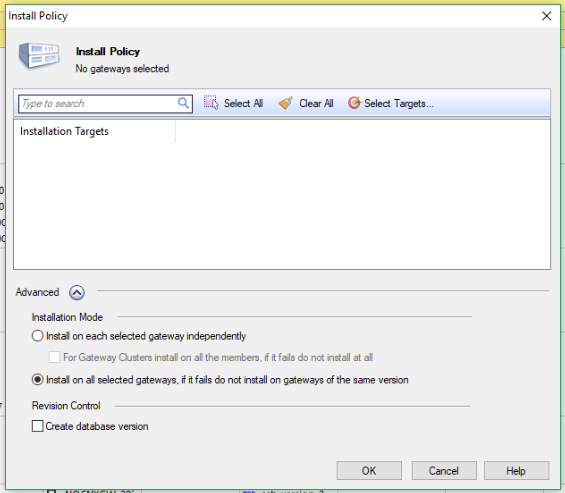
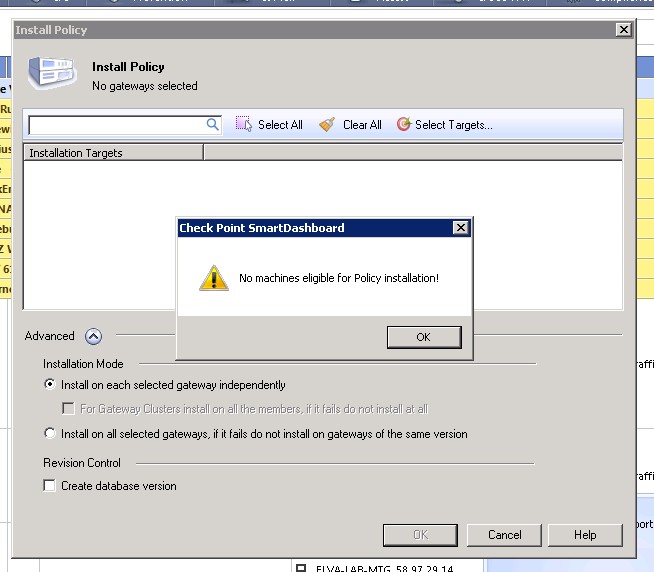
After my customer restored backup by use upgrade_import to new Mgmt(Gaia R77.30), They can't install policy because Firewall gateways object don't show up in policy target. Please advise me to solved this issues.
Note: Sic status is communicating / SMS can ping to the gateways as normal.
I tried with SK77821 already but no luck.
Look like gateway object don't show in Smartview monitor too.

Hi, Thank you everyone. I found the root cause already, it's from label of gateway propterties.
I don't know thy after restored the label change to R77 when I try to change to R77.30.
It can install policy. 
Hello.
Reboot the Mgmt server.
I tried cpstop;cpstart twice, deleted mgmt cache, deleted smartconsole cache but didn't solve it.(sk100507)
Finally rebooted and the issue was resolved.
Try from another system as well......if this works...
I use this backup and restored in my VM environment. Found the same issues.
Did you add any gateway in MGMT?
This mgmt have the gateways obj already, Sic status is communicating. Just gateways obj disappeared when I try to install policy.
what happens if you click on "select targets"?
Install database ?
Have you added gw with new migrated Manager? If already SIC established please try from another CP Dashboard.
Looks like existing CP Dashboard may having issue... from where yiu are trying to push policy.....
Hi, Thank you everyone. I found the root cause already, it's from label of gateway propterties.
I don't know thy after restored the label change to R77 when I try to change to R77.30.
It can install policy. 
I have faced the same issue with R80.10 but found the solution to run a script to delete the duplicate entries in database.
I have a somewhat similar problem: My Dashboard show only the manager in the overview and I can´t install policies from the gui, there are no targets to install to. My gateways are present in the Database and SIC is running. When I "install-policy" from the CLI it works fine as usual, but no gateways in the GUI. Management ist R80.40, Gateways a mix of 80.40 and older. Any ideas? The gateways where present until a recent reboot of the management. Can´t find any additional problem.
Hello, yashpal_singh.
Have you run any solutions?
I'm currently having the same issue with R80.x and am very stumped.
thank you.
Hello.
Reboot the Mgmt server.
I tried cpstop;cpstart twice, deleted mgmt cache, deleted smartconsole cache but didn't solve it.(sk100507)
Finally rebooted and the issue was resolved.
Leaderboard
Epsum factorial non deposit quid pro quo hic escorol.
| User | Count |
|---|---|
| 33 | |
| 10 | |
| 10 | |
| 8 | |
| 8 | |
| 7 | |
| 7 | |
| 6 | |
| 6 | |
| 5 |
Tue 12 May 2026 @ 10:00 AM (CEST)
The Cloud Architects Series: Check Point Cloud Firewall delivered as a serviceWed 13 May 2026 @ 11:00 AM (EDT)
TechTalk: The State of Ransomware Q1 2026: Key Trends and Their ImpactThu 14 May 2026 @ 07:00 PM (EEST)
Under the Hood: Presentando Check Point Cloud Firewall como ServicioTue 12 May 2026 @ 10:00 AM (CEST)
The Cloud Architects Series: Check Point Cloud Firewall delivered as a serviceAbout CheckMates
Learn Check Point
Advanced Learning
YOU DESERVE THE BEST SECURITY