- Products
- Learn
- Local User Groups
- Partners
- More

The State of Ransomware Q1 2026
Key Trends and Their Impact
Good, Better, Best:
Prioritizing Defenses Against Credential Abuse
AI Security Masters E7:
How CPR Broke ChatGPT's Isolation and What It Means for You
Blueprint Architecture for Securing
The AI Factory & AI Data Center
Call For Papers
Your Expertise. Our Stage
CheckMates Go:
CheckMates Fest
Hi ,
I have a clean installation GAIA 77.30 on Vmware,and I can open the GAIA webpage and setup the server as a primary managerment server. after that all finish ,and download the smartconsole via gaia webpage ,and install GUI ,but fail to connect managerment server.Error "connection cannot be initiated.Please make sure that the Server"x.x.x.x" is up and running and that you are defined as a GUI client .
1,I have off the windows firewall on my GUI client system.
2,I have set "any" access to the managerment server via smartdashboard
3,I have checked the GAIA system is running fine ,and the related process is ok,
4,I can ping from server to my PC and PC to server .and the time zone and date/time is same on both side .
I have checked many SK ,even if to change other PC to set up this ,and download a newer one 77.30 ISO image,but the problem still can't be solved ,could you help to advise ?
If this is a fresh install, it's a known issue.
Has to do with the fact we are setting the expiration date of the internal CA 20 years into the future...and that exceeds the Unix Epoch.
Fix: Install a recent jumbo hotfix.
If this is a fresh install, it's a known issue.
Has to do with the fact we are setting the expiration date of the internal CA 20 years into the future...and that exceeds the Unix Epoch.
Fix: Install a recent jumbo hotfix.
This is so funny, the subject has come up in conversation with my son about a month ago, but this is the first time I am reading about an impact of this issue in real life:)

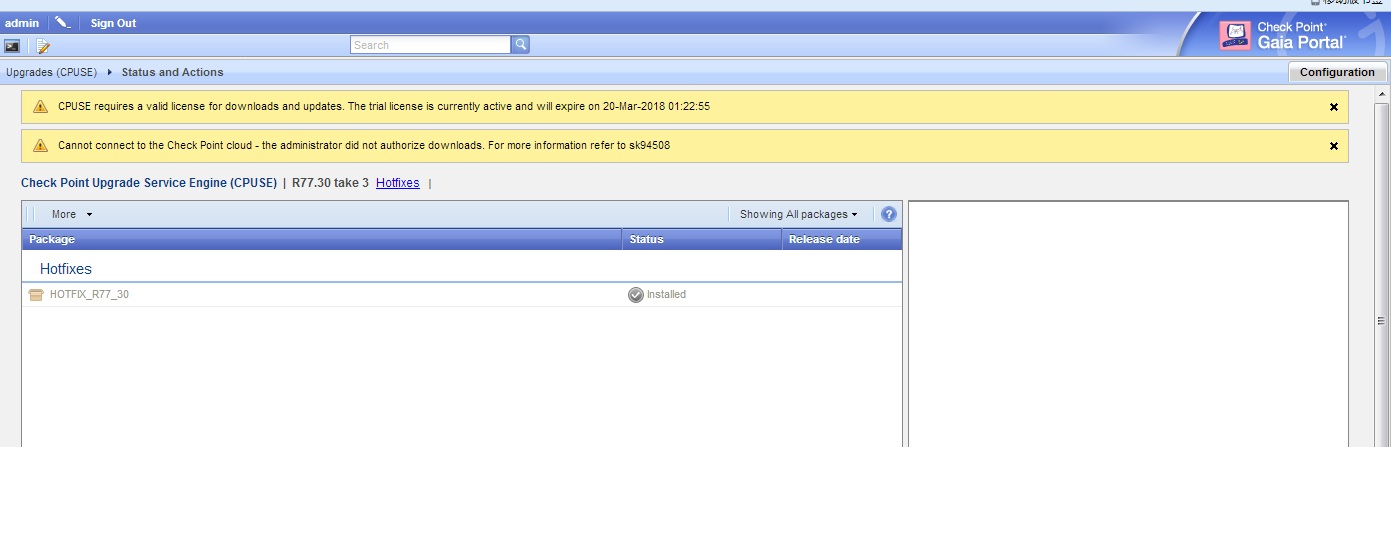
Hi ,many thanks for your information .when I am ready to upload jumbo files ,and found no "Import Package" button,do you have some advice ?thanks.
Unless it's being blocked somewhere, the CPUSE portal should show GA Jumbo Hotfixes.
Why it's not showing on the WebUI, I'm not sure, but you should be able to do this on the CLI (e.g. installer import).
Hi ,
Good day!
I have installed it by CLI successfully ,and then follow the SK ,the issue was solved .
Many thanks for your help and advise !

oh ,many thanks.
Just stepped into it: 3 hours later it dawned on me that I've seen this mentioned before.
No sooner than this was resolved, I am looking into Login to Gaia OS is denied with "CLINFR0819 User: admin denied access via CLI" error ![]()
Except it being repeatedly reproducible with JHFA Take_159.
Since it's in VMware workstation, I'll be rolling it back and trying different JHFA.
I ran across the same issue, but found that Avast (AV) installed locally was blocking the authentication request.
Leaderboard
Epsum factorial non deposit quid pro quo hic escorol.
| User | Count |
|---|---|
| 33 | |
| 10 | |
| 10 | |
| 9 | |
| 9 | |
| 7 | |
| 7 | |
| 6 | |
| 6 | |
| 6 |
Tue 12 May 2026 @ 10:00 AM (CEST)
The Cloud Architects Series: Check Point Cloud Firewall delivered as a serviceWed 13 May 2026 @ 11:00 AM (EDT)
TechTalk: The State of Ransomware Q1 2026: Key Trends and Their ImpactThu 14 May 2026 @ 07:00 PM (EEST)
Under the Hood: Presentando Check Point Cloud Firewall como ServicioTue 12 May 2026 @ 10:00 AM (CEST)
The Cloud Architects Series: Check Point Cloud Firewall delivered as a serviceAbout CheckMates
Learn Check Point
Advanced Learning
YOU DESERVE THE BEST SECURITY