- Products
- Learn
- Local User Groups
- Partners
- More

The Great Exposure Reset
24 February 2026 @ 5pm CET / 11am EST
AI Security Masters E4:
Introducing Cyata - Securing the Agenic AI Era
AI Security Masters E3:
AI-Generated Malware
CheckMates Go:
CheckMates Fest
I got the queries, if it is possible to implement a policy which block the client from downloading the executable(exe) files in checkpoint.
Our client were using fortinet 200D where we found such policy. So, we need to make that same policy to checkpoint.
Regards,
Sagar Manandhar
Refer to the following SK: How to block any File Type Family to Anti-Virus scan in R77.XX
These instructions should also apply for R80.x as well.
Refer to the following SK: How to block any File Type Family to Anti-Virus scan in R77.XX
These instructions should also apply for R80.x as well.
i did it. but it is not working. ?
from what i know AV blade check only file extension and not the MimeType of the file
How does customers add this specific the file type families. is it possible for customer
yes.


Starting with R80.10 this could also be achieved by using the new Content Awareness features. So there would be no need for an Anti-Virus license (NGTP bundle), but an NGFW bundle would be sufficient.
simply create this rule:

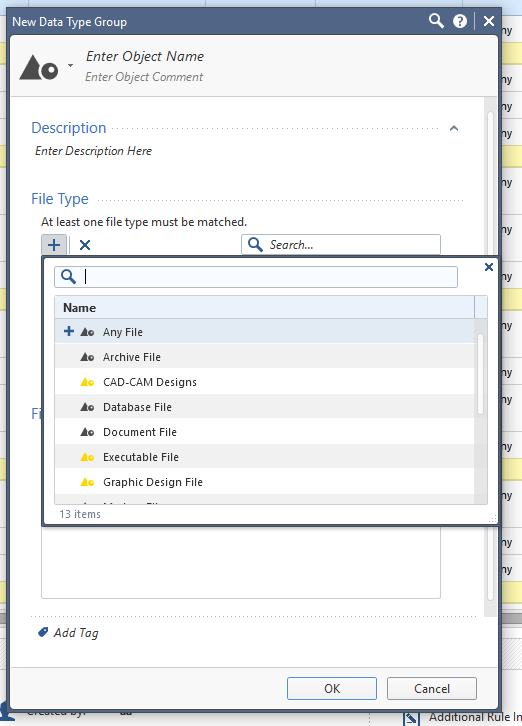
How to enable Content Awareness:
1. Make sure you have an R80.10 Gateway
2. Edit the gateway and enable the Content Awareness blade.
3. Edit the current security policy layer and enable the Content Awareness blade.
4. The new "Content" column will show up in the rulebase.
I wish I could mark both our solutions as correct in Jive ![]()
For my own clarity, this seems to work with both HTTP and HTTPS in my lab. I am not doing HTTPS inspection, can I ask how this works with HTTPS? My assumption was that I'd still be able to download an EXE, but I was wrong. I don't know too much about Content Awareness possibilities, but it is intriguing.
Yeah. So if you have lower version than R80.10. You can achieve it by Antivirus blade as well as DLP blade.
Guys,
correct me If I am wrong, for activation Content Awareness blade, I need DLP license which is not part of NGFW nor NGTP/TX bundle.
Wrong! NGFW is enough, see here:
Trying to configure a Content Awareness rule for this scenario.
I have an inline rule configured for web browsing (rule 17):

I have more detailed inline rules below this (rule 17.x)
I wish to create content awareness checks at the lower levels of the inline rule but the Content column is greyed out?
R80.20 SM Admin Guide shows that this should be possible.

Leaderboard
Epsum factorial non deposit quid pro quo hic escorol.
| User | Count |
|---|---|
| 51 | |
| 38 | |
| 13 | |
| 13 | |
| 12 | |
| 11 | |
| 11 | |
| 8 | |
| 7 | |
| 7 |
Mon 23 Feb 2026 @ 11:00 AM (EST)
Latest updates on Quantum Spark including R82 features and Spark Management zero touch - AMERTue 24 Feb 2026 @ 10:00 AM (CET)
Latest updates on Quantum Spark including R82 features and Spark Management zero touch - EMEATue 24 Feb 2026 @ 11:00 AM (EST)
Under The Hood: CloudGuard Network Security for Azure Virtual WANMon 23 Feb 2026 @ 11:00 AM (EST)
Latest updates on Quantum Spark including R82 features and Spark Management zero touch - AMERTue 24 Feb 2026 @ 10:00 AM (CET)
Latest updates on Quantum Spark including R82 features and Spark Management zero touch - EMEATue 24 Feb 2026 @ 11:00 AM (EST)
Under The Hood: CloudGuard Network Security for Azure Virtual WANThu 26 Feb 2026 @ 05:00 PM (CET)
AI Security Masters Session 4: Introducing Cyata, Securing the Agentic AI EraFri 06 Mar 2026 @ 08:00 AM (COT)
Check Point R82 Hands‑On Bootcamp – Comunidad DOJO PanamáAbout CheckMates
Learn Check Point
Advanced Learning
YOU DESERVE THE BEST SECURITY