- Products
- Learn
- Local User Groups
- Partners
- More

AI Security Masters E7:
How CPR Broke ChatGPT's Isolation and What It Means for You
Call For Papers
Your Expertise. Our Stage
Good, Better, Best:
Prioritizing Defenses Against Credential Abuse
Ink Dragon: A Major Nation-State Campaign
Watch HereCheckMates Go:
CheckMates Fest
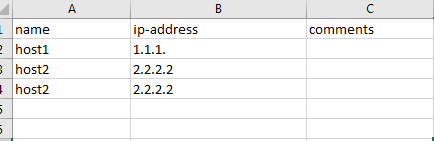
I created a CSV file , the format is below

I then transferred this csv file to the Checkpoint management server, run the batch command, i got the following errors

Can someone please assist?
Thanks
Please see How to import multiple objects into R80.x Management database using .csv file for the accepted CSV format.
When you are showing it in a spreadsheet, we do not know what the delimiters are when it is opened in the text editor.
Additionally, if you are creating this file on Windows, it is likely that the EOL (end of line) characters are incorrect.
You can either compensate it by using dos2unix https://bencane.com/2014/02/11/converting-files-from-windows-format-to-unix-format-with-dos2unix/
or using something like Notepad++ to save the file in the compatible format.
Regards,
Vladimir
Please see How to import multiple objects into R80.x Management database using .csv file for the accepted CSV format.
When you are showing it in a spreadsheet, we do not know what the delimiters are when it is opened in the text editor.
Additionally, if you are creating this file on Windows, it is likely that the EOL (end of line) characters are incorrect.
You can either compensate it by using dos2unix https://bencane.com/2014/02/11/converting-files-from-windows-format-to-unix-format-with-dos2unix/
or using something like Notepad++ to save the file in the compatible format.
Regards,
Vladimir
thank you so much. txt works.
Also, what is the format of the file if I need to batch add networks.
Depends on what parameters you want to set.
In general, the first line is the name of the parameters you want to set, which must match exactly the parameter name in the API documentation.
I know this is an old thread, but I found out for service groups on r80.40, the csv-format is:
name,members,members,members,members
"icmp-requests","echo-request","info-req","mask-request","timestamp"
I haven't tried any other type of groups, so I'm not sure that the format is universal - it is per group, but if some groups have more or less members, I'd think the import would fail as those columns are empty.
Instead I created a REST-API-script that did the export/import of service-groups for me. I'll be publishing it on GitHub and Checkmates this week.
My bad, published it on github, but forgot to link it here. Created a new post as not to spam external links:
Hi!
Can you please check what I am doing wrong
mgmt_cli add dns-domain --batch file
[Expert@smartcenter:0]# cat file
name,is-sub-domain
".example1.com",false
".example2.com",false
I tried to use single quotes, without quotes and nothing is worked for me, I am always receive error
Line 2: code: "generic_err_invalid_parameter_name"
message: "Unrecognized parameter [name]"
Line 3: code: "generic_err_invalid_parameter_name"
message: "Unrecognized parameter [name]"
by the way mgmt_cli add dns-domain name ".example1.com" is-sub-domain false, work just fine
Any help ? Thanks
Hi Please revise correct format for batch file as below, then do command again, thanks.
name,is-sub-domain
.example1.com,false
.example2.com,false
Hi , Please revise the correct format as below, then do command again, thanks.
name,is-sub-domain
.example1.com,false
.example2.com,false
Leaderboard
Epsum factorial non deposit quid pro quo hic escorol.
| User | Count |
|---|---|
| 65 | |
| 25 | |
| 13 | |
| 12 | |
| 12 | |
| 9 | |
| 8 | |
| 8 | |
| 7 | |
| 7 |
Tue 21 Apr 2026 @ 05:00 PM (IDT)
AI Security Masters E7: How CPR Broke ChatGPT's Isolation and What It Means for YouTue 28 Apr 2026 @ 06:00 PM (IDT)
Under the Hood: Securing your GenAI-enabled Web Applications with Check Point WAFTue 21 Apr 2026 @ 05:00 PM (IDT)
AI Security Masters E7: How CPR Broke ChatGPT's Isolation and What It Means for YouTue 28 Apr 2026 @ 06:00 PM (IDT)
Under the Hood: Securing your GenAI-enabled Web Applications with Check Point WAFTue 12 May 2026 @ 10:00 AM (CEST)
The Cloud Architects Series: Check Point Cloud Firewall delivered as a serviceThu 30 Apr 2026 @ 03:00 PM (PDT)
Hillsboro, OR: Securing The AI Transformation and Exposure ManagementAbout CheckMates
Learn Check Point
Advanced Learning
YOU DESERVE THE BEST SECURITY