Create a Post
cancel
Showing results for 
Search instead for 
Did you mean: 
Mark_Shaw
Explorer

Application & URL Filtering Report Parameters

My security team has requested me to run a report for "Media Streams"

Report 1 - Top users of Media streams over the last 30 days. I can run and application & URL filtering report with the filter app_category:"Media Streams" 

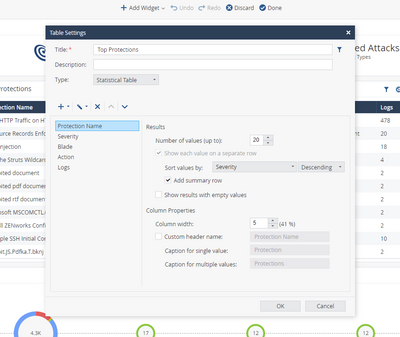
However it only shows top 20 high bandwidth users, is there anyway to increase this to say 50 or 100 users?


Report 2 - Is there a way to run a report for a specific group of staff e.g. the IT department?

Thanks in advance

0 Kudos
2 Replies
PhoneBoy
Admin
Admin

What precise report are you using as your starting point?
You should be able to edit it and increase the number of results returned and/or filter based on group.

0 Kudos
Amir_Senn
MVP Silver CHKP MVP Silver CHKP
MVP Silver CHKP

1. In Edit mode, choose table references -> Choose desired field -> increase number of values

2. There need to be something that's common for IT department, like a subnet or IP range. Otherwise you can create a group and add relevant network objects to that group and then filter by that group.

Capture.PNG

Kind regards, Amir Senn
0 Kudos

Leaderboard

Epsum factorial non deposit quid pro quo hic escorol.

Upcoming Events

    Thu 05 Mar 2026 @ 12:00 PM (SGT)

    2026 Threat Landscape Briefing - APAC

    Thu 05 Mar 2026 @ 03:00 PM (CET)

    2026 Threat Landscape Briefing - EMEA

    Thu 05 Mar 2026 @ 11:00 AM (EST)

    Tips and Tricks 2026 #1: MCP Servers

    Thu 05 Mar 2026 @ 02:00 PM (EST)

    2026 Threat Landscape Briefing -AMER
    CheckMates Events