- Products
- Learn
- Local User Groups
- Partners
- More

MVP 2026: Submissions
Are Now Open!
What's New in R82.10?
Watch NowOverlap in Security Validation
Help us to understand your needs better
CheckMates Go:
Maestro Madness
Hi all,
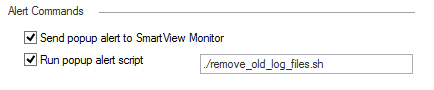
Attempting to run a script to remove log files older than X amount of days when disk space is below a certain percentage. I know the script works, just trying to figure out the mechanism. I have included what I believe to be correct in the "Alerts" tab within Global Properties, so it looks something like:
This file is within /home/admin and can be executed by anyone.
Is this the correct way of doing this kind of task?
Strangely I'm also seeing irregularities in the monitoring side of things when it comes to how much disk space is actually left. The CLI reports around 80% usage but our monitoring software reports 25% left?
Here is the Disk Space Management section within the Management server configuration:
26% was only used as a test.
Some help would be greatly appreciated here as things aren't adding up.
Tom
Hi Tom,
Interesting post.
First things first, assuming your estate is R80.x, it is recommended as a best practice to store scripts inside the Scripts Repository as that location will ensure the survival of your script during upgrades (see https://community.checkpoint.com/t5/API-CLI-Discussion-and-Samples/Proper-place-to-put-custom-script...).
Secondly, I tend to install the database whenever I make a change under the Disk Space Management menu to ensure that the changes take effect.
Finally, I think more investigation is warranted for the irregularities that you mentioned. More specifically:
- What is the monitoring system you use?
- What is the exact sensor that has been configured along with its associated details such as threshold, the time interval that it checks the available disk space etc.
- A time stamp of when you first noticed the issue (assuming it was reported recently).
I hope this helps.
Hi Maarten,
Would you mean then ./home/admin/remove_old_log_files.sh ?
Yes but without the period at the front as it means "current directory" whereas you want to specify the absolute path.
Have spotted that in my testing.
Will completed the noted changes today.
Hi Nick,
This file is stored with /home/admin and that is something that is mentioned in that thread, I will look at the Script Repo though to see if it's any different/better.
I will try and install the database and check to see if this fixes this issue also.
Answers to yours questions:
1) We use Paessler's PRTG
2) It is just a linux based meminfo sensor, with a 30 second interval.
3) Timescale, I have recently only noticed this when comparing both set of information.
Leaderboard
Epsum factorial non deposit quid pro quo hic escorol.
| User | Count |
|---|---|
| 16 | |
| 15 | |
| 7 | |
| 5 | |
| 5 | |
| 5 | |
| 4 | |
| 4 | |
| 4 | |
| 4 |
Tue 16 Dec 2025 @ 05:00 PM (CET)
Under the Hood: CloudGuard Network Security for Oracle Cloud - Config and Autoscaling!Thu 18 Dec 2025 @ 10:00 AM (CET)
Cloud Architect Series - Building a Hybrid Mesh Security Strategy across cloudsTue 16 Dec 2025 @ 05:00 PM (CET)
Under the Hood: CloudGuard Network Security for Oracle Cloud - Config and Autoscaling!Thu 18 Dec 2025 @ 10:00 AM (CET)
Cloud Architect Series - Building a Hybrid Mesh Security Strategy across cloudsAbout CheckMates
Learn Check Point
Advanced Learning
YOU DESERVE THE BEST SECURITY