- Products
- Learn
- Local User Groups
- Partners
- More
MVP 2026: Submissions
Are Now Open!
What's New in R82.10?
10 December @ 5pm CET / 11am ET
Announcing Quantum R82.10!
Learn MoreOverlap in Security Validation
Help us to understand your needs better
CheckMates Go:
Maestro Madness
We are currently testing to implement BGP4 using gaia and trying to advertise 1 IPv4 subnet and 1 IPv6 block. So far we can see that IPv4 peer has establish successfully and able to advertise IPv4 segment. However, for IPv6 we are not able to get peering up. after few hours troubleshooting, we find that our firewall not able to connect to the peer node. this is due that when we try to ping peer ip address we can see our firewall is replying using its own interface instead of sending the traffic out to peer node. which of course indirectly causing the the peer not able to establish for ipv6.
We did happened to get the peering up by doing below.
1. Unload firewall policy. when the firewall policy has been unloaded. we can see that our firewall able to ping peer node correctly. show bgp peers also stated the peering has been establish and we are able to advertise IPv6 block.
when firewall policy has been loaded again, the peering will go down again and ping result shows that our firewall reply using its own IP.
2. changing the net.ipv6.conf.all.forwarding=0. we manage to get the peering to be establish again, even though the firewall policy has been loaded. pinging to the node also show correct icmp response instead of replying using firewall ip. When we change net.ipv6.conf.all.forwarding to 1 again, the same issue arise again.
is there anyone that can help us to point out any setting needed to be change to make sure it is running correctly.
Thanks
This is a situation where the details clearly matter.
The subnet in question is 2407:f000::23:0:0/96
The first address in a network block, at least in IPv4, is usually not considered a valid address.
That is what you are pinging in this case.
When I set up IPv6 in my own network and I ping a similar address (e.g. fc12:3456:78:90::0/64), I see similar behavior (namely the firewall "responds" with it's own IP in a ping):
[Expert@GW:0]# ping6 fc12:3456:78:90::0
PING fc12:3456:78:90::0 (fc12:3456:78:90::) 56 data bytes
64 bytes from fc12:3456:78:90::111: icmp_seq=0 ttl=64 time=0.024 ms
64 bytes from fc12:3456:78:90::111: icmp_seq=1 ttl=64 time=0.045 ms
64 bytes from fc12:3456:78:90::111: icmp_seq=2 ttl=64 time=0.032 ms
64 bytes from fc12:3456:78:90::111: icmp_seq=3 ttl=64 time=0.048 ms
64 bytes from fc12:3456:78:90::111: icmp_seq=4 ttl=64 time=0.046 ms
64 bytes from fc12:3456:78:90::111: icmp_seq=5 ttl=64 time=0.040 ms
64 bytes from fc12:3456:78:90::111: icmp_seq=6 ttl=64 time=0.059 ms
I tested this in R80.20.
I'm guessing other versions may have the same issue.
When I unload policy, the ping works as expected.
In my case, I don't have a host with that IP on the same network, but I don't get a response from my own IP.
To work around this, change the ISP router's IP address to 2407:f000::23:0:1 and it should work as expected.
If you can't change the IP of your ISP router, then you will need to open a TAC case.
"When we try to ping peer ip address we can see our firewall is replying using its own interface instead of sending the traffic out to peer node."
I'm not understanding.
A network diagram would be helpful.
Honestly how disabling IP Forwarding makes this problem go away as the only thing it should do is not forward traffic received on an interface.
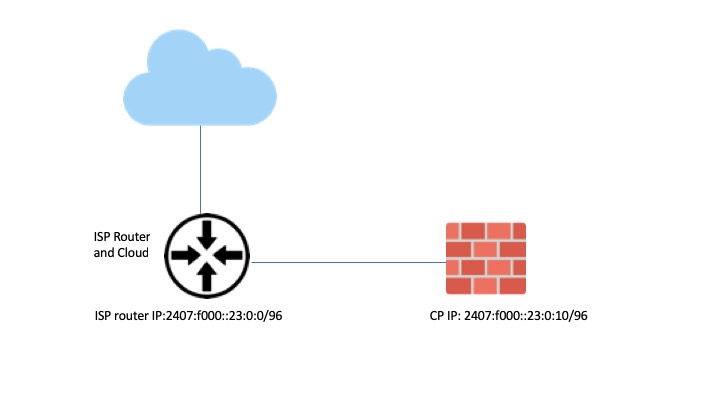
Sorry for not making it clear. Hope this diagram will help you to understand our issue.

our target is to have peering establish between ISP router : 2407:f000::23:0:0 with our firewall 2407:f000::23:0:10 and able to publish other ipv6 subnet which will be hosted behind the firewall after this. As per my description before, we will not be able to establish BGP peers for IPv6 whenever firewall has been loaded with firewall policy and only able to get BGP peers establish either when we unload the firewall policy or disable forwarding. the firewall does not doing any NATing. currently the firewall default gateway is actually pointing to 2407:f000::23:0:0. based on the test above, we try to check if the firewall it self able to ping 2407:f000::23:0:0 and the result shows that it is able to ping but the ping response is actually coming from firewall own ip which is 2407:f000::23:0:10 and not from 2407:f000::23:0:0.
However, when we unload the policy or disable forwarding we manage to get ping response correctly which is from 2407:f000::23:0:0.
i'm not sure if there is any other configuration needed.
This is a situation where the details clearly matter.
The subnet in question is 2407:f000::23:0:0/96
The first address in a network block, at least in IPv4, is usually not considered a valid address.
That is what you are pinging in this case.
When I set up IPv6 in my own network and I ping a similar address (e.g. fc12:3456:78:90::0/64), I see similar behavior (namely the firewall "responds" with it's own IP in a ping):
[Expert@GW:0]# ping6 fc12:3456:78:90::0
PING fc12:3456:78:90::0 (fc12:3456:78:90::) 56 data bytes
64 bytes from fc12:3456:78:90::111: icmp_seq=0 ttl=64 time=0.024 ms
64 bytes from fc12:3456:78:90::111: icmp_seq=1 ttl=64 time=0.045 ms
64 bytes from fc12:3456:78:90::111: icmp_seq=2 ttl=64 time=0.032 ms
64 bytes from fc12:3456:78:90::111: icmp_seq=3 ttl=64 time=0.048 ms
64 bytes from fc12:3456:78:90::111: icmp_seq=4 ttl=64 time=0.046 ms
64 bytes from fc12:3456:78:90::111: icmp_seq=5 ttl=64 time=0.040 ms
64 bytes from fc12:3456:78:90::111: icmp_seq=6 ttl=64 time=0.059 ms
I tested this in R80.20.
I'm guessing other versions may have the same issue.
When I unload policy, the ping works as expected.
In my case, I don't have a host with that IP on the same network, but I don't get a response from my own IP.
To work around this, change the ISP router's IP address to 2407:f000::23:0:1 and it should work as expected.
If you can't change the IP of your ISP router, then you will need to open a TAC case.
Thanks for the heads up. basically we get the ip assigned by the ISP. i have already inform them to change the IP address on their router. will update you again the result.
Thanks for your help. We have manage to get the router ip address change and really solved the issue. Now our BGP sessiona has working correctly. Thanks again.
Leaderboard
Epsum factorial non deposit quid pro quo hic escorol.
| User | Count |
|---|---|
| 16 | |
| 12 | |
| 8 | |
| 7 | |
| 7 | |
| 4 | |
| 3 | |
| 3 | |
| 2 | |
| 2 |
Fri 12 Dec 2025 @ 10:00 AM (CET)
Check Mates Live Netherlands: #41 AI & Multi Context ProtocolTue 16 Dec 2025 @ 05:00 PM (CET)
Under the Hood: CloudGuard Network Security for Oracle Cloud - Config and Autoscaling!Fri 12 Dec 2025 @ 10:00 AM (CET)
Check Mates Live Netherlands: #41 AI & Multi Context ProtocolTue 16 Dec 2025 @ 05:00 PM (CET)
Under the Hood: CloudGuard Network Security for Oracle Cloud - Config and Autoscaling!Thu 18 Dec 2025 @ 10:00 AM (CET)
Cloud Architect Series - Building a Hybrid Mesh Security Strategy across cloudsAbout CheckMates
Learn Check Point
Advanced Learning
YOU DESERVE THE BEST SECURITY