- Products
- Learn
- Local User Groups
- Partners
- More

MVP 2026: Submissions
Are Now Open!
What's New in R82.10?
Watch NowOverlap in Security Validation
Help us to understand your needs better
CheckMates Go:
Maestro Madness
Hello,
I would like to know if there is any way to delete a change that is published along with others and has not been installed.
Just delete one from a group before installing, and not have to cancel the rest of the changes or add another change that cancels it.
Thank you so much.
Changes made by administrators in the context of a session.
The session can either be published in its entirety (committing the changes to the rulebase so they can be installed) or discarded.
It is not possible to publish only portions of the session.
See also: https://sc1.checkpoint.com/documents/R81.20/WebAdminGuides/EN/CP_R81.20_SecurityManagement_AdminGuid...
As others have answered this is not possible. However there is a way for you to “monitor” the changes as they happen and easily “fix” them.
In SmartConsole go to Manage & Settings > Preferences
Scroll all the way down to Check Point Lab section
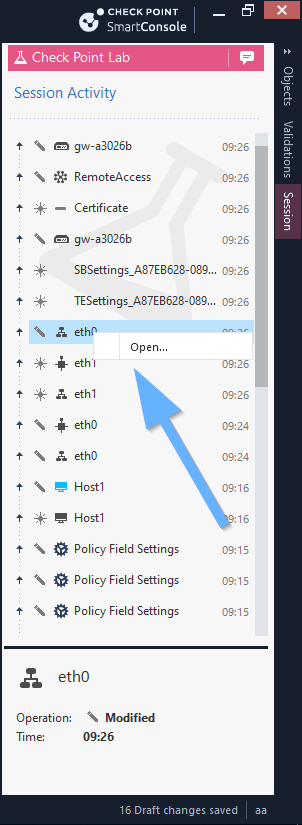
Activate the option Enable Session pane – Review all the changes before you publish
This will add a new pane on the right side of the screen called Session
In this pane you can see the objects and areas that were changed and edit it directly from the pane to “undo” the change.
Changes made by administrators in the context of a session.
The session can either be published in its entirety (committing the changes to the rulebase so they can be installed) or discarded.
It is not possible to publish only portions of the session.
See also: https://sc1.checkpoint.com/documents/R81.20/WebAdminGuides/EN/CP_R81.20_SecurityManagement_AdminGuid...
You can do it the step by step way and revert your changes one by one. Had a look at the audit logs and you can see what changes are done in your session.
As others have answered this is not possible. However there is a way for you to “monitor” the changes as they happen and easily “fix” them.
In SmartConsole go to Manage & Settings > Preferences
Scroll all the way down to Check Point Lab section
Activate the option Enable Session pane – Review all the changes before you publish
This will add a new pane on the right side of the screen called Session
In this pane you can see the objects and areas that were changed and edit it directly from the pane to “undo” the change.
Leaderboard
Epsum factorial non deposit quid pro quo hic escorol.
| User | Count |
|---|---|
| 12 | |
| 10 | |
| 9 | |
| 8 | |
| 6 | |
| 3 | |
| 2 | |
| 2 | |
| 2 | |
| 1 |
Tue 16 Dec 2025 @ 05:00 PM (CET)
Under the Hood: CloudGuard Network Security for Oracle Cloud - Config and Autoscaling!Thu 18 Dec 2025 @ 10:00 AM (CET)
Cloud Architect Series - Building a Hybrid Mesh Security Strategy across cloudsTue 16 Dec 2025 @ 05:00 PM (CET)
Under the Hood: CloudGuard Network Security for Oracle Cloud - Config and Autoscaling!Thu 18 Dec 2025 @ 10:00 AM (CET)
Cloud Architect Series - Building a Hybrid Mesh Security Strategy across cloudsAbout CheckMates
Learn Check Point
Advanced Learning
YOU DESERVE THE BEST SECURITY