- Products
- Learn
- Local User Groups
- Partners
- More

Stop Babysitting Rules.
Go Agentic
Step Into the Future of
AI-Powered Cyber Security
Bridge the CAASM Gap
with Exposure Management
AI Security Masters E8:
Claude Mythos: New Era in Cyber Security
Call For Papers
Your Expertise. Our Stage
CheckMates Go:
CheckMates Fest
We currently have a Check Point Cluster HA mode.
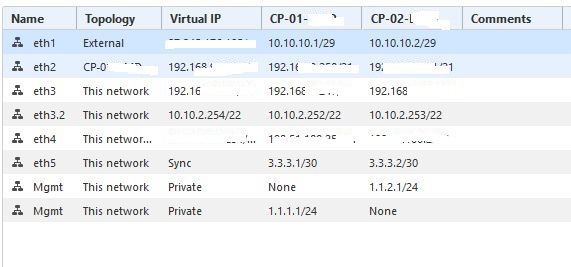
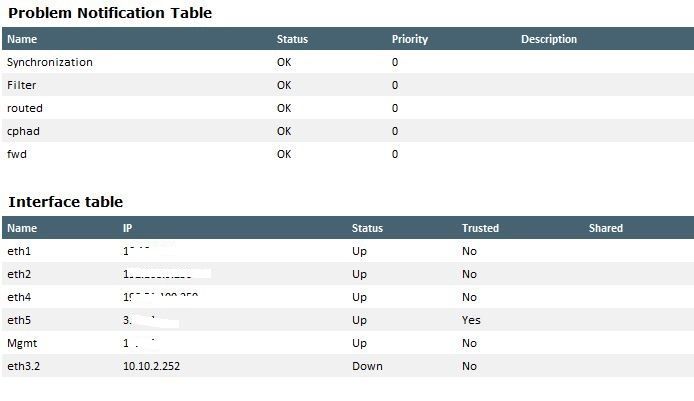
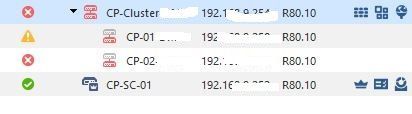
We made test Vlan in GAIA on both nodes (see pics) and assign virt IP in SmartConsole – after it one Cluster node change state to down. What do we wrong?Network
Error
Node 1
Node 2
Error
Hi, Jerry
cphaprob -a if
equired interfaces: 5
Required secured interfaces: 1
eth1 UP non sync(non secured), multicast
eth2 UP non sync(non secured), multicast
eth4 UP non sync(non secured), multicast
eth5 UP sync(secured), multicast
Mgmt Disconnected non sync(non secured), multicast
eth3 DOWN (86.3 secs) non sync(non secured), multicast (eth3.2 )
Virtual cluster interfaces: 5
eth1 87.
eth2 192.
eth3 192.
eth4 198.
eth3.2 10.10.2.254
cphaprob stat
Number Unique Address Assigned Load State
1 (local) 3.3.3.1 0% Down
2 3.3.3.2 100% Active Attention
Local member is in current state since Tue Mar 26 15:10:17 2019
Does basic connectivity actually work on interface eth3.2? Is there at least one other pingable IP address on that network other than the cluster members themselves?
@Jerry wrote:
your SYNC int's are 3.3.3.1 and 2 - are they really eth5 ? have you checked the subnet mask of eth5?
if PRI is 3.3.31 and SEC is 3.3.3.2 I presume tere isn't any VIP on that INT done by the object Network Management section?
ps. you need more than 1 Sync interface for the ClusterXL to work and I guess when eth3 DOWN and NON-SYNC is that one part of the Cluster is only DOWN another is UP am I correct?
I guess the whole ClusterXL setup seem little bit twisted here to be honest.
what happends when you do cphaprob syncstat / ldstat? paste it here pls.
Jerry, yes 3.3.3.1 and 3.3.3.2 realy eth5.
Our Cluster HA is work well untill we not make a VLAN.
After VLAN was created - one node is down and another is UP - you are right.
You have assigned an IP address for physical interface eth3. You are trying to add new VLAN on eth3? What is the point here? Such a configuration is not allowed.
Hi, Jozko
Today I'll try your solution to do.
I'll back after trying.
Thanks
So I'm back.
We've resolved our VLAN issue.
The problem was in Cisco port configuration. In our case – ports were configured as NATIVE VLAN mode. After we changed port mode to Hybrid – all works fine.
According sk88700 – no matter have you assigned an IP address for physical interface or not – it works fine if VLAN port on network equipment configured properly .
Thanks everyone for help
Leaderboard
Epsum factorial non deposit quid pro quo hic escorol.
| User | Count |
|---|---|
| 8 | |
| 4 | |
| 4 | |
| 4 | |
| 2 | |
| 2 | |
| 2 | |
| 2 | |
| 2 | |
| 1 |
Tue 02 Jun 2026 @ 10:00 AM (AEST)
The Cloud Architect Series: Check Point WAF. The next generation of AI-Powered Protection - APACTue 02 Jun 2026 @ 06:00 PM (IDT)
Under the Hood | Check Point SASE: Identity Integration & Access Policy Design Best PracticesThu 04 Jun 2026 @ 02:00 PM (CEST)
Deep Dive Webinar: New CloudGuard GWLB Deployment Without NAT Gateways - EuropeTue 02 Jun 2026 @ 10:00 AM (AEST)
The Cloud Architect Series: Check Point WAF. The next generation of AI-Powered Protection - APACTue 02 Jun 2026 @ 06:00 PM (IDT)
Under the Hood | Check Point SASE: Identity Integration & Access Policy Design Best PracticesThu 04 Jun 2026 @ 02:00 PM (CEST)
Deep Dive Webinar: New CloudGuard GWLB Deployment Without NAT Gateways - EuropeThu 04 Jun 2026 @ 07:00 PM (IDT)
Deep Dive Webinar: New CloudGuard GWLB Deployment Without NAT Gateways - AmericaThu 04 Jun 2026 @ 10:00 AM (PDT)
AI Security Masters E9: READY OR NOT: Securing the AI Enterprise 1/5 - AI Agent SecurityAbout CheckMates
Learn Check Point
Advanced Learning
YOU DESERVE THE BEST SECURITY