- Products
- Learn
- Local User Groups
- Partners
- More

AI Security Masters E7:
How CPR Broke ChatGPT's Isolation and What It Means for You
Call For Papers
Your Expertise. Our Stage
Good, Better, Best:
Prioritizing Defenses Against Credential Abuse
Ink Dragon: A Major Nation-State Campaign
Watch HereCheckMates Go:
CheckMates Fest
Hi guys,
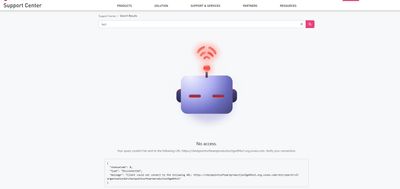
I am facing strange issue for more than 2 weeks while trying to search something over Support Center. Issue is seen using desktop web browsers Chrome and Edge. If I want to search something, it will simple not search anything. I can press ENTER or click on search icon on the right of search field, nothing happens. Sometimes it will work if I try hard like 20 times to press ENTER. In some cases, if search is loading, i get weird icon and at the end of the page there is an error saying that connection was disconnected:
It happens only on desktop web browser. Using mobile device, all is working fine. It doesnt matter if I am logged in or not.
I tried to use incognito mode, clear cache, restart computer.
Anyone facing same issue ?
Never had that issue myself. I just tested on 5 different browsers (Edge, chrome, mozilla, brave and opera GX), works great on all of them.
Andy
Not aware of any issues (I use SupportCenter all the time from multiple sources).
Sounds like the host that the system is trying to reach out to (should be listed in that error message) might be blocked on your desktop computer.
Maybe something related to proxy which I use? Will fire wireshark to see what is going on.
That certainly may explain it...
Andy
I've had issues like that when behind a gateway that was doing https inspection, but my laptop didn't have their gateway CA cert installed. Something in the required connectivity gets disrupted and you get that sort of error.
Right, but does not look like @JozkoMrkvicka is getting cert errors though...
Andy
Never say never, but I still dont get why sometimes all is working fine and in couple of hours search is not working at all...
Didnt have time to check/compare packet captures yet.
Not sure, sorry brother.
Andy
I wasn't getting cert errors either, it was just that stuff was only partially bypassed.
Never had that issue in my ssl inspection lab, either R81.20 or R82.
Andy
Looks like Check Point changed something under the hood and I have no more problem searching Support Center.
What I recently noticed is that I have to be logged in to search Support Center. Without loggin in, there is no search possible.
"Logging in unlocks the full capabilities of the support center for you".
So far I didnt notice any new capabilities once logged in.
I tried to replicate this issue and no matter how many times I tried, I could not.
Glad its working for you.
Andy
Leaderboard
Epsum factorial non deposit quid pro quo hic escorol.
| User | Count |
|---|---|
| 8 | |
| 8 | |
| 4 | |
| 3 | |
| 3 | |
| 3 | |
| 2 | |
| 2 | |
| 2 | |
| 2 |
Tue 21 Apr 2026 @ 05:00 PM (IDT)
AI Security Masters E7: How CPR Broke ChatGPT's Isolation and What It Means for YouTue 28 Apr 2026 @ 06:00 PM (IDT)
Under the Hood: Securing your GenAI-enabled Web Applications with Check Point WAFTue 21 Apr 2026 @ 05:00 PM (IDT)
AI Security Masters E7: How CPR Broke ChatGPT's Isolation and What It Means for YouTue 28 Apr 2026 @ 06:00 PM (IDT)
Under the Hood: Securing your GenAI-enabled Web Applications with Check Point WAFTue 12 May 2026 @ 10:00 AM (CEST)
The Cloud Architects Series: Check Point Cloud Firewall delivered as a serviceThu 30 Apr 2026 @ 03:00 PM (PDT)
Hillsboro, OR: Securing The AI Transformation and Exposure ManagementAbout CheckMates
Learn Check Point
Advanced Learning
YOU DESERVE THE BEST SECURITY