- Products
- Learn
- Local User Groups
- Partners
- More

Simplify Admin Operations with R82.20
Watch HereThe State of Ransomware Q2 2026:
This Quarter's Trends, and Their Impact on Your Defenses
READY OR NOT: Securing the AI Enterprise
AI Research & Threat Landscape
CheckMates Go:
Half is Not Enough
Hi All,
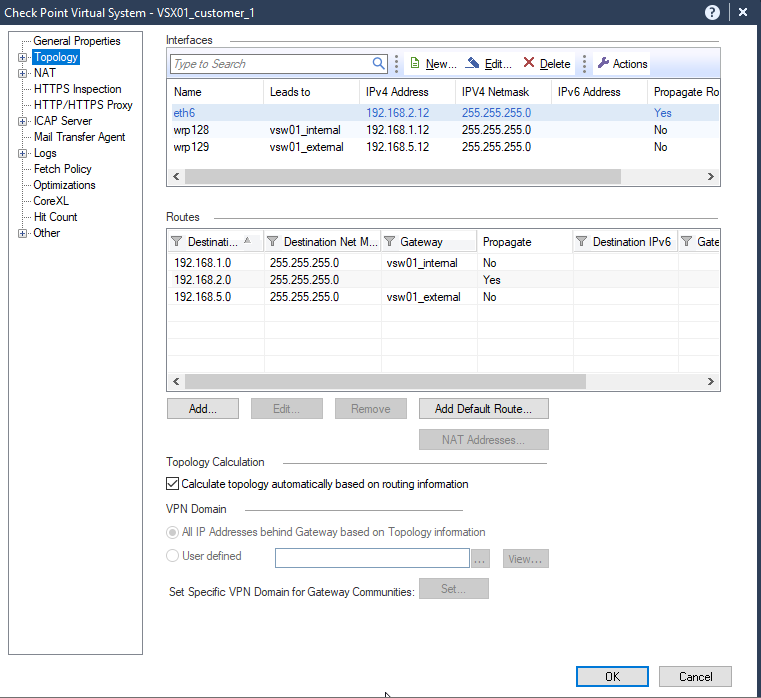
I have a setup with two virtual systems and internal and external virtual-switch
My two vsys has dedicated interface.
VSYS-1
Eth-6 -> 192.168.2.12/24
VSYS-2
Eth-7 - 192.168.3.12/24
I have enabled route propagation on both interfaces and these two vsys has connectivity with both internal and external vswitch.
But I am not able to see propagated routes in both vsys.
I am using R80.40 at the moment.
Please assist where the problem can be.
Thank You
Which JHF take is installed on the system?
Are all routes you expect to be propagated not present or just some specific ones?
Refer also: https://sc1.checkpoint.com/documents/R81.20/WebAdminGuides/EN/CP_R81.20_VSX_AdminGuide/Content/Topic...
( Please note R80.40 is EOL and you should consider upgrading in the near term ).
Has each gateway had its policy installed recently, how long has each been up?
Can we please also see the following output from each VS.... the topology seems not correct.
netstat -rn
ip route get x.y.z.0
@an_technical I believe your topology is a little bit wrong. You have a layer 2 connect between both VS via 2 virtual switches. That‘s ok, but all attached interfaces are on different IP subnets, so no routing is possible between VS1 and VS2 and vice versa. And additional you have always two connects between both VSs, this must be observed with priorities.
I believe you‘re talking only about route propagation via the route configuration settings in the VS object not any other dynamic routing protocol like OSPF or BGP …?
Im not vsx guru by any means, but purely from routing perspective, makes total sense.
Andy
Thanks @Wolfgang : Yes you are right. I corrected the interface IP on wrp interface and I see route is propagated now. I am propagating the internal segment routes but these are propagated through external vswitch.
I am not able to find anything where we can propagate these through internal switch. Any suggestions pleas?
No option to do it via topology?
Andy
I can add manual static routes by disabling route propagation but we have large number of routes.
@an_technical you have a redundant connection between both VS, with VSX route propagation there is no way to differentiate an prioritize. You can remove one of the vswitches or you have to define the routes manually.
With vsx_provisioning_tool you can define a large range of routes via script.
Note sure if it behaves differently in newer supported versions without testing, refer also:
Is there any known issue on R81.20 Version 631?
Not to my knowledge. Which JHF?
I agree with Chris 100%. You should upgrade to officially supported version, which is at least R81.10 at the moment, but I would recommend R81.20 if possible.
Andy
Leaderboard
Epsum factorial non deposit quid pro quo hic escorol.
| User | Count |
|---|---|
| 23 | |
| 4 | |
| 2 | |
| 2 | |
| 2 | |
| 2 | |
| 2 | |
| 2 | |
| 1 | |
| 1 |
Tue 25 Aug 2026 @ 05:00 PM (CEST)
The State of Ransomware Q2 2026: This Quarter's Trends, and Their Impact on Your DefensesThu 27 Aug 2026 @ 10:00 AM (EDT)
Why Email Agent Hijacking is a Game-Changer for Email SecurityTue 25 Aug 2026 @ 05:00 PM (CEST)
The State of Ransomware Q2 2026: This Quarter's Trends, and Their Impact on Your DefensesThu 27 Aug 2026 @ 10:00 AM (EDT)
Why Email Agent Hijacking is a Game-Changer for Email SecurityTue 01 Sep 2026 @ 05:00 PM (CEST)
Under the Hood | Check Point SASE: Onboarding, Step by StepTue 15 Sep 2026 @ 12:00 PM (MDT)
Lone Tree, CO: Workspace Security and Exposure ManagementAbout CheckMates
Learn Check Point
Advanced Learning
YOU DESERVE THE BEST SECURITY