- Products
- Learn
- Local User Groups
- Partners
- More

What's New in R82.10?
Register HereWhen the Agents Attack
A Live Look at Agentic Exposure Validation
AI Security Masters E8:
Claude Mythos: New Era in Cyber Security
CheckMates Go:
CheckMates Fest
Hi all. We have a monitoring server I need to give my colleagues in the US access to. I thought it would be a simple thing to allow but it seems not (or I'm completely missing something).
My colleagues are connecting from home to the VPN of our US office, so of course they're getting an IP from the US VPN pool.
The server is in our UK office.
My firewall rule for the US gateway:
US VPN Pool > UK Monitoring server > Office VPNs > HTTP/HTTPS > Accept > Log
My firewall rule for the UK gateway:
US VPN Pool > UK Monitoring server > Office VPNs > HTTP/HTTPS > Accept > Log
Traffic is getting dropped however. I must be missing something I just don't know what. Looking at the logs it says 'Encryption Failure: According to the policy the packet should not have been decrypted'
Any help would be hugely appreciated,
Many years ago I accomplished this by configuring the VPN domain for the Europe site so it was working and installed the policy to the Europe gateway, then modified the VPN domain for the US site and installed the policy there.
Whenever I wanted to install a security policy to the other VPN site I had to change the VPN domain before installing it. This wasn't much work to do before each policy installation but most importantly the final result was that it worked. This was back in the R65.x days. Now in the R80.x days I would prepare this within two scripts (one of the Europe and one for the US site), put them into the script repository of SmartConsole and run these when I want to install a policy. The script would then modify the VPN domain to my required configuration and initiate the policy installation.
Well you could also access through the SMTP and the other's 3rd party accessible software. It depends on your need that what you have to do by the accessing server in other office. You have to decide and give the permission to access it well.
Hope it would be helpful you too.
Regrads
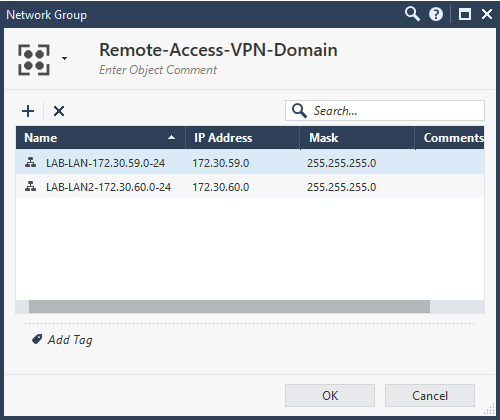
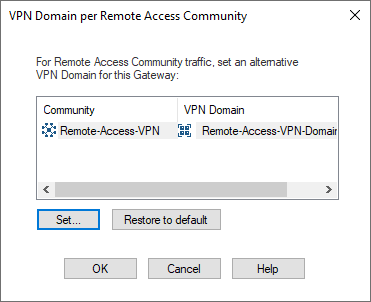
I labbed this up and did some additional research. Turns out, the key here is in the Gateway Cluster Properties under Network Management > VPN Domain > Set domain for Remote Access Community. You can then click on the Remote Access community, click set and specify the VPN domain. What I did was create a new network group with the networks in the US and the networks in the UK that remote users needed to access as this setting dictates what routes are installed in the remote users routing table. From here, you need to ensure the remote users IP pool is included in the local encryption domain on the US gateway and if the UK firewall is a third party device, you'll need to ensure the remote users IP pool is included in their remote encryption domain.
Then you'll need to rules, one allowing remote access and one allowing access over the S2S VPN to the UK. The first rule is installed on the US GW and the second rule is installed on on both GWs. You may be able to get away with one rules but this setup worked for me.
In my screenshots, "LAN-LAN-172.30.59.0-24" is the US LAN, "LAB-LAN2-172.30.60.0-24" is the UK LAN. "VPN_Management_Users" is an access role with the remote VPN users.
Leaderboard
Epsum factorial non deposit quid pro quo hic escorol.
| User | Count |
|---|---|
| 12 | |
| 9 | |
| 8 | |
| 6 | |
| 6 | |
| 6 | |
| 5 | |
| 4 | |
| 3 | |
| 3 |
Tue 23 Jun 2026 @ 05:00 PM (CEST)
Under the Hood: Check Point Cloud Firewall | Securing all of your clouds: Art of the possibleThu 25 Jun 2026 @ 10:00 AM (PDT)
AI Security Masters E10: READY OR NOT: Securing the AI Enterprise 2/5 - AI Red TeamingThu 02 Jul 2026 @ 06:00 PM (CST)
Revolucionando la Seguridad con IA Generativa: Prevención Inteligente en Tiempo RealThu 09 Jul 2026 @ 11:00 AM (CEST)
The Cloud Architects Series: Check Point Edge Protection SD-WAN & SASETue 14 Jul 2026 @ 10:00 AM (PDT)
AI Security Masters E11: READY OR NOT: Securing the AI Enterprise 3/5 - AI Workforce SecurityTue 23 Jun 2026 @ 05:00 PM (CEST)
Under the Hood: Check Point Cloud Firewall | Securing all of your clouds: Art of the possibleThu 25 Jun 2026 @ 10:00 AM (PDT)
AI Security Masters E10: READY OR NOT: Securing the AI Enterprise 2/5 - AI Red TeamingTue 14 Jul 2026 @ 10:00 AM (PDT)
AI Security Masters E11: READY OR NOT: Securing the AI Enterprise 3/5 - AI Workforce SecurityThu 30 Jul 2026 @ 10:00 AM (PDT)
AI Security Masters E12: READY OR NOT: Securing the AI Enterprise 4/5 - AI GatewayThu 20 Aug 2026 @ 10:00 AM (PDT)
AI Security Masters E13: READY OR NOT: Securing the AI Ent 5/5 - AI Research & Threat LandscapeThu 02 Jul 2026 @ 06:00 PM (CST)
Revolucionando la Seguridad con IA Generativa: Prevención Inteligente en Tiempo RealAbout CheckMates
Learn Check Point
Advanced Learning
YOU DESERVE THE BEST SECURITY