Create a Post
cancel
Showing results for 
Search instead for 
Did you mean: 
HeikoAnkenbrand
MVP Diamond
MVP Diamond

R82 - new interesting commands


Here you can find interesting new CLI commands for R82 or add your own interesting commands.

Here are my favorites:


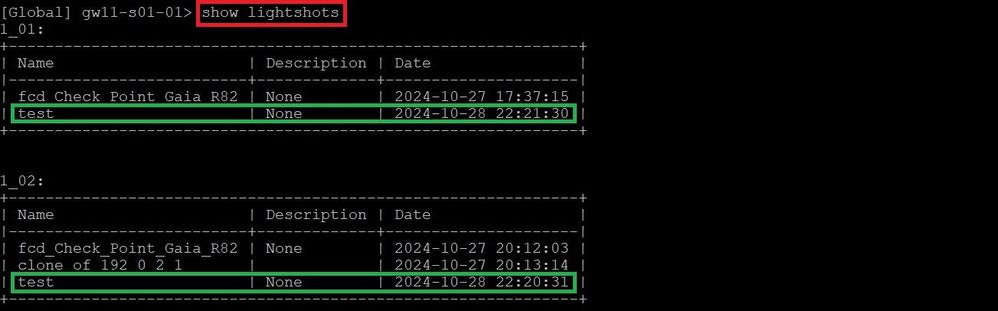
         lightshot


Utility to work with light Gaia OS snapshots.
The utility saves the snapshots in this partition: /mnt/lightshot

> add lightshot
> show lightshot
> show lightshots
> set lightshot
> delete lightshot
> show lightshot-partition

An example of an ElasticXL cluster:

L1_nbvmbn.jpg

L2_lurtegrtk.jpg


         cluster-cli       /       cinfo


This command shows ElasticXL cluster information. Controls the administrative state of Security Group Members on the specified Site and controls the administrative state of the specified Site.

# cluster-cli

There are a number of shortended commands for this command:

cset cluster-cli set
cinfo cluster-cli show info
cconn cluster-cli show info connection
cstat cluster-cli show info overview


And a list with interesting cinfo commands:

cinfo connection Show connection information.
cinfo cpu Show members CPU usage information
cinfo interfaces Show cluster interfaces information
cinfo overview Show members overview.
cinfo pnotes Show members pnotes information
cinfo policy Show members policy information
cinfo provision Show members provision
cinfo throughput Show members throughput information


An example of an ElasticXL cluster:

C1_kfhaskfll.jpg
C2_fnehek.jpg
C3_fdfewf.jpgC4_gfdgdfg.jpg

➜ CCSM Elite, CCME, CCTE, CCVS ➜ www.checkpoint.tips
(1)
16 Replies
ShaiF
Employee
Employee

Adding some more info regarding cluster-cli:

1. cluster-cli has auto complete of next available option using tab. 
2. cluster-cli commands available in gclish as well:
    >  show cluster info ....
3. running cluster-cli without argument will open you command wizard where you can build your command and see all available options:


image.png


Ulf_K
Explorer

Hi @ShaiF,

Can you please provide a few examples of this interactive command.

0 Kudos
ShaiF
Employee
Employee

Sure,

cluster-cli is part of our new expert commands which support both auto complete of next option using tab and default wizard in case no arguments given. The wizard purpose is to give user the option to drill down in all tool options, choose what he need (you can see the build command as you choose options) and then give the option to run it (with close& run button). 

cluster_cli.gif

HeikoAnkenbrand
MVP Diamond
MVP Diamond

Hi @ShaiF,

FYI:
I get an error when I execute this command.

cl1_hgfkhgdk.jpg

➜ CCSM Elite, CCME, CCTE, CCVS ➜ www.checkpoint.tips
0 Kudos
ShaiF
Employee
Employee

HI @HeikoAnkenbrand ,

Can you share the entire output of the failure and in addition the output of:
g_all connview --format=json --src=10.10.52.211

?

0 Kudos
HeikoAnkenbrand
MVP Diamond
MVP Diamond

More information about lightshots can be found here.
Lightshot vs Snapshot 

➜ CCSM Elite, CCME, CCTE, CCVS ➜ www.checkpoint.tips
0 Kudos
the_rock
MVP Diamond
MVP Diamond

Hey @HeikoAnkenbrand 

Since I cant access my R82 lab at the moment, but will try later, just curious...do all these commands work on regular R82 gateway?

Andy

Best,
Andy
"Have a great day and if its not, change it"
0 Kudos
the_rock
MVP Diamond
MVP Diamond

Never mind, just tested, appears its only for exl.

Andy

Best,
Andy
"Have a great day and if its not, change it"
0 Kudos
HeikoAnkenbrand
MVP Diamond
MVP Diamond

Monitoring dashboard for Scalable Platforms (ElasticXL Cluster, Maestro, Scalable Chassis).

# insights

In1_534534.jpg

➜ CCSM Elite, CCME, CCTE, CCVS ➜ www.checkpoint.tips
0 Kudos
Don_Paterson
MVP Gold
MVP Gold

Is insights now supported on the standard gateway?

I see it working on an R82 JHFA T91 firewall in the lab.


0 Kudos
Timothy_Hall
MVP Gold
MVP Gold

Definitely does not work on R82 GA and returns "Feature supported on scalable platform setup only."

Works for me on non-SP R82.10 Jumbo Hotfix Take 24, but only if the firewall has 8 or more cores.

Works on non-SP R82.20 public EA (no JHFA), but only if the firewall has 8 or more cores.

I can't see any documentation stating that using insights on non-SP systems is supported at all; quite the opposite.  @_Val_ any chance you can bring this finding to the R&D person responsible for insights to get some kind of official word?

New Book: "Max Power 2026" Coming Soon
Check Point Firewall Performance Optimization
0 Kudos
Don_Paterson
MVP Gold
MVP Gold

Curious.. My lab is 8 core and as above R82 T91.

When I check the help it seems to describes it as available to all products, meaning that it does not specify SP, which you would imagine it would if the help file was accurate.


0 Kudos
Don_Paterson
MVP Gold
MVP Gold

OK, buried down in the help is REQUIREMENTS and System Requirements and the first point is Check Point Gaia scalable platform setup.

Everything I have tested in it in my lab works 🙂

0 Kudos
HeikoAnkenbrand
MVP Diamond
MVP Diamond

In some scenarios, the administrator might want to revert the Security Gateway's Access Control policy to a previous state without using the Management Server (for example, if there’s no connectivity from management to gateway). Policy Revert Tool (policy_rev_tool) is a CLI that allows reverting the Security Gateway's Access Control policy to a previous state ("revision") directly from the gateway.

policy_rev_tool

Actions:

  • stat: show status (whether feature is enabled and how many previous revisions are saved)
  • list: display saved revisions (revision ID, policy date, policy name) and show which revision is currently installed
  • revert <id>: revert to specified revision (provide revision ID)
  • del <id>: delete specified revision (provide revision ID)
  • keep <id>: prevent specified revision from being deleted on future policy installations
  • setmax <num>: set maximum number of revisions to save (use value 0 to disable feature or 1-10 to change the maximum; default is 2)
➜ CCSM Elite, CCME, CCTE, CCVS ➜ www.checkpoint.tips
0 Kudos
HackerXL
Participant

More IPS commands in R82:

ips protections                          

print_name <protection_id (hex)Display protection ID
print_id '<protection name>'Display protection ID
disabled showShow IPS disabled and excluded protections
disabled exclude <protection_id>Exclude IPS disabled protection
ips protections disabled delete_exclude <protection_id>|allDelete excluded IPS disabled protection


the_rock
MVP Diamond
MVP Diamond

@HackerXL ...very good commands indeed.

Andy

Best,
Andy
"Have a great day and if its not, change it"
0 Kudos

Leaderboard

Epsum factorial non deposit quid pro quo hic escorol.

Upcoming Events

    CheckMates Events