- Products
- Learn
- Local User Groups
- Partners
- More

What’s New in Identity and Trust?
11 November @ 5pm CET / 11am EST
AI Security Masters
Security in the Pace of AI:
From Threat to Force Multiplier
CPX is Back!
Join us in Las Vegas, Vienna, and/or Bangkok!
What’s New in Agentic Network Orchestration
CheckMates Go:
Fun Ding
Hi All,
I have a site running VSX, with one of the VS's running the IPSEC blade only (MAB not enabled) to which endpoint clients connect. As expected the clients gets a certificate warning when you set up the connection for the first time (the client does a HTTPS connection to the gateway as part of setting up the site).
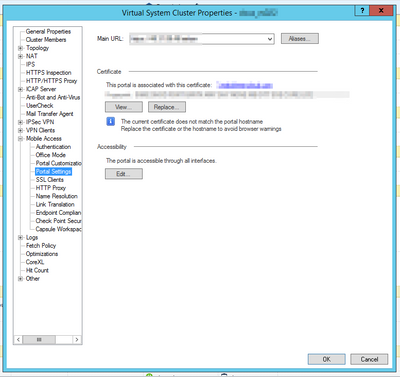
Usually I would resolve this by installing a trusted certificate via the platform portal setting on the gateway properties. Problem is I can't find this setting, not on the VS or on VS0.
How does one resolve this in a VSX environment? All my searching have come up blank, I'm certain I'm missing something very simple.
Thanks,
Ruan
Seems like I've found the solution. Although there is an instance of Multi-Portal daemon running on VS0, it is actually not running. I simply needed to follow the Client's CA signed certificate steps in sk97648
Did you look there?
Hi Jan,
Unfortunately in this environment MAB is not enabled. Good to know it is an option though!
As mentioned in non VSX environments I resolve this by changing out the platform portal certificate, seems this is not an option with VSX then.
And what about the "UserCheck" config more to the top on the same screenshot?
I know for a fact we didn't modify that cert but it shows the same as our MAB cert
That requires IA to be enabled, which is also not enabled in this environment. But you have given me an idea - What I will test is:
Thanks for responding and I will revert with my results!
weird, we don't have IA enabled on that vs
Sorry that was my mistake, it's not related to IA.
I enabled Content Awareness to get access to the UserCheck portal and replaced the certificate with one trusted by the clients. Testing was successful, however once one disable the the relevant blade the certificate reverts back to the one signed by the internal Check Point CA.
I've got a ticket open with TAC now - will update the thread based on the outcome of that.
It seems I’m also facing the same issue. Have you had any luck with TAC? Couldn’t find any SK on this.
Seems like I've found the solution. Although there is an instance of Multi-Portal daemon running on VS0, it is actually not running. I simply needed to follow the Client's CA signed certificate steps in sk97648
If you can change this in the Gaia UI, you can temporarily turn off VSX mode on the Gateway, make the appropriate changes, then turn VSX mode back on.
is it that simple?
are there any side effects of temporarily turning off VSX mode on the Gateway, then re-enabling VSX mode ?
thankyou
Not that I've seen.
I would make certain no one is making changes to VSX objects while VSX mode is off, though.
Leaderboard
Epsum factorial non deposit quid pro quo hic escorol.
| User | Count |
|---|---|
| 30 | |
| 9 | |
| 9 | |
| 9 | |
| 8 | |
| 5 | |
| 4 | |
| 4 | |
| 3 | |
| 3 |
Tue 10 Nov 2026 @ 06:00 PM (IST)
Under the Hood: Introducing Check Point Cloud Firewall as a ServiceTue 10 Nov 2026 @ 08:00 PM (IST)
Check Point Mobile Security | Extending Zero Trust with NetskopeThu 12 Nov 2026 @ 11:00 AM (EST)
Tips and Tricks 2026 #15: Check Point MDR and Incident ResponseTue 10 Nov 2026 @ 06:00 PM (IST)
Under the Hood: Introducing Check Point Cloud Firewall as a ServiceTue 10 Nov 2026 @ 08:00 PM (IST)
Check Point Mobile Security | Extending Zero Trust with NetskopeThu 12 Nov 2026 @ 11:00 AM (EST)
Tips and Tricks 2026 #15: Check Point MDR and Incident ResponseTue 17 Nov 2026 @ 08:30 AM (EST)
Bogota Breakfast & Hack: IA bajo control y ataques en vivo con Workspace SecurityAbout CheckMates
Learn Check Point
Advanced Learning
WE SECURE YOUR AI TRANSFORMATION