- Products
- Learn
- Local User Groups
- Partners
- More

MVP 2026: Submissions
Are Now Open!
What's New in R82.10?
Watch NowOverlap in Security Validation
Help us to understand your needs better
CheckMates Go:
Maestro Madness
Question about Override Categorization in URL Filtering.
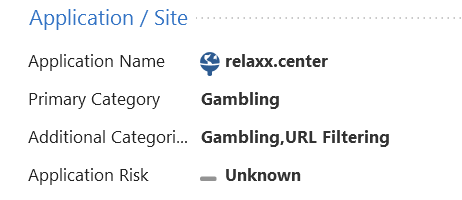
I am trying to override categorization of URL that is categorized as "Gambling" on my Check Point gateway although when I checked in URL Categorization | Check Point Software Technologies it is categorized as "Business / Economy".
Log from Security Management

URL Category in Check Point
Few Questions:
1. Why the URL is categorized differently on my gateway then in URL Categorization | Check Point Software Technologies ?
2. I applied for URL re-categorization ("Request for Category Change ) but got a reply that it will stay as "Business / Economy". Is this the right procedure or it is a bug and I should involve TAC?
3. In the meantime I want to manually do Override categorization. Do I need to just create an Override Categorization object with primary category Business / Economy" and install policy or I should explicitly add the Override Categorization object to a rule?
You just need to create an override category object.
But you should probably open a TAC case to figure out why you need to do it in the first place, especially since your gateway and the categorization site are showing different categories for the same URL.
As always, thank you Dameon for the quick answer! will open a ticket with TAC about this issue!
Hi, did you get a response about the difference between how the gateway categorizes an url and how the Check Point url categorization site shows it?
I'm asking because I have the same issue. I assume one of them updates more slowly? In my case the gateway is up-to-date (version 18111203) and the issue is that the url is categorized in the suspicious category as well as Web Advertisements, Business / Economy. The Check Point url cat site only shows the last 2.
The url comes from a newsletter and is a redirecting tracking url.
Jeroen
As Daemon suggested, Override Categorization should be the fastest way to resolve it (and this is what I did). Also, check that the URL Filtering policy doesn't block any of the website categories. There are some mismatches between the way that the Categories are displayed in the CP Management and the URL Categorization. According to what I understand those are 2 different DB's and the categories are not updated frequently on the Management and SmartConsole.
There is also a way to request category change but I don't know how effective it is.
And of course you can open a ticket for TAC but it might take them some time to research and update the URLF DB.
Ok, thanks for your reply!
Jeroen
Leaderboard
Epsum factorial non deposit quid pro quo hic escorol.
| User | Count |
|---|---|
| 12 | |
| 10 | |
| 9 | |
| 8 | |
| 6 | |
| 3 | |
| 2 | |
| 2 | |
| 2 | |
| 1 |
Tue 16 Dec 2025 @ 05:00 PM (CET)
Under the Hood: CloudGuard Network Security for Oracle Cloud - Config and Autoscaling!Thu 18 Dec 2025 @ 10:00 AM (CET)
Cloud Architect Series - Building a Hybrid Mesh Security Strategy across cloudsTue 16 Dec 2025 @ 05:00 PM (CET)
Under the Hood: CloudGuard Network Security for Oracle Cloud - Config and Autoscaling!Thu 18 Dec 2025 @ 10:00 AM (CET)
Cloud Architect Series - Building a Hybrid Mesh Security Strategy across cloudsAbout CheckMates
Learn Check Point
Advanced Learning
YOU DESERVE THE BEST SECURITY