- Products
- Learn
- Local User Groups
- Partners
- More
MVP 2026: Submissions
Are Now Open!
What's New in R82.10?
10 December @ 5pm CET / 11am ET
Announcing Quantum R82.10!
Learn MoreOverlap in Security Validation
Help us to understand your needs better
CheckMates Go:
Maestro Madness
Hello,
We need to configure Opsec in checkpoint to communicate with QRader.
The question is will this be a unidirectional communication with the QRader or bidirectional ? i read that the certificates are pulled from the checkpoint, in that case are these certificates pulled from the management server or the Gateways ? So do i need to enable port access from QRader to Management Server or the Gateways ?
Environment Details : VSX Cluster, Gaia R80.10 ,SmartConsole
Thanks
The opsec is done with the management/log server, not the gateways. Create the OPSEC object, check LEA as service and define your QRadar host, then initialize SIC.
Thanks...so after this i need to copy the content of Communication: DN field into QRader ?
Also, bidirectional ACL will be applied for Qrader -> Management Server IP on the required Port ?
I remember this being unnecessarily more difficult than other OPSEC integrations I had performed.
Here is a screenshot that may help you get started. The trick was obtaining the correct DN's for the QRadar OPSEC object and the SMS.
The OPSEC DN is easy enough to obtain. Just edit the properties of the object and copy+paste the DN next to the Communication button.
The SMS was a little trickier unless someone knows I shortcut I don't. In R77, I think you used to be able to just see this by viewing the properties of the SMS and clicking the Communication button. This seems to be a bit different in R80. The quickest way I was able to find was to enable the ICA Portal. From the CLI of your SMS, run:
cpca_client set_mgmt_tool on
Then browse to http://<ip of your SMS>:18265
You should be able to find the DN of the SMS there. Once you have it, turn the ICA Portal back off: cpca_client set_mgmt_tool off
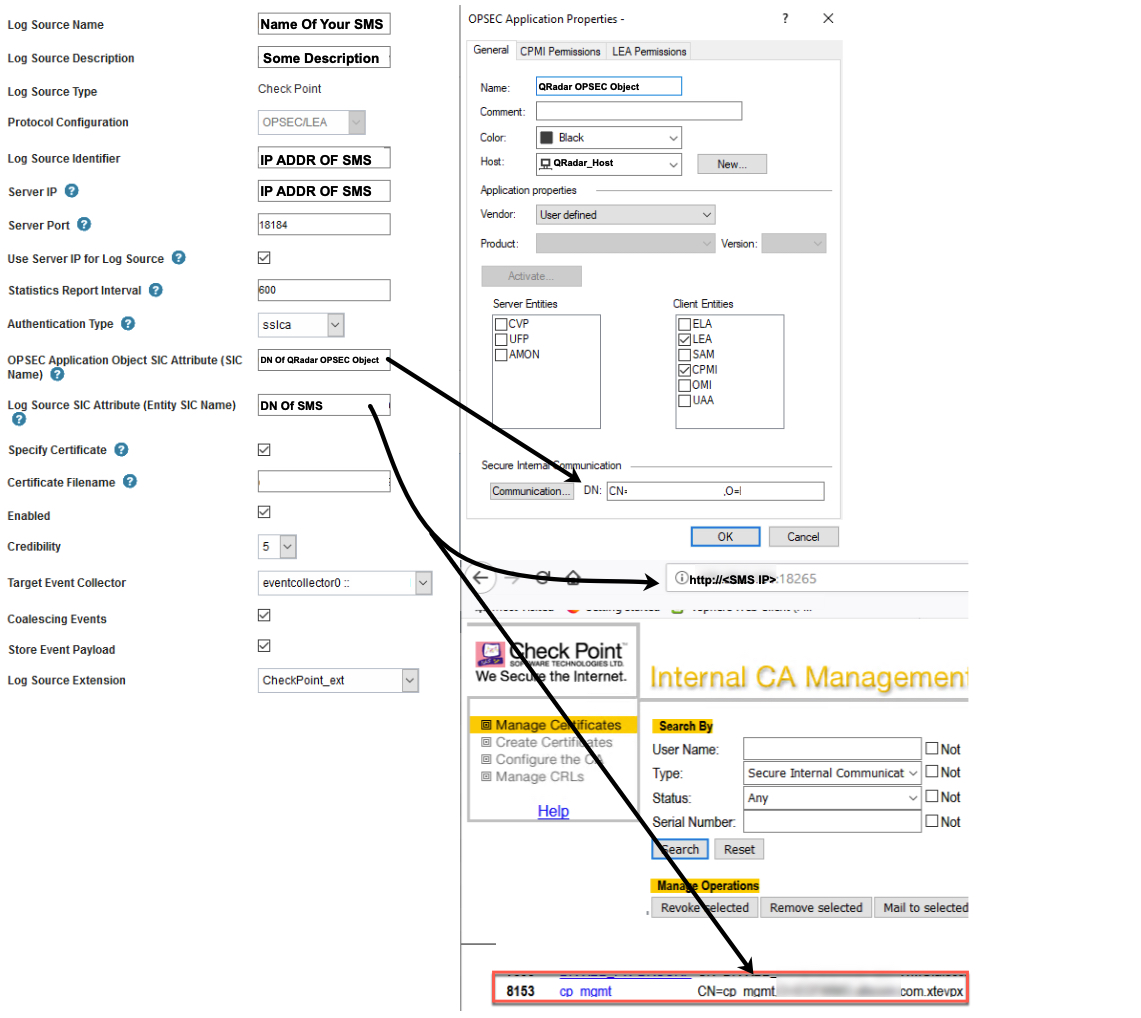
For some reason, I had to manually copy the certificate from my SMS to the QRadar server. I think this was because the two servers were on different LANs without the proper Firewall rules to allow the ICA communication. Assuming you have that, you should be able to skip the part about specifying a file name for the cert.
Since the procedure is different from here, I found these steps in a different Check Mates thread on this topic. Hopefully, this should be accurate enough to finish the configuration!
Specify Certificate Checked
Certificate Authority IP IP of your management server
Pull Certificate Password the shared / trusted SIC secret you specified in OBSEC object
Enabled Checked
Target Collector which QRADAR appliance do you want to reach out to the Log Server
Coalescing Events Checked
Store Event Payload Checked
Log Source Extension I left this blank
Select QRadar Groups Check the group you want.
Using GUIDBEdit is another option (sk61833😞 How to find the SIC DN name of Security Management for an OPSEC client configuration
Any reason you're using LEA to export logs instead of Log Exporter?
it's definitely an option, here is QRadar's guide in the IBM Knowledge Center: Configure Check Point Log Exporter to forward LEEF events to QRadar by using syslog
Leaderboard
Epsum factorial non deposit quid pro quo hic escorol.
| User | Count |
|---|---|
| 16 | |
| 12 | |
| 8 | |
| 7 | |
| 7 | |
| 4 | |
| 3 | |
| 3 | |
| 2 | |
| 2 |
Fri 12 Dec 2025 @ 10:00 AM (CET)
Check Mates Live Netherlands: #41 AI & Multi Context ProtocolTue 16 Dec 2025 @ 05:00 PM (CET)
Under the Hood: CloudGuard Network Security for Oracle Cloud - Config and Autoscaling!Fri 12 Dec 2025 @ 10:00 AM (CET)
Check Mates Live Netherlands: #41 AI & Multi Context ProtocolTue 16 Dec 2025 @ 05:00 PM (CET)
Under the Hood: CloudGuard Network Security for Oracle Cloud - Config and Autoscaling!Thu 18 Dec 2025 @ 10:00 AM (CET)
Cloud Architect Series - Building a Hybrid Mesh Security Strategy across cloudsAbout CheckMates
Learn Check Point
Advanced Learning
YOU DESERVE THE BEST SECURITY
