- Products
- Learn
- Local User Groups
- Partners
- More

What's New in Check Point SASE
Wednesday, 9 September @ 5pm CET / 11am EDT
The State of Ransomware Q2 2026:
This Quarter's Trends, and Their Impact on Your Defenses
AI Security Masters
Implementing the AI Security Trifecta
CheckMates Go:
Half is Not Enough
Hello
First of all sorry for my english, i'm not an english native speaker.
I have one question.
Let me try to explain the issue.
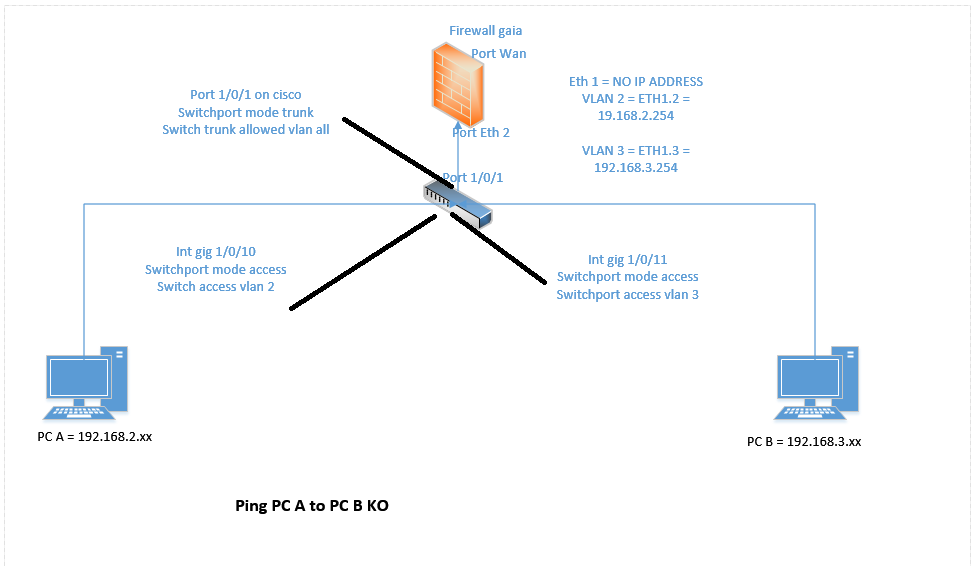
I have a firewall checkpoint gaia in r77.30 software version.
The FW is connected to the LAN throught a cisco switch 2960 (fyi it is a switch not a router).
My FW is my DHCP.
My FW is connected to the port LAN 1 and port Gig 1/0/1 on my cisco switch 2960.
My port Gig 1/0/1 is in trunk mode.
I created a VLAN 2 and VLAN 3 on my FW
I created a VLAN 2 and VLAN 3 on my switch.
I connected a laptop on port Gig 1/0/10 on my cisco switch
I connected a laptop on port Gig 1/0/11 on my cisco switch
My 2 ports are in "switch port mode access" - "switchport access vlan 2" for the first laptop and "switchport access vlan 3" for the second laptop.
My DHCP works fine and i have an ip on vlan 2 and an ip in vlan 3 but from vlan 2 i cannot ping vlan 3. Why ? How to test an inter-vlan routing with a firewall checkpoint ?
Hello
First of all sorry for my english, i'm not an english native speaker.
I have one question.
Let me try to explain the issue.
I have a firewall checkpoint gaia in r77.30 software version.
The FW is connected to the LAN throught a cisco switch 2960 (fyi it is a switch not a router).
My FW is my DHCP.
My FW is connected to the port LAN 1 and port Gig 1/0/1 on my cisco switch 2960.
My port Gig 1/0/1 is in trunk mode.
I created a VLAN 2 and VLAN 3 on my FW
I created a VLAN 2 and VLAN 3 on my switch.
I connected a laptop on port Gig 1/0/10 on my cisco switch
I connected a laptop on port Gig 1/0/11 on my cisco switch
My 2 ports are in "switch port mode access" - "switchport access vlan 2" for the first laptop and "switchport access vlan 3" for the second laptop.
My DHCP works fine and i have an ip on vlan 2 and an ip in vlan 3 but from vlan 2 i cannot ping vlan 3. Why ? How to test an inter-vlan routing with a firewall checkpoint ?
Hello
First of all sorry for my english, i'm not an english native speaker.
I have one question.
Let me try to explain the issue.
I have a firewall checkpoint gaia in r77.30 software version.
The FW is connected to the LAN throught a cisco switch 2960 (fyi it is a switch not a router).
My FW is my DHCP.
My FW is connected to the port LAN 1 and port Gig 1/0/1 on my cisco switch 2960.
My port Gig 1/0/1 is in trunk mode.
I created a VLAN 2 and VLAN 3 on my FW
I created a VLAN 2 and VLAN 3 on my switch.
I connected a laptop on port Gig 1/0/10 on my cisco switch
I connected a laptop on port Gig 1/0/11 on my cisco switch
My 2 ports are in "switch port mode access" - "switchport access vlan 2" for the first laptop and "switchport access vlan 3" for the second laptop.
My DHCP works fine and i have an ip on vlan 2 and an ip in vlan 3 but from vlan 2 i cannot ping vlan 3. Why ? How to test an inter-vlan routing with a firewall checkpoint ?
Thanks for your quickly reply.
1 - Yes i have 2 windows laptop. Ping is ok because when they are in the same subnets, they can ping and anyway i have turned off my windows firewall on both computer.
2 - Check within SmartLog or SmartView Tracker --> It is in lab environement for the moment, so i did not install and configure these features.
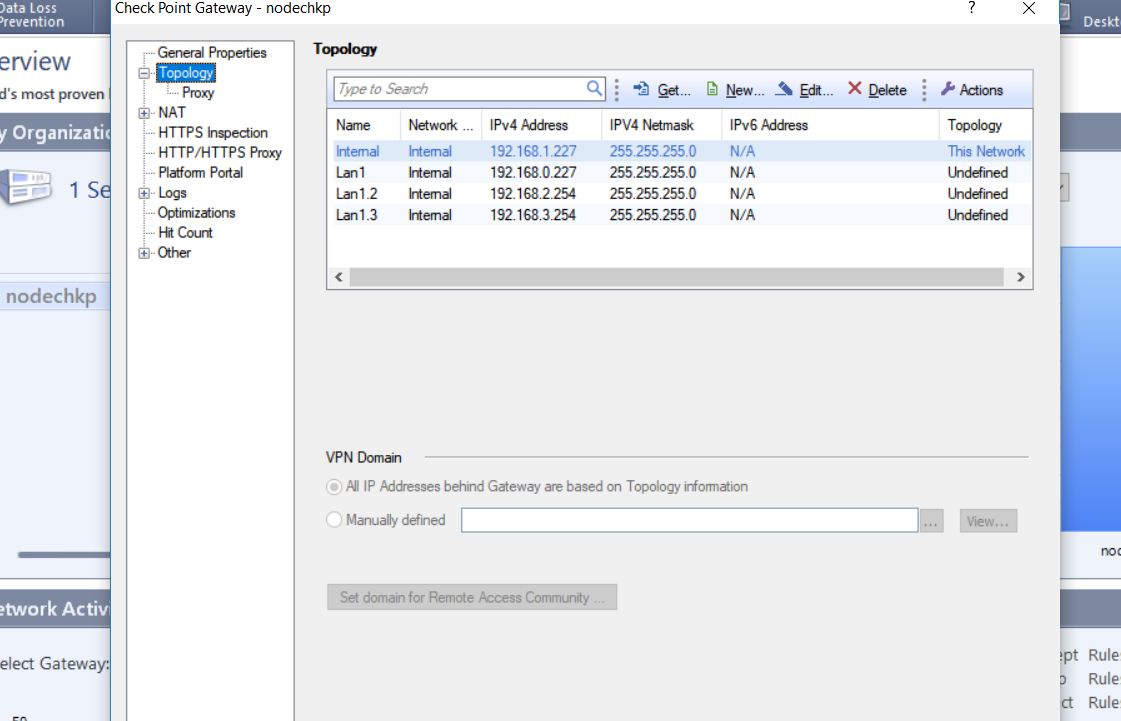
2.1 - Make sure that VLAN2 and VLAN3 is also configuration within your firewall objects topology within SmartDashboard identically to what you have configured at the GAiA WebUI --> I just add vlan2 and vlan3 within my FW objects topology. Let me know if you are ok with this, check my attachment please.
3 - I will check this point after.
Thanks for your quickly reply.
1 - Yes i have 2 windows laptop. Ping is ok because when they are in the same subnets, they can ping and anyway i have turned off my windows firewall on both computer.
2 - Check within SmartLog or SmartView Tracker --> It is in lab environement for the moment, so i did not install and configure these features.
2.1 - Make sure that VLAN2 and VLAN3 is also configuration within your firewall objects topology within SmartDashboard identically to what you have configured at the GAiA WebUI --> I just add vlan2 and vlan3 within my FW objects topology. Let me know if you are ok with this, check my attachment please.
3 - I will check this point after.