- Products
- Learn
- Local User Groups
- Partners
- More

MVP 2026: Submissions
Are Now Open!
What's New in R82.10?
Watch NowOverlap in Security Validation
Help us to understand your needs better
CheckMates Go:
Maestro Madness
Thank you Val Loukine (and other admins) for his page CP4B. Really helpful.
I am new to Check Point. I changed company and will have to use this technology. In the past I used Cisco, Palo Alto, PfSense.
In Part 2 the lab is discussed. I think I might be short in resources to make the lab :-(. I have a mini desktop with
Intel(R) Core(TM) i5-8500T CPU @ 2.10GHz, 2112 MHz, 6 core('s) and 12GB ram. I don't have access to a nice ESXI environment with lots of ram and storage. Has someone else experience with a setup like mine using VMware Workstation and only 12GB of ram?
Also I try to figure out what the comment of Vladimir means at the end of the page. Should I use Virtual Box instead of VMware Workstation?
Last question; I used GNS3 in the past for Cisco labs. Is this an even better option for a lab setup?
Hi Czar,
I have used both GNS3 and EVE-NG in the past.
Would should work fine.
Cheers,
Hunt
Yes, you should be fine with 12GB of RAM and a VIrtual Box environment. Allocate 4GB for each of Check Point machines though. Use your own laptop as a client instead of an additional virtual machine.
This year we want to build some cloud based labs one can request from CheckMates, but the project is only starting now. It will take some time to build it to completion.
Thanks for the fast replies.
In the meantime I did a quick GNS3 try on my work laptop. It's quite a good device (i5 with 16GB Ram).
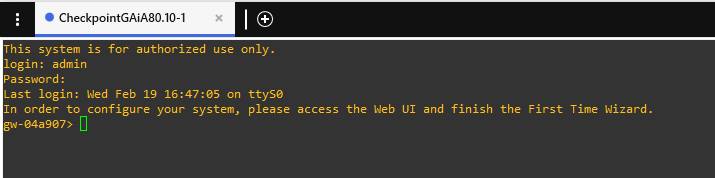
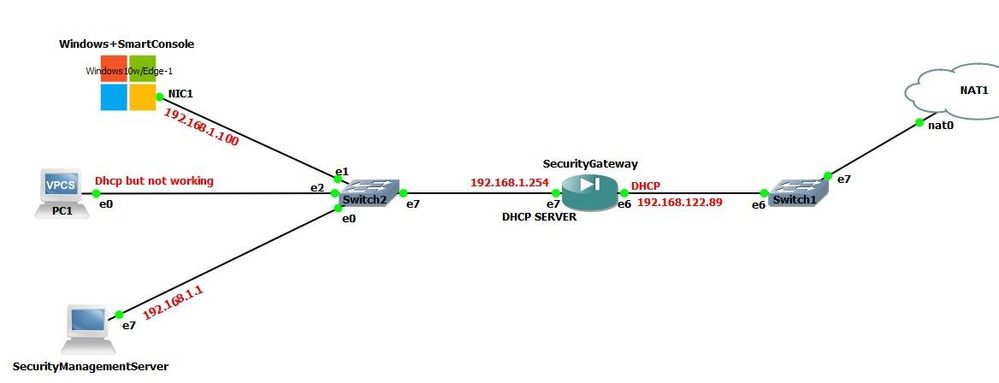
I have to say that it went very smooth. I choose all the defaults. And at the end look what I got 😀
I am running GNS3 2.2.5 (GNS3 VM version also 2.2.5).
I thought It could be interesting for some people. If info and screenshots of my more in depth lab at home are requested drop a message. I will try both paths. GNS3 style and VMware Workstation style. But first I'll add some RAM to have a system with 16GB instead of 12GB. To run Gaia I had to allocate 8GB of RAM to my GNS3 VM 😯. With 4GB I got an error and the system refused to start.
On the CP4B I am a bit stuck because it says to create a third interface in my VM environment to put the SMS in. I cannot do that on my work laptop because of administrator rights that I don't have 😑.
Please do not mark "solution" in this tread. Solutions are for the cases when you are asking a question in the main post and then get an answer in the comments.
As for the technical challenges you are having, isn't GNS having a "shared network" netween your VMs and the physical host? If there is such a thing, use it to connect to your virtual machines. Then your laptop can be a SmartConsole client with out a hustle.
I had to pimp my GNS3 VM a lot and it's asking a lot of my system, but it's ok. What I have for the moment:
GNS3 VM settings:
Maybe I should rethink it and go for a less resource (RAM) eating setup. Like you suggested and make my host running the SmartConsole. That spares me the Windows system in GNS3. Or maybe go for the full Gaia VM in Workstation. I will miss the GNS3 Visio view though....
I also tried quicly to make my SG a dhcp server but that seems to fail. My PCI (vpcs device) does not get any ip address.
My config on the SG concerning dhcp server:
gw-54b707> show dhcp server status
DHCP Server Enabled
gw-54b707> show dhcp server all
DHCP Server Enabled
DHCP-Subnet 192.168.1.0
State Enabled
Net-Mask 24
Maximum-Lease 86400
Default-Lease 43200
Pools (Include List)
192.168.1.50-192.168.1.100 : enabled
Maybe a firewall rule issue. Don't know yet.
Leaderboard
Epsum factorial non deposit quid pro quo hic escorol.
| User | Count |
|---|---|
| 12 | |
| 10 | |
| 9 | |
| 8 | |
| 6 | |
| 3 | |
| 2 | |
| 2 | |
| 2 | |
| 1 |
Tue 16 Dec 2025 @ 05:00 PM (CET)
Under the Hood: CloudGuard Network Security for Oracle Cloud - Config and Autoscaling!Thu 18 Dec 2025 @ 10:00 AM (CET)
Cloud Architect Series - Building a Hybrid Mesh Security Strategy across cloudsTue 16 Dec 2025 @ 05:00 PM (CET)
Under the Hood: CloudGuard Network Security for Oracle Cloud - Config and Autoscaling!Thu 18 Dec 2025 @ 10:00 AM (CET)
Cloud Architect Series - Building a Hybrid Mesh Security Strategy across cloudsAbout CheckMates
Learn Check Point
Advanced Learning
YOU DESERVE THE BEST SECURITY