- Products
- Learn
- Local User Groups
- Partners
- More

The Great Exposure Reset
24 February 2026 @ 5pm CET / 11am EST
CheckMates Fest 2026
Watch Now!AI Security Masters
Hacking with AI: The Dark Side of Innovation
CheckMates Go:
CheckMates Fest
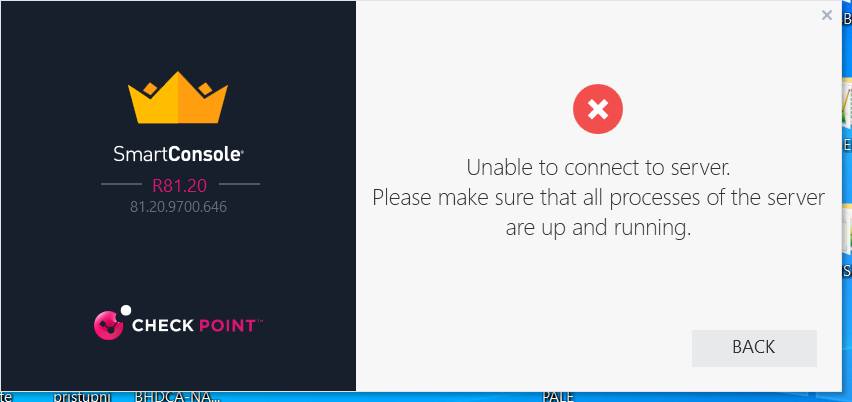
Hello, I have Check Point MGMT server as virtual machine on VmWare. After I have done migrate import, everything works fine, but when I reboot that virtual machine some processes can't start so I can't to log over Smart Console (attached document) and I have to do migrate import again to start all processes.
Is there any compatibility issues between version of CP MGMT server (Gaia R81.20) and VmWare
What is the output of cpwd_admin list?
What does api status show after running api restart
Hello, on the previous attached document "VM.txt" reason for API process is stopped is because I didn't wait enaugh time after restart of virtual machine to start all processes.
A real problem is when I restart virtual machine and type "api status" command I get notification that FWM process is stopped, also "cpwd_admin list" command says that processes FMW and FWMHA stat is T "terminated" (attached pictures). I can't log with Smart Console on MGMT server (attached picture). After that I have to do migrate import to import database and after that everything works fine.
What can be cause of problem?
Can you run the following command:
export TDERROR_ALL_ALL=5 ; fwm -d
Please send me at tfridman@checkpoint.com or post here
I sent it to relevant R&D owner for his opinion.
However in the debug file it states that:
Found an indication that the current domain was migrated, and the migration was unexpectedly interrupted. Cannot start after such an interruption
Have you considered running the full migration (export / import) again?
I can't undersnand this clearly
Found an indication that the current domain was migrated, and the migration was unexpectedly interrupted. Cannot start after such an interruption
What do you suggest? To delete virtual machine, create a new one and import database.
I want do everything what will resolve the problem.
Trying a new VM could be a good place to start.
Please update how it went.
OK, I will try with new VM tomorrow.
Please, let me know what is the reason of this behaviour, corrupted exported/imported database or maybe VmWare incompatibility. How to be sure that new VM and imported database will resolve the problem?
Best regards,
Milan Babic
It could be a problem during the Export but sounds more likely it was something in the Import.
For VMware support look at the Hardware Compatibility List:
https://www.checkpoint.com/support-services/hcl/
Does the amount of memory allocated, number of cores, and disk space allocation meet the minimums for R81.20? This is a common cause of problems in a VMWare environment, I use R81.20 in VMWare Workstation for training and it works fine with the proper resources allocated. The minimum is 2 cores, 8GB RAM and 110 GB disk space for an SMS but I'd strongly recommend at least 4 cores, 16GB of RAM, and 250GB of disk space.
Also set the Guest VM version to "RHEL 7 64-bit" to ensure it creates the proper and most efficient disk/network devices for you.
What are the hardware specs you've assigned to the VM?
You need at least 8GB for SMS (even in a lab).
Model of server: Cisco UCSC-C220-M4S
I have found that there is no that server in "GAiA and Secure Platform Hardware Compatibility List".
I am not sure is it supported.
You said this was a VM, so the underlying hardware is irrelevant.
What I am asking for is the number of cores, RAM, and disk you assigned to this VM.
Hello, the problem has been resolved. I have installed a new virtual machine MGMT server and after that import database. Every services are started after reloading a MGMT server.
The problem was probably interrupt during database import.
Best regards.
Leaderboard
Epsum factorial non deposit quid pro quo hic escorol.
| User | Count |
|---|---|
| 27 | |
| 19 | |
| 10 | |
| 9 | |
| 7 | |
| 7 | |
| 6 | |
| 6 | |
| 5 | |
| 4 |
Thu 19 Feb 2026 @ 03:00 PM (EST)
Americas Deep Dive: Check Point Management API Best PracticesMon 23 Feb 2026 @ 11:00 AM (EST)
Latest updates on Quantum Spark including R82 features and Spark Management zero touch - AMERTue 24 Feb 2026 @ 10:00 AM (CET)
Latest updates on Quantum Spark including R82 features and Spark Management zero touch - EMEAThu 19 Feb 2026 @ 03:00 PM (EST)
Americas Deep Dive: Check Point Management API Best PracticesMon 23 Feb 2026 @ 11:00 AM (EST)
Latest updates on Quantum Spark including R82 features and Spark Management zero touch - AMERTue 24 Feb 2026 @ 10:00 AM (CET)
Latest updates on Quantum Spark including R82 features and Spark Management zero touch - EMEAFri 06 Mar 2026 @ 08:00 AM (COT)
Check Point R82 Hands‑On Bootcamp – Comunidad DOJO PanamáAbout CheckMates
Learn Check Point
Advanced Learning
YOU DESERVE THE BEST SECURITY