- Products
- Learn
- Local User Groups
- Partners
- More

Scaling Check Point Automation with Arodonata
7 October @ 5pm CET / 11am EDT
What's New in Check Point SASE
The State of Ransomware Q2 2026:
This Quarter's Trends, and Their Impact on Your Defenses
AI Security Masters
Implementing the AI Security Trifecta
CheckMates Go:
Half is Not Enough
Hi,
if you have R82 and Zero Phishing active on a gateway (I know, not the most common setup), you may run into a problem I just had.
An iPhone or an iPad updated to IOS 18.4 will no longer be able to connect to a WIFI that is secured by a firewall described above.
The culprit in this case: Zero Phishing:
curl http://captive.apple.com/`
[HTML>[HEAD>[TITLE>Success[/TITLE>[/HEAD><BODY><script nonce="***">var zphInj="***"[/script>[script nonce="***" src='http://zero-phishing.iaas.checkpoint.com/zph/token_generator.php?api_key={***}' crossorigin>[/script>[script nonce="***" src='https://zerophishing.iaas.checkpoint.com/3/zp.js?api_key={***}' defer crossorigin>[/script>Success[/BODY>[/HTML>
(info: replaced all "<" by "[" to be able to post)
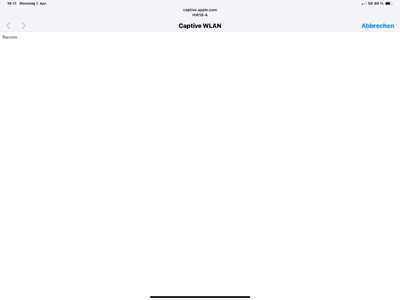
Prior to IOS 18.4, my iPhone had no problem with that reply, but with IOS 18.4 it hangs with this screen:
It no longer recognizes the "SUCCESS" due to the SCRIPT-Tag from Zero Phishing.
I don't need a solution, disabling the blade was a quick fix. I know how to create exceptions.
But I guess this will hit several people who don't know what hit them. As the update on IOS triggers this, I looked in Apple's direction first (and not completely wrong to do so). I opened an SR to give CP a heads up as I will not be the last one to stumble over this.
JHF was 12 in my case.
Yours, Martin
See the solution on how to create an exception: https://community.checkpoint.com/t5/Firewall-and-Security-Management/Zero-Phishing-and-IOS-18-4-Capt...
Appreciate you sharing this tidbit in case others run into it.
Hopefully it will be addressed in a future JHF.
I am quite optimistic on that. This will cause a lot of SR cases. Advised my contacts in the support team on the incoming wave. I‘m glad I ran into this one early, so it may do some good.
The workaround is to add an exception to the threat prevention policy.
1. Under "Custom Applications/Categories" -> Application/Site -> Create an object for example: AppleCaptive
2. Add "captive.apple.com" to the Application object "AppleCaptive".
3. Create an exception
As I wrote, I know how to create an exception. This post was meant as something Google finds when you're looking for the problem. This has the potential to keep less experienced admins to scratch their heads 😁.
We've faced the same issue. The workaround helped a lot. Thank you!
Thanks for this post, I had the exact same issue and it is now fixed!
I was not able to see anything relevant in the logs, which made the troubleshooting quite difficult.
Luckily, I came across your post — otherwise I would probably still be looking in the wrong direction.
How we could see these errors in logs
We just started to see this issue yesterday (2/23). We are R82 JHF 73. I added the captive.apple.portal per example and did not help. If user chooses to "Use without Internet" client will join the SSID and have Internet access. Client will NOT see the captive.apple.portal again unless they "forget" the SSID and try to rejoin. I presume eventually client will see again if device is not online after some time. No issues with Android or Windows. Does not matter what SSID / auth method is used the Apple device tries to join (although I believe MAC Auth devices are not reporting this issue). I spent 6 hours with Cisco TAC who say its a DNS resolution timing issue that causes the Apple devices to believe they are on a Captive Portal SSID. We use Cloudflare as external DNS -- we tried using Google's 8.8.8.8 and it did not help. I did a curl from GW and it returns 200 code. No blocks in Log. How can I tell if its Phishing blade?
[Expert@GW-2:0]# curl_cli -v http://captive.apple.com
* Rebuilt URL to: http://captive.apple.com/
* Trying 17.253.3.137...
* TCP_NODELAY set
* Connected to captive.apple.com (17.253.3.137) port 80 (#0)
[ HTTP/1.1 200 OK
[ Content-Length: 69
[ Cache-Control: max-age=31536000
[ Last-Modified: Mon, 23 Feb 2026 06:31:50 GMT
[ Content-Type: text/html
[ Date: Mon, 23 Feb 2026 06:31:50 GMT
[ Age: 57238
[ Via: http/1.1 usnyc3-edge-fx-014.ts.apple.com (acdn/293.16398), http/1.1 usnyc3-edge-fx-014.ts.apple.com (acdn/293.16398)
[ X-Cache: miss, hit-fresh
[ CDNUUID: bf9030cb-3676-4078-921f-1c634444da6a-11805875095
[ Access-Control-Allow-Origin: *
[ Connection: keep-alive
[
[HTML>[HEAD>[TITLE>Success[/TITLE>[/HEAD>[BODY>Success[/BODY>[/HTML>
* Connection #0 to host captive.apple.com left intact
You have to do the curl from a system behind the firewall. If it is the same output, it is not the problem I described in my post. If there is some weird output like in my original post, it's that blade.
This cannot be tested from the firewall itself...
Thanks. Ran curl in powershell on my Win 11 laptop and got 200 code. But laptop is wired connected....
RawContent : HTTP/1.1 200 OK
Age: 9810
X-Cache: miss, hit-fresh
CDNUUID: 5c47da3d-1ac8-4a88-bcc0-04d362c6711b-15226575337
Access-Control-Allow-Origin: *
Connection: keep-alive
Content-Length: 999
Cache-Cont...
The 200 is not important, but the "[HTML>[HEAD>[TITLE>Success[/TITLE>[/HEAD>[BODY>Success[/BODY>[/HTML>" is....
To determine if the blade is intervening, a wired PC is OK.
Thanks. Tried it in Wi-Fi and got the same result. But not sure what I should be looking for here:
Content : <HTML><HEAD><TITLE>Success</TITLE></HEAD><BODY><script nonce="3D67A23820B">var zphInj="eyJkc3RfaXAi
OiIxNy4yNTMuOTcuMjAyIiwiZHN0X3BvcnQiOiI4MCIsImVuY29kZWRfaHR0cF9ob3N0IjoiWTJGd2RHbDJaUzVoY0hCc1....
....I don't see anything in curl response that shows Phishing
This comes from the Anti-Phishing blade:
<script nonce="3D67A23820B">var zphInj="eyJkc3RfaXAi
OiIxNy4yNTMuOTcuMjAyIiwiZHN0X3BvcnQiOiI4MCIsImVuY29kZWRfaHR0cF9ob3N0IjoiWTJGd2RHbDJaUzVoY0hCc
There is something intervening in your access to the captive portal and it looks like the Anti-Phishing blade.
This part is added by the blade:
<script nonce="3D67A23820B">var zphInj="eyJkc3RfaXAi
OiIxNy4yNTMuOTcuMjAyIiwiZHN0X3BvcnQiOiI4MCIsImVuY29kZWRfaHR0cF9ob3N0IjoiWTJGd2RHbDJaUzVoY0hCc
Phishing does not have a "dedictated" blade to turn off to test. GW is set to Use Automatic Settings. Autonomous Policy is set to Perimeter (recommended). Blocked and Detected phishing attempts show 0. Maybe change to Internal Network Profile which seems to disable Zero Phishing. No way to "bypass" Phishing for the portal?
See the solution on how to create an exception: https://community.checkpoint.com/t5/Firewall-and-Security-Management/Zero-Phishing-and-IOS-18-4-Capt...
Thanks. I added the Exception to Threat Prevention policy and it works. I am still going to enter a CP ticket to see if it can be addressed w/o need for Exception rule. We just applied JHF 73 to our R82 last week and this had never been an issue before. Androids use a URL to probe for captive portal which does not seem to be impacted by Phishing blade. I ran the curl against connectivitycheck.gstatic.com/generate_204 and no phishing code present.
Thanks for the assist.
Hi, Did you manage to get anywhere with Check Point for an offical fix for this?
I advise CP through a ticket of this effect.
But I didn't ask for a fix since I would not rate it a bug. It is a change in IOS that triggered the problem.
Sorry!

Leaderboard
Epsum factorial non deposit quid pro quo hic escorol.
| User | Count |
|---|---|
| 26 | |
| 6 | |
| 4 | |
| 4 | |
| 4 | |
| 4 | |
| 3 | |
| 3 | |
| 3 | |
| 2 |
Wed 23 Sep 2026 @ 06:00 PM (EDT)
Santo Domingo: Workspace Security and SASE Live: Protección Total del Usuario Email, Endpoint y SASEMon 28 Sep 2026 @ 03:00 PM (CEST)
La nouvelle réalité des attaques DDoS: autonomie, échelle et avenir de la défenseThu 01 Oct 2026 @ 05:00 PM (CEST)
Under the Hood: Check Point WAF | Preventing minus-zero-day attacksMon 28 Sep 2026 @ 03:00 PM (CEST)
La nouvelle réalité des attaques DDoS: autonomie, échelle et avenir de la défenseThu 01 Oct 2026 @ 05:00 PM (CEST)
Under the Hood: Check Point WAF | Preventing minus-zero-day attacksWed 23 Sep 2026 @ 06:00 PM (EDT)
Santo Domingo: Workspace Security and SASE Live: Protección Total del Usuario Email, Endpoint y SASEAbout CheckMates
Learn Check Point
Advanced Learning

YOU DESERVE THE BEST SECURITY