- Products
- Learn
- Local User Groups
- Partners
- More

What's New in R82.10?
Watch HereWhen the Agents Attack
A Live Look at Agentic Exposure Validation
AI Security Masters E8:
Claude Mythos: New Era in Cyber Security
CheckMates Go:
CheckMates Fest
I've been configuring remote access on VSX R80.40 with the latest GA Take. Both TLS portal and Mobile clients work with username/password, and I've been following the various documentations to configure RADIUS authentication.
However as soon as I try with RADIUS authentication set, it immediately fails with "1st factor RADIUS - Server not responding".
In $FWDIR/log/vpnd.elg, there is the message that no RADIUS servers are responding. The thing is that I don't see any logs or fw monitor which show any RADIUS packets being sent by the VS, a tcpdump on the RADIUS server doesn't either. In terms of connectivity, it's all good, ping from the VS to the RADIUS goes through another VS and there it works.
If I switch back to username/password (provided by Identity Collector), it works immediately.
I'm probably missing something here, any hint would be appreciated.
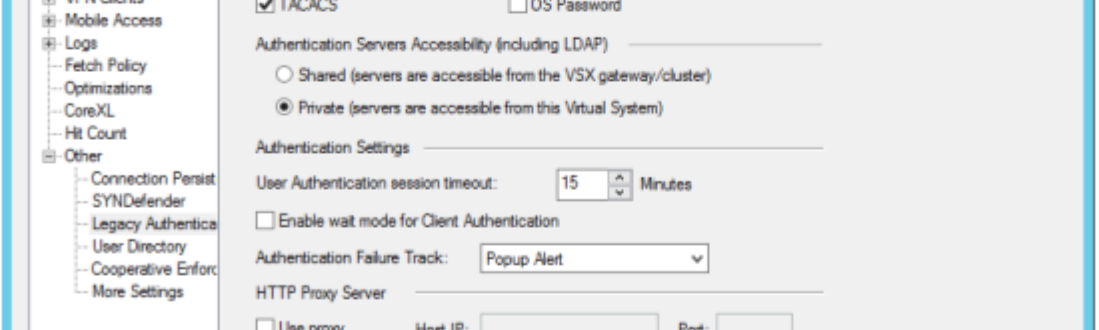
in the settings on the VS firewall object you can choose who goes to the RADIUS server, VS0 (default) or the VS in question where you configured the RADIUS setup
EDIT: added crappy screenshot
VS settings => Other => Legacy Authentication => Shared to Private
@Royi_Priov any suggestions here?
I suggest investigating with TAC.
Thanks, looks like it was it, now to troubleshoot the RADIUS side.
Hello, @Alex-
In VSX, when you need to integrate a RADIUS server for authenticating remote VPN connection users, is this configuration done from the VS CLI that works with the IPsec VPN blade? Or where is the configuration done?
Can the “integration” of a Radius server be done through SmartConsole?
Thank you for your comments.
It's all done in the Smart Console.
Hi Alex
Did you get a solution to it? After legacy authentication change the access request was accepted, but still cannot login. Any ideas?
Leaderboard
Epsum factorial non deposit quid pro quo hic escorol.
| User | Count |
|---|---|
| 75 | |
| 13 | |
| 7 | |
| 5 | |
| 5 | |
| 4 | |
| 4 | |
| 4 | |
| 4 | |
| 3 |
Thu 25 Jun 2026 @ 10:00 AM (PDT)
AI Security Masters E10: READY OR NOT: Securing the AI Enterprise 2/5 - AI Red TeamingThu 02 Jul 2026 @ 06:00 PM (CST)
Revolucionando la Seguridad con IA Generativa: Prevención Inteligente en Tiempo RealThu 09 Jul 2026 @ 11:00 AM (CEST)
The Cloud Architects Series: Check Point Edge Protection SD-WAN & SASETue 14 Jul 2026 @ 10:00 AM (PDT)
AI Security Masters E11: READY OR NOT: Securing the AI Enterprise 3/5 - AI Workforce SecurityThu 30 Jul 2026 @ 10:00 AM (PDT)
AI Security Masters E12: READY OR NOT: Securing the AI Enterprise 4/5 - AI GatewayThu 20 Aug 2026 @ 10:00 AM (PDT)
AI Security Masters E13: READY OR NOT: Securing the AI Ent 5/5 - AI Research & Threat LandscapeThu 25 Jun 2026 @ 10:00 AM (PDT)
AI Security Masters E10: READY OR NOT: Securing the AI Enterprise 2/5 - AI Red TeamingTue 14 Jul 2026 @ 10:00 AM (PDT)
AI Security Masters E11: READY OR NOT: Securing the AI Enterprise 3/5 - AI Workforce SecurityThu 30 Jul 2026 @ 10:00 AM (PDT)
AI Security Masters E12: READY OR NOT: Securing the AI Enterprise 4/5 - AI GatewayThu 20 Aug 2026 @ 10:00 AM (PDT)
AI Security Masters E13: READY OR NOT: Securing the AI Ent 5/5 - AI Research & Threat LandscapeThu 02 Jul 2026 @ 06:00 PM (CST)
Revolucionando la Seguridad con IA Generativa: Prevención Inteligente en Tiempo RealAbout CheckMates
Learn Check Point
Advanced Learning
YOU DESERVE THE BEST SECURITY