Create a Post
cancel
Showing results for 
Search instead for 
Did you mean: 
the_rock
MVP Diamond
MVP Diamond
Jump to solution

Threat prevention (IPS) query

Hey guys,

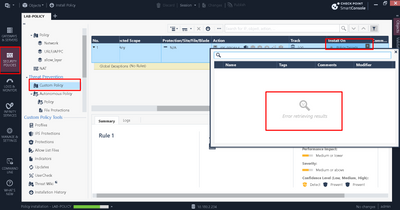
Not sure if anyone ever encountered this issue, but had customer ask me about it the other day and funny enough, I see same problem in my R81.20 lab. Problem is there regardless if cluster is set as install target in policy settings or not. I mean, this is such a minor cosmetic issue, as IPS works fine and there are no other problems, but if anyone knows how to fix it, I think it would make client happy : - ). 

Cheers

I attached screenshot below.

Tx as always

Andy


Screenshot_1.png

Best,
Andy
"Have a great day and if its not, change it"
0 Kudos
2 Solutions

Accepted Solutions
Timothy_Hall
MVP Gold
MVP Gold

You're not crazy, I remember running into this while updating my IPS/AV/ABOT Immersion class to R81.20.  Workaround was to just drag the gateway object into that field.

New Book: "Max Power 2026" Coming Soon
Check Point Firewall Performance Optimization

View solution in original post

the_rock
MVP Diamond
MVP Diamond

K, thanks Timothy, appreciated! I got it...all I did was right click on cluster object in install policy target in network layer rule, click "paste" and tren went to install on TP layer rule, right click again, click "paste" and that did it.

Cheers man, your suggestions are always fantastic! 🙌🙌

Andy

Best,
Andy
"Have a great day and if its not, change it"

View solution in original post

0 Kudos
4 Replies
the_rock
MVP Diamond
MVP Diamond

Forgot to mention steps I did:

-updated to latest jumbo take 10

-rebooted both cluster fws, as well as mgmt server

-removed, re-added cluster in install target in policy editor

-installed database

-added another threat prevention later

All those things did not make a difference...Im fairly sure its something stupid Im missing, just cant figure out what. Lets see if all the way smarter folks than I on here can figure it out : - )

Andy

Best,
Andy
"Have a great day and if its not, change it"
0 Kudos
Timothy_Hall
MVP Gold
MVP Gold

You're not crazy, I remember running into this while updating my IPS/AV/ABOT Immersion class to R81.20.  Workaround was to just drag the gateway object into that field.

New Book: "Max Power 2026" Coming Soon
Check Point Firewall Performance Optimization
the_rock
MVP Diamond
MVP Diamond

I might be little crazy lol. Anyway, does not let me drag/drop...not sure why, but your suggestion sounds totally logical, IF I can figure out how to do it haha

Andy

Best,
Andy
"Have a great day and if its not, change it"
0 Kudos
the_rock
MVP Diamond
MVP Diamond

K, thanks Timothy, appreciated! I got it...all I did was right click on cluster object in install policy target in network layer rule, click "paste" and tren went to install on TP layer rule, right click again, click "paste" and that did it.

Cheers man, your suggestions are always fantastic! 🙌🙌

Andy

Best,
Andy
"Have a great day and if its not, change it"
0 Kudos

Leaderboard

Epsum factorial non deposit quid pro quo hic escorol.

Upcoming Events

    CheckMates Events