- Products
- Learn
- Local User Groups
- Partners
- More

Step Into the Future of
AI-Powered Cyber Security
When the Agents Attack
A Live Look at Agentic Exposure Validation
Bridge the CAASM Gap
with Exposure Management
AI Security Masters E8:
Claude Mythos: New Era in Cyber Security
CheckMates Go:
CheckMates Fest
So I can follow an incoming syslog message all the way into SmartEvent. What I cannot do however is create a report filtering specifically for syslog because the blade does not show up for selection, consequently it does not show up in log view either when trying to select a specific blade for filtering on??
Has anyone encountered/found a solution for this??
--Juan
There is no syslog blade. Yet, you should be able to filter by other fields
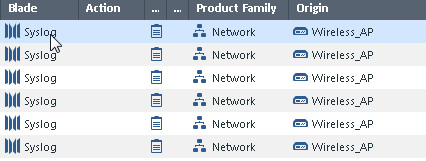
This is screenshot from the log entries that come into my R80.10 Manager and SmartEvent server - my wireless AP is forwarding syslog messages to them. I have tried filtering on origin, product family and last resort was blade but it cannot be selected in the reporting.

--Juan
Gotcha. Looks like an oversight to me. Would be a good RFE
Does seem like an oversight.
Tomer Sole can you help confirm?
I asked for the better experts to answer on this one.
Filtering on blade is supported, maybe the syslog blade is not listed in the picker.
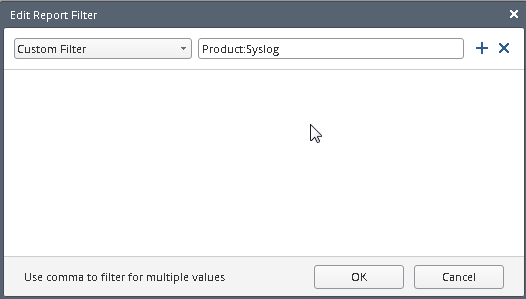
In that case, you can use a custom filter:
Product:Syslog
Tried that and didn't work, set the filter and didn't get any results.

Try "product:Syslog"
Given that it's not showing up as a filtering option in the report do I need to create a custom event for it also? Again I tried to go in and do this but it does not show up as a product available to filter on for an event.
The problem as I see it is that Syslog does not show up as an "Eventia Product" so i'm not so sure how to filter on these events to get them pulled into the database.
--Juan
Wondering if anyone has an answer for this as I haven't been able to get it to work??
Leaderboard
Epsum factorial non deposit quid pro quo hic escorol.
| User | Count |
|---|---|
| 32 | |
| 20 | |
| 9 | |
| 7 | |
| 6 | |
| 6 | |
| 5 | |
| 4 | |
| 4 | |
| 3 |
Wed 10 Jun 2026 @ 01:00 PM (EDT)
Deep Dive: When the Agents Attack: A Live Look at Agentic Exposure ValidationThu 11 Jun 2026 @ 11:00 AM (EDT)
Tips and Tricks 2026 #8: Say Yes to AI Without Saying Yes to RiskFri 12 Jun 2026 @ 10:00 AM (CEST)
CheckMates Live Netherlands - Sessie 47: Continuous Threat Exposure ManagementTue 16 Jun 2026 @ 05:00 PM (CEST)
Under the Hood: Check Point SASE | Internet Access Optimization & Performance TuningWed 10 Jun 2026 @ 01:00 PM (EDT)
Deep Dive: When the Agents Attack: A Live Look at Agentic Exposure ValidationThu 11 Jun 2026 @ 11:00 AM (EDT)
Tips and Tricks 2026 #8: Say Yes to AI Without Saying Yes to RiskFri 12 Jun 2026 @ 10:00 AM (CEST)
CheckMates Live Netherlands - Sessie 47: Continuous Threat Exposure ManagementTue 16 Jun 2026 @ 05:00 PM (CEST)
Under the Hood: Check Point SASE | Internet Access Optimization & Performance TuningThu 18 Jun 2026 @ 10:00 AM (CEST)
The Cloud Architects Series: Check Point WAF - The Next Generation of AI powered protectionAbout CheckMates
Learn Check Point
Advanced Learning
YOU DESERVE THE BEST SECURITY