- Products
- Learn
- Local User Groups
- Partners
- More

Call For Papers
Your Expertise, Our Stage
Ink Dragon: A Major Nation-State Campaign
March 11th @ 5pm CET / 12pm EDT
AI Security Masters E5:
Powering Prevention: The AI Driving Check Point’s ThreatCloud
The Great Exposure Reset
AI Security Masters E4:
Introducing Cyata, Securing the Agentic AI Era
CheckMates Go:
CheckMates Fest
Anyone else get this display issue where the results won't actually show? I think I've had this issue since R80.00 EA and across multiple computers / installs. It happens randomly and on both Logs and History. Only way to fix is to close out of SmartConsole and re-open.
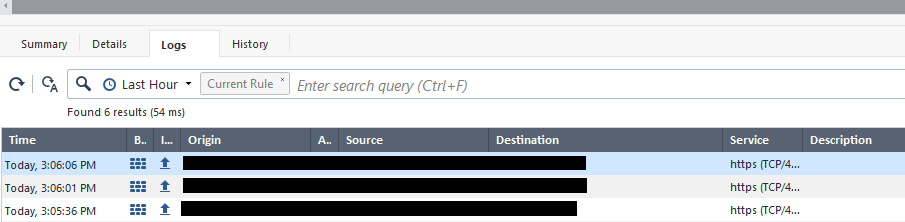
For the record, this is what it should look like:
From my own testing, it could have something to do with with the fact that I habitually minimize the other side-panes in the Log & Monitors view like Objects, Validations on the right side and URLs and Files on the bottom. So I open SmartConsole, open a Logs tab, immediately minimize all the auxiliary panels, view some logs, then at some later point click on a firewall rule and try to view the rule logs, then this happens. But if I open SmartConsole, go to a rule and view its logs first, then it doesn't seem to matter if I later view logs under Logs & Monitor and come back to view a rule log, it still works.
???
Hey @Georgios
Yes, thats great news! Were you provided custom build of smart console for R81.20 or R82?
Best,
Andy
For what its worth, I checked again this morning in my R82 lab and now I see everything pop up, though I never restarted the server or made any changes...very odd.
Its regular smart console.
Andy
Faced it also couple of times on different SC versions/builds. I didnt bother to open TAC case, instead I just copy rule UID(s) and paste them into SmartView search bar. That method is 100% reliable and already used to it.
I find that method very reliable as well.
Andy
Just tested that in R82 lab, very well 👍
Andy
There is only one issue - logs for specific NAT rule are not searchable using NAT rule UID
Always learn something super interesting from you. Thats 100% true, just tested in R82 lab and nothing shows up, though rule itself shows 21K hits.
Andy
Last R82 SmartConsole build, 82.0.9800.1051 did not fix it.
Just checked my lab, same smart console build, works fine, for every rule.
Andy
Yeah it's hit or miss. Mostly miss for me.
For me, so far, its 90% hit and 10% miss. Lets give it another 2 weeks and see...
Andy
I'm on SmartConsole 82.0.9800.1055 and I haven't seen the issue crop up so I think they got it fixed. 🤞
Looks like these are it: PRJ-57649, PRHF-34460.
Hi,
Im on smartconsole R82 Build 1056, but still does not dsiplay the log, even if i go to Logs & Events it does not show up. Instead I have to click log file to see the logs. Did I miss something?
I deploy standalone R82 on virtual machine for lab environment.
@rroihans please open a separate discussion.
In Standalone machine Log Indexing is not enabled by default.
Edit the Standalone object and go to Logs topic to enable Log Indexing
Leaderboard
Epsum factorial non deposit quid pro quo hic escorol.
| User | Count |
|---|---|
| 38 | |
| 16 | |
| 15 | |
| 15 | |
| 12 | |
| 9 | |
| 7 | |
| 7 | |
| 6 | |
| 6 |
Fri 06 Mar 2026 @ 08:00 AM (COT)
Check Point R82 Hands‑On Bootcamp – Comunidad DOJO PanamáThu 12 Mar 2026 @ 05:00 PM (CET)
AI Security Masters Session 5: Powering Prevention: The AI Driving Check Point’s ThreatCloudThu 12 Mar 2026 @ 05:00 PM (CET)
AI Security Masters Session 5: Powering Prevention: The AI Driving Check Point’s ThreatCloudTue 17 Mar 2026 @ 10:00 AM (CET)
Industrial Cybersecurity in Practice: Manufacturing & Utilities - EMEATue 17 Mar 2026 @ 03:00 PM (CET)
From SASE to Hybrid Mesh: Securing Enterprise AI at Scale - EMEAFri 06 Mar 2026 @ 08:00 AM (COT)
Check Point R82 Hands‑On Bootcamp – Comunidad DOJO PanamáTue 24 Mar 2026 @ 06:00 PM (COT)
San Pedro Sula: Spark Firewall y AI-Powered Security ManagementAbout CheckMates
Learn Check Point
Advanced Learning
YOU DESERVE THE BEST SECURITY