Hi Checkmates
For SAML Integration with Azure AD there is a lot of conflicting information on Checkpoint. I struggled to get the authorization part working (access role using Azure AD groups) . From discussion with Checkpoint (Huge thanks to Motty@CP) a lot of it is legacy config that pre-dates the introduction of Ms Entra ID objects ( R81.x I think) I thought I would share a complete SAML config where Entra ID is used for both authentication and authorization.
This is partially covered by sk179788 but since it mentioned using LDAP I overlooked it since I wasn't using LDAP
Conceptually, you only want the gateway to ask Entra ID whether this user is allowed to sign in or not. There is no need to verify group membership, this is Entra ID’s responsibility. Don’t add complexity by asking CheckPoint to perform the same checks…
In this configuration, there is no need to create any manual groups EXT_ID_ or Identity tags. Those were required when there was no dedicated Entra ID object. Not anymore
For the purpose of this test, my Azure/EntraID test user “jpot@...” is a member of 4 x EntraID security groups :
- ENTRA-RAVPN-USERS : A group used for controlling who can sign in to the remote access VPN service
- EntraID_SunnyMonday & EntraID_RainyTuesday: groups used by access roles within the policy
- EntraID_CloudyWednesday: A group not used anywhere in checkpoint

Use case 1 : Allow any authenticated users
Keep the configuration simple: In this setup, a single Azure App Registration and Enterprise app are configured to perform both authentication and authorization. No need to create two separate apps. I found the doc wasn’t particularly clear on this.
In my setup my App Registration and Entreprise Application are called: CHKP-SAML-RAVPN

User and Group:
The entreprise application is assigned a single Entra ID group named ENTRA-RAVPN-USERS which represents the users allowed to use the Remote Access VPN service. This is the authorization part of the VPN connectivity, done by EntraID
Single Sign On (SSO) -> Attribute and Claims:
- Here, no groups are being sent as part of SAML assertion. We simply don’t have a need for it.
- Unique User identifier. Should be set to “user.localuserprincipalname”. It may work as well with “user.userprincipalname” but it is down to your environment especially if you have an hybrid AD setup. user.localuserprincipalname always sends the UPN which is what the gateway use when querying the data center service (Ms EntraID object)

Ms Entra ID object, secret & API permissions:


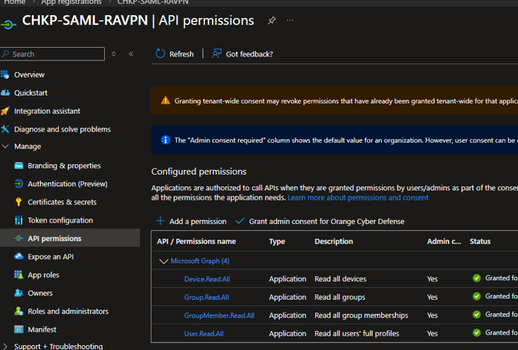
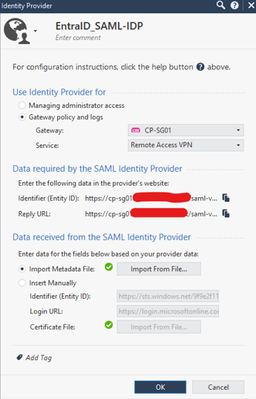

Offer Office Mode IP
Set Allow Office mode to all users.

Set Remote Access VPN participating user groups to all users

In SmartDashboard, create your generic user profile

For the login option (authentication realm), create a new login option, in this example “Azure_EntraID” and select your Azure identity Provider

Under User Directory, Select Manual configuration-> LDAP Users, external user profiles and set the LDAP Lookup type to be of UPN (remember the UPN is what the saml assertion is sending for the Unique User identifier) . This is really important. It can easily be overlooked especially if you don’t use LDAP. From what I was told, under the hood, the LDAP code was re-written to include querying Azure AD using Ms Graph.

Another thing to check is that the user directory lookup is set to all otherwise it will ignore the data center and only query the LDAP UD defined

Now SSH onto the gateway
- Back up the current configuration file:
cp -v $CPDIR/conf/DataCenterServicesRealms.conf{,_BKP}
- Edit the current configuration file:
vi $CPDIR/conf/DataCenterServicesRealms.conf
Add this line at the bottom:
vpn_<NAME OF SAML REALM>
Use the name of the Login option, not the display name. In my example vpn_ Azure_EntraID
This is a list of authentication realms for which the gateway is told to query the data centre service (your Azure Entra ID object) This is for the authorization part for retrieving group membership
Verification:
You can tell the integration is working by noticing the “aad_group_” groups automatically mapped to the user account.
Upon signing in, the user is automatically assigned groups and roles which have an active use in the security policy. Here, notice that EntraID_CloudyWednesday is not showing. The gateway didn’t ask for it since it has no use for it. Same for ENTRA-RAVPN-USERS. Since we told the gateway to accept any user, on the checkpoint side, there is no knowledge this test user belongs to the RAVPN group.

Use case 2 : Restrict access to some user groups
Now if you really want to control the authentication part with a group ( I don’t have a very strong use case; maybe you don’t want to offer office mode to everyone or some SAML users can only use mobile access while others use ravpn), you can configure Azure to send the group assigned to the entreprise application as part of the SAML assertion.
In Azure AD, Modify the Attributes and Claims as follows:
By default, Azure sends the group’s object ID. Whatever it sends you need to have a matching EXT_ID_<whatever> local group.
Add group claim -> Group Assigned to the application -> Cloud Only group display names. Tick Customize the name and type group_attr

In my setup this was the way to go, I don’t have an hybrid environment. Other combinations may work. If unsure, use a saml-tracer browser extension to check what Azure is sending and make sure CheckPoint expects it.

So for my ENTRA-RAVPN-USERS group, I created an empty EXT_ID_ ENTRA-RAVPN-USERS group which I then assigned to office mode and remote access community
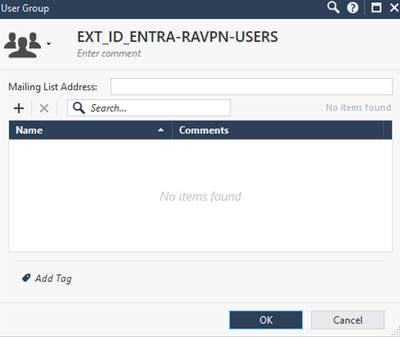
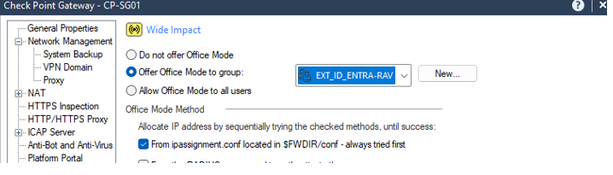


And there it is, I’m now receiving the group names assigned to the entreprise apps as part of my SAML assertion.
Hope this will help someone.








