- Products
- Learn
- Local User Groups
- Partners
- More

AI Security Masters E7:
How CPR Broke ChatGPT's Isolation and What It Means for You
Blueprint Architecture for Securing
The AI Factory & AI Data Center
Call For Papers
Your Expertise. Our Stage
Good, Better, Best:
Prioritizing Defenses Against Credential Abuse
Ink Dragon: A Major Nation-State Campaign
Watch HereCheckMates Go:
CheckMates Fest
I have a question.
My customer is currently using a virtual GW as VPN GW, the VPN users have to authenticate themselves with a certificate.
The customer wants to replace his GW with a new one (new release), is it possible to migrate the certificate from the old GW to the the new one?
Thank you
In general, there is no way to export the private key of a gateway and import it to another.
If they use the same Certificate Authority (ie are managed by the same management), then this shouldn’t create an issue since it’s ultimately the CA that validates a certificate is valid.
Other than possibly a fingerprint message when the user connects to the new gateway for the first time, there shouldn’t be any issues authenticating.
More details about your current and proposed configuration (current version, target version, how is the gateway managed from what versions, etc) would help clarify our answers.
Why not update the existing GW to the new release ? This would keep everything...
Because he want to restart from scratch with a new one
Not possible without TAC afaik.
In general, there is no way to export the private key of a gateway and import it to another.
If they use the same Certificate Authority (ie are managed by the same management), then this shouldn’t create an issue since it’s ultimately the CA that validates a certificate is valid.
Other than possibly a fingerprint message when the user connects to the new gateway for the first time, there shouldn’t be any issues authenticating.
More details about your current and proposed configuration (current version, target version, how is the gateway managed from what versions, etc) would help clarify our answers.
Hi Phone Boy,
We have 2 GWs, a 3800 (R80.40) and an 1800 (R80.20.50).
According to your comment, can I use the same certificate to connect to different GW's VPN if they use the same MGMT (Same CA)?
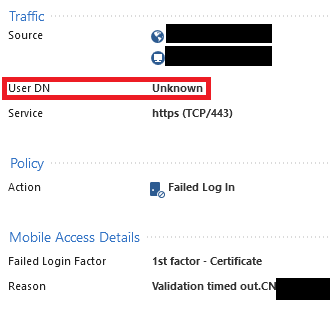
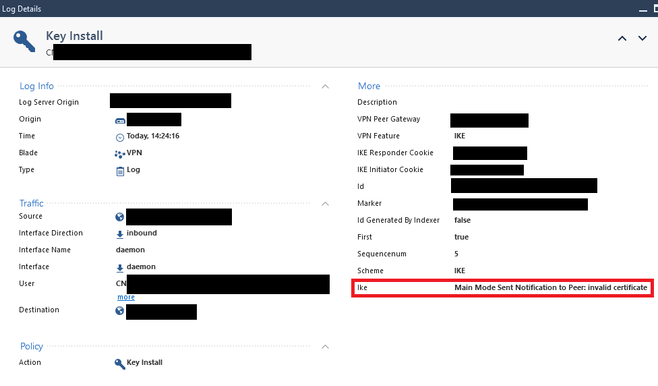
I have tried, but in the logs (after vpn debug ikeon), I see the below in the smart logs:
It's strange, it can see the correct DN, but shows "user DN unknown" and for the key install it shows "invalid certificate".
Any ideas please?
I also tried to create a new client certificate and enroll that one to the other GW, but still fails. (i.e. one client certificate per gw per user)
Suggest involving the TAC to troubleshoot this: https://help.checkpoint.com
Please also note that R80.20.x will be EOL in Oct-23, please refer:
https://www.checkpoint.com/support-services/support-life-cycle-policy/#embedded-security
Hey @GSallin
Not sure if it is possible, but below discussion might be helpful:
Andy
Leaderboard
Epsum factorial non deposit quid pro quo hic escorol.
| User | Count |
|---|---|
| 63 | |
| 19 | |
| 13 | |
| 12 | |
| 12 | |
| 9 | |
| 8 | |
| 7 | |
| 7 | |
| 7 |
Tue 28 Apr 2026 @ 06:00 PM (IDT)
Under the Hood: Securing your GenAI-enabled Web Applications with Check Point WAFTue 28 Apr 2026 @ 06:00 PM (IDT)
Under the Hood: Securing your GenAI-enabled Web Applications with Check Point WAFTue 12 May 2026 @ 10:00 AM (CEST)
The Cloud Architects Series: Check Point Cloud Firewall delivered as a serviceThu 30 Apr 2026 @ 03:00 PM (PDT)
Hillsboro, OR: Securing The AI Transformation and Exposure ManagementAbout CheckMates
Learn Check Point
Advanced Learning
YOU DESERVE THE BEST SECURITY