- Products
- Learn
- Local User Groups
- Partners
- More

Stop Babysitting Rules.
Go Agentic
Step Into the Future of
AI-Powered Cyber Security
Bridge the CAASM Gap
with Exposure Management
AI Security Masters E8:
Claude Mythos: New Era in Cyber Security
Call For Papers
Your Expertise. Our Stage
CheckMates Go:
CheckMates Fest
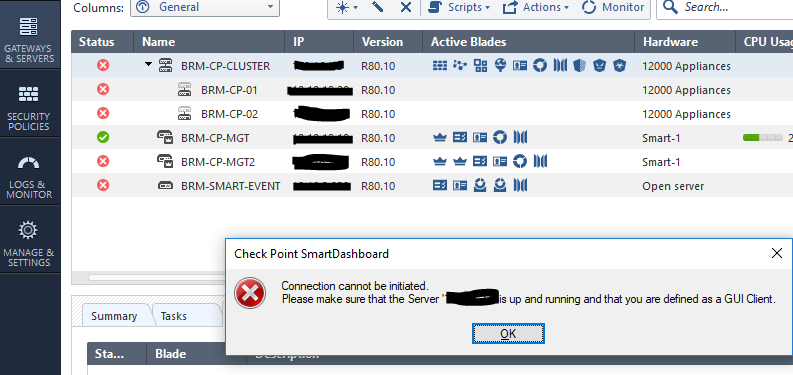
All over sudden my management server does not let me do anything, I cannot open the cluster properties,I cannot rest sic from management,I can open the policies but I cannot change anything.
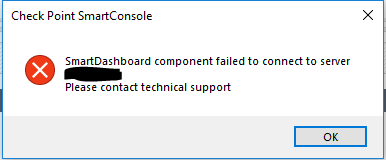
I get below errors.I have tried on various machines with smart console and i get the same result,I believe its the management server but I cant fully put a finger to what exactly on the management server is causing this.
Anyone ever faced the same issue?
This reminds me about the same problem I once had and could not open gateway properties and had red x sign on all gateways. Check this thread and my solution at the end of this thread: https://community.checkpoint.com/thread/8590-sms-lost-connection-to-all
I haven't experienced this yet. Did you already try rebooting the SmartCenter Server?
Yes I have
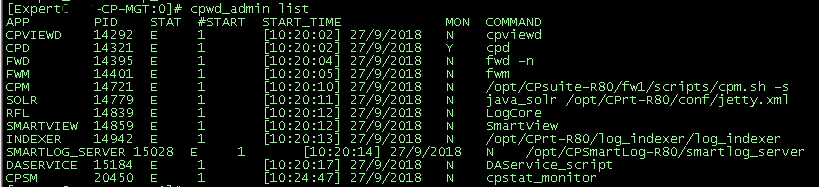
Hi, usually this is due to FWM being down. Please check the state of the server processes, and if one of them is down, do a cprestart (SmartCenter) or mdsstop;mdsstart (Multi-Domain)
I did this and shows all processes are running:
Thanks.
Please proceed with a support ticket.
This reminds me about the same problem I once had and could not open gateway properties and had red x sign on all gateways. Check this thread and my solution at the end of this thread: https://community.checkpoint.com/thread/8590-sms-lost-connection-to-all
I will test this,I seem to have all the symptoms since even my sic status says "Established" and I have not had any certificates revoked.
Just to clarify,did you have the certificates revoked error? I didn't have that error but I seem to have all the symptoms
I did not get the error about certificate but one of my colleague got that error when he tried to connect with SmartConsole, which led me to that SK and that fixed my problem.
I followed this and resolved the issue
Is there any FW between clients and the management server?
Maybe a MTU issue? Can you connect a laptop in the same network that the Smartcenter is in and see if you can work from there?
No firewall is between this,I was perfect on Friday last week only to have the issue noticed on Monday,No changes no nothing has been done during that period(weekend)
Leaderboard
Epsum factorial non deposit quid pro quo hic escorol.
| User | Count |
|---|---|
| 34 | |
| 19 | |
| 10 | |
| 9 | |
| 9 | |
| 7 | |
| 7 | |
| 5 | |
| 4 | |
| 4 |
Tue 02 Jun 2026 @ 10:00 AM (AEST)
The Cloud Architect Series: Check Point WAF. The next generation of AI-Powered Protection - APACTue 02 Jun 2026 @ 06:00 PM (IDT)
Under the Hood | Check Point SASE: Identity Integration & Access Policy Design Best PracticesThu 04 Jun 2026 @ 02:00 PM (CEST)
Deep Dive Webinar: New CloudGuard GWLB Deployment Without NAT Gateways - EuropeTue 02 Jun 2026 @ 10:00 AM (AEST)
The Cloud Architect Series: Check Point WAF. The next generation of AI-Powered Protection - APACTue 02 Jun 2026 @ 06:00 PM (IDT)
Under the Hood | Check Point SASE: Identity Integration & Access Policy Design Best PracticesThu 04 Jun 2026 @ 02:00 PM (CEST)
Deep Dive Webinar: New CloudGuard GWLB Deployment Without NAT Gateways - EuropeThu 04 Jun 2026 @ 07:00 PM (IDT)
Deep Dive Webinar: New CloudGuard GWLB Deployment Without NAT Gateways - AmericaThu 04 Jun 2026 @ 10:00 AM (PDT)
AI Security Masters E9: READY OR NOT: Securing the AI Enterprise 1/5 - AI Agent SecurityAbout CheckMates
Learn Check Point
Advanced Learning
YOU DESERVE THE BEST SECURITY