- Products
- Learn
- Local User Groups
- Partners
- More

AI Security Masters E7:
How CPR Broke ChatGPT's Isolation and What It Means for You
Call For Papers
Your Expertise. Our Stage
Good, Better, Best:
Prioritizing Defenses Against Credential Abuse
Ink Dragon: A Major Nation-State Campaign
Watch HereCheckMates Go:
CheckMates Fest
Hello,
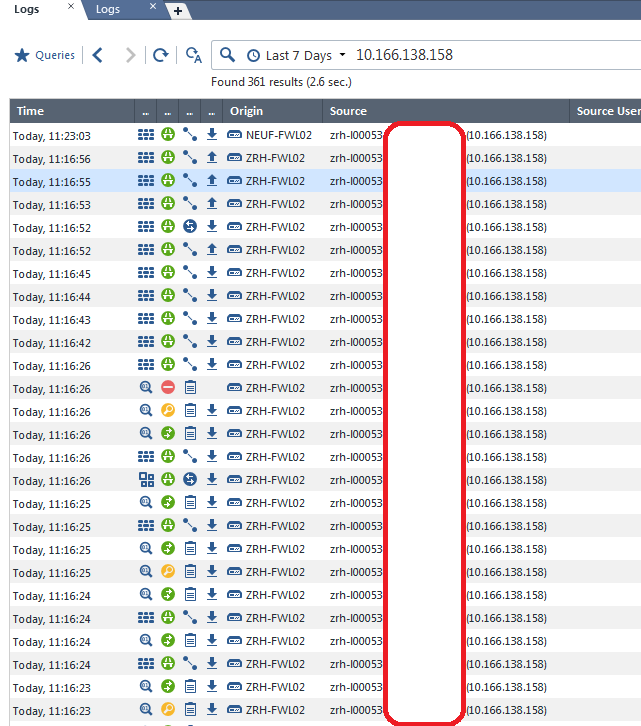
I have been looking for information about how the reverse DNS lookup works for the "logs" in R80.10. The issue we have is that the FQDN being displayed in the Logs is incorrect. In the log view ZRH-L00053" is displayed for the IP 10.166.138.158
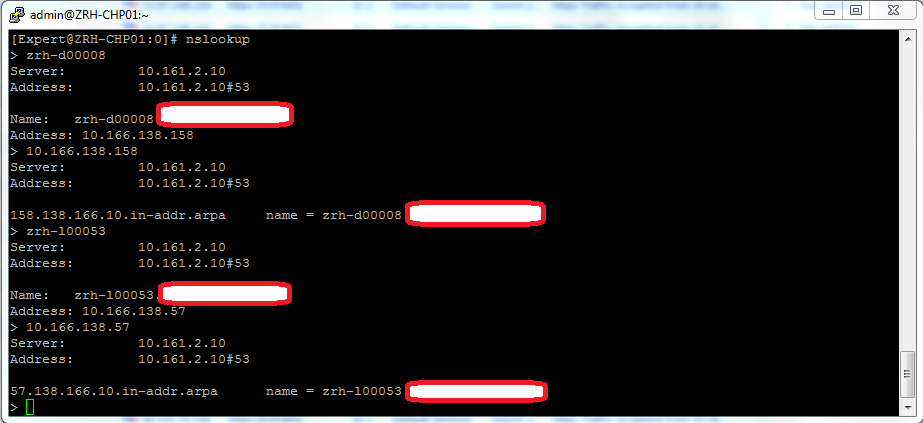
When we check the DNS on the management server the host ZRH-D00008 is the actual owner of this IP Address in both directions and ZRH-L00053 maps to another IP
If anyone has any information about how this reverse DNS lookup is working it would be great
Many thanks,
Michael
Curious, what does the DNS on the gateway that accepted/blocked the traffic say about this IP?
As far as I know, this is resolved on the management station.
You might also look at the local hosts file on the management station to see if it say something different as I believe that will take precedence.
HI,
Your assumptions match up with mine. In the end as a work around I restarted the management server as a way to force the server to re-query the DNS for the information. I bit extreme, I found not other information about how to reset the DNS cache on the device.
Well.....we opened a TAC case on this one. We got a runaround at first about how PTR works overall but quickly got TAC to focus on the real issue: The management/log server.
TAC had us go through DNS cache clears on the smartconsole machine but no changes.
Last night, we rebooted both of our management and log servers per TAC's request (and only after referencing this thread).
Today.......all is resolving correctly 🙂
So.....now we are pushing TAC on 'why' this occurred and 'how' this can be prevented going forward.
Hello Scott,
have you had any update from TAC? I'm wandering if there is a solution to the problem because I'm experiencing the same trouble on R80.30 environment. I also found that using smartconsole I get wrong resolution, using old Smartview tracker hidden in the console folder ip are correctly resolved.
Maybe it just use a different cache...
Thank you for sharing
Enrico
Hi,
top this thread. Were the TAC helpful with describing the issue and privide resolution, reboot of machines its not a solution. And cannot find the way how to clear dns cache (hard to say if would help). Found similar issue on R81 mgmt
Thanks
Same on R81.10.
I'll link you to a possible resolution shortly, just need to revisit my archives on the issue.
Perhaps this thread may help you:
Hello,
same problem here, i'm on R81.
Anyone solved?
thank you
Leaderboard
Epsum factorial non deposit quid pro quo hic escorol.
| User | Count |
|---|---|
| 65 | |
| 25 | |
| 13 | |
| 12 | |
| 12 | |
| 9 | |
| 8 | |
| 8 | |
| 7 | |
| 7 |
Tue 21 Apr 2026 @ 05:00 PM (IDT)
AI Security Masters E7: How CPR Broke ChatGPT's Isolation and What It Means for YouTue 28 Apr 2026 @ 06:00 PM (IDT)
Under the Hood: Securing your GenAI-enabled Web Applications with Check Point WAFTue 21 Apr 2026 @ 05:00 PM (IDT)
AI Security Masters E7: How CPR Broke ChatGPT's Isolation and What It Means for YouTue 28 Apr 2026 @ 06:00 PM (IDT)
Under the Hood: Securing your GenAI-enabled Web Applications with Check Point WAFTue 12 May 2026 @ 10:00 AM (CEST)
The Cloud Architects Series: Check Point Cloud Firewall delivered as a serviceThu 30 Apr 2026 @ 03:00 PM (PDT)
Hillsboro, OR: Securing The AI Transformation and Exposure ManagementAbout CheckMates
Learn Check Point
Advanced Learning
YOU DESERVE THE BEST SECURITY