- Products
- Learn
- Local User Groups
- Partners
- More

Step Into the Future of
AI-Powered Cyber Security
The State of Ransomware Q1 2026
Key Trends and Their Impact
AI Security Masters E8:
Claude Mythos: New Era in Cyber Security
Blueprint Architecture for Securing
The AI Factory & AI Data Center
Call For Papers
Your Expertise. Our Stage
CheckMates Go:
CheckMates Fest
Hi Guys,
Yesterday, we installed a new log server. This is R80.10 fresh install.
this log server is not the management server.
It seems that everything is ok.
[Expert@fwreport:0]# cpwd_admin list
APP PID STAT #START START_TIME MON COMMAND
CPVIEWD 9008 E 1 [13:25:17] 5/10/2017 N cpviewd
CPD 9022 E 1 [13:25:17] 5/10/2017 Y cpd
FWD 9116 E 1 [13:25:18] 5/10/2017 N fwd -n
FWM 9121 E 1 [13:25:18] 5/10/2017 N fwm
CPM 9358 E 1 [13:25:19] 5/10/2017 N /opt/CPsuite-R80/fw1/scripts/cpm.sh -s
SOLR 7804 E 1 [16:43:48] 5/10/2017 N java_solr /opt/CPrt-R80/conf/jetty.xml
RFL 7817 E 1 [16:43:48] 5/10/2017 N LogCore
SMARTVIEW 7848 E 1 [16:43:48] 5/10/2017 N SmartView
INDEXER 7956 E 1 [16:43:48] 5/10/2017 N /opt/CPrt-R80/log_indexer/log_indexer
SMARTLOG_SERVER 7975 E 1 [16:43:48] 5/10/2017 N /opt/CPSmartLog-R80/smartlog_server
CPSEMD 8080 E 1 [16:43:49] 5/10/2017 Y cpsemd
CPSEAD 8083 E 1 [16:43:49] 5/10/2017 N cpsead
DASERVICE 9822 E 1 [13:25:20] 5/10/2017 N DAService_script
When we try to check logs, there is an error and logs are not shown int the smartconsole.

I followed differents sk119335
Can you help me to fix this ?
Thanks for you help,
Can you verify after the steps were performed that the checkbox to enabled log indexing is still enabled?
Also, what hardware is your log server installed on (CPU cores, RAM, etc)?
If you have insufficient RAM in particular, the log indexing processes won't start.
Hello,
I have the same problem with a SmartEvent that is hooked to my SMS.
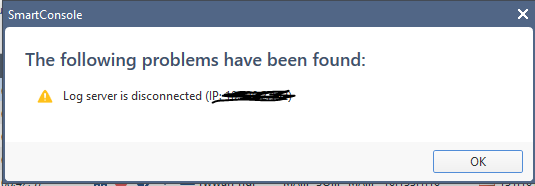
Recurrently I get the alert message that says:
"The following problems have been found:
Log server is disconnected: (IP:192.168.1.30)"
There is connectivity between the SMS and the SmartEvent.
I have restarted the processes in the SmartEvent and in the SMS, but I keep getting the same alert again and again.
The only way I can get the alert to disappear is when I uncheck all the options in the SmartEvent object (Logging&Status, SmartEvent....).
Any idea how to correct this kind of alerts?
Thank you.
This happened as a result of something? Upgrade or other?
Have you tried to install DB on the server?
This alert has been in place for some time.
The client practically "ignored" the alert.
When I give "Install DB" to both my SMS and my SmartEvent, it installs without problems.
This alert is rare.
Deleting the SmartEvent object from the SmartConsole, and recreating it, could be a solution?
It could be but I don't recommend it at this point.
First recommendation is to install latest JHF. This might be solved already or could be solved by reset to some processes without related content in JHF.
If you don't want to install JHF or already have latest one installed, there is a command you can use that might solve the issue - evstop ; evstart.
It is similar to cpstop ; cpstart but only resets services related to logging. Much faster than cpstop ; cpstart, and SmartConsole can remain open.
You can try it first on SmartEvent server and if this doesn't solve the issue you can do it on the management server as well.
Hi,
Thanks.
This is en open server based with 8 CPU and 8 Gb RAM and 500GoHDD. The log server is installed on vmware.
Everything seems ok (SIC, Processes, enable log indexing...), the log indexing processes starts on the log server. The SG send logs to the logs server.
The issue is when we try to see logs from the remote logs server from the smartconsole.
Thank you,
8GB of RAM is a bare minimum, I suspect more would help, even just as a log server.
The Check Point TAC may be able to do additional troubleshooting: Contact Support | Check Point Software
I apologise upfront if I'm asking to check silly and obvious.. ![]()
Hi,
Thank you all of you.
As suggested by Dameon, i opened a SR to checkpoint support.
I had a similar problem with a log server in Azure. In our case, it was because we needed to allow TCP port 8211. I found that in sk119497 at the bottom of the article for the implied rule accept_remote_smartlog.
Leaderboard
Epsum factorial non deposit quid pro quo hic escorol.
| User | Count |
|---|---|
| 24 | |
| 19 | |
| 10 | |
| 9 | |
| 8 | |
| 7 | |
| 6 | |
| 4 | |
| 4 | |
| 4 |
Wed 20 May 2026 @ 11:00 AM (CEST)
The New DDoS Reality: Autonomy, Scale, and the Future of DefenceFri 29 May 2026 @ 09:00 AM (EDT)
Caracas: Executive Breakfast: Innovación en Ciberseguridad – IA y Threat IntelligenceTue 02 Jun 2026 @ 06:00 PM (IDT)
Under the Hood | Check Point SASE: Identity Integration & Access Policy Design Best PracticesWed 20 May 2026 @ 11:00 AM (CEST)
The New DDoS Reality: Autonomy, Scale, and the Future of DefenceTue 02 Jun 2026 @ 06:00 PM (IDT)
Under the Hood | Check Point SASE: Identity Integration & Access Policy Design Best PracticesThu 04 Jun 2026 @ 02:00 PM (CEST)
Deep Dive Webinar: New CloudGuard GWLB Deployment Without NAT Gateways - EuropeThu 04 Jun 2026 @ 07:00 PM (IDT)
Deep Dive Webinar: New CloudGuard GWLB Deployment Without NAT Gateways - AmericaFri 12 Jun 2026 @ 10:00 AM (CEST)
CheckMates Live Netherlands - Sessie 47: Continuous Threat Exposure ManagementFri 29 May 2026 @ 09:00 AM (EDT)
Caracas: Executive Breakfast: Innovación en Ciberseguridad – IA y Threat IntelligenceAbout CheckMates
Learn Check Point
Advanced Learning
YOU DESERVE THE BEST SECURITY