- Products
- Learn
- Local User Groups
- Partners
- More

On-Premise SD-WAN Management
Register HereWhat's New in R82.10?
Watch Here AI Security Masters E8:
Claude Mythos: New Era in Cyber Security
CheckMates Go:
The Moment Before
Hello Checkmates,
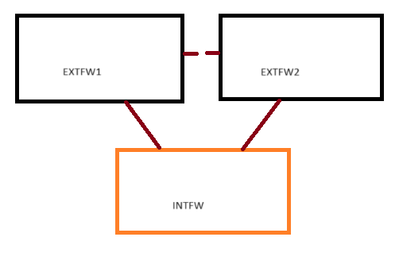
I have a question regarding the behavior of my internal firewall. Please see image below as reference:
Currently, anything below INTFW has internet access, but for some reason, INTFW doesn't. I have confirmed this when I checked my URL and App Control updates, and it shows a failed attempt. Logs show allowed via implied rule as seen in the screenshot below:
Running fwctl zdebug + drop | grep [INTFW IP] on EXTFW1 (current active cluster member) doesn't show any drops, so it confirmed that the allowed log entries are correct. It shouldn't be about the routes as my internal network is working as it should be, it's only INTFW that doesn't have internet.
I would like insight to this as it would allow me to then update my internal firewall to the latest JHF and would probably fix a lot of issues that I'm experience.
Thanks!
What do the logs say, does it show the traffic is being NAT'd at the Ext firewall??
Here's an example of a log egress to 8.8.8.8 from the INTFW
I see no translation entries, but we do have a NAT policy, the group INTERNAL should have the 192.168.4.X IP address configured on the internal firewall.
The source address shown in the log is different to the subnet you mention so it may not be hitting your current NAT rules.
Granted since it's not an RFC1918 it might be a moot point if the address is valid otherwise.
Would I still need NAT if the scenario is:
INTFW [20.20.0.4] <---> EXTFW1 [20.20.0.3]
That IP is the link that is directly connected to the EXTFW1, so I would assume I don't need to NAT it as its directly connected.
If it's a public routeable address that is valid and belongs to your org then no...
Yes, that's why the behavior is unusual. To add, I can ping to my DMZ-residing servers without issue, it's that one hop going to the internet that is not working for some reason. So, for ping tests:
I've sent you a DM to check something related here regarding your choice of IP addresses.
If you run ip r g 8.8.8.8 command, what does it show?
Andy
Most likely the issue is the source IP in this case.
Leaderboard
Epsum factorial non deposit quid pro quo hic escorol.
| User | Count |
|---|---|
| 68 | |
| 23 | |
| 7 | |
| 6 | |
| 4 | |
| 4 | |
| 4 | |
| 3 | |
| 3 | |
| 3 |
Thu 09 Jul 2026 @ 10:00 AM (CEST)
Schutz souveräner Workloads: Check Point & die AWS European Sovereign CloudThu 09 Jul 2026 @ 11:00 AM (CEST)
The Cloud Architects Series: Check Point Edge Protection SD-WAN & SASEThu 09 Jul 2026 @ 11:00 AM (EDT)
Tips and Tricks 2026 #9 - What's New with Check Point Email SecurityFri 10 Jul 2026 @ 11:00 AM (IDT)
CheckMates Live Netherlands - Sessie 48: Nieuwe Check Point Workspace SecurityTue 14 Jul 2026 @ 10:00 AM (PDT)
AI Security Masters E11: READY OR NOT: Securing the AI Enterprise 3/5 - AI Workforce SecurityThu 09 Jul 2026 @ 11:00 AM (EDT)
Tips and Tricks 2026 #9 - What's New with Check Point Email SecurityFri 10 Jul 2026 @ 11:00 AM (IDT)
CheckMates Live Netherlands - Sessie 48: Nieuwe Check Point Workspace SecurityTue 14 Jul 2026 @ 10:00 AM (PDT)
AI Security Masters E11: READY OR NOT: Securing the AI Enterprise 3/5 - AI Workforce SecurityThu 30 Jul 2026 @ 10:00 AM (PDT)
AI Security Masters E12: READY OR NOT: Securing the AI Enterprise 4/5 - AI GatewayThu 20 Aug 2026 @ 10:00 AM (PDT)
AI Security Masters E13: READY OR NOT: Securing the AI Ent 5/5 - AI Research & Threat LandscapeAbout CheckMates
Learn Check Point
Advanced Learning
YOU DESERVE THE BEST SECURITY