- Products
- Learn
- Local User Groups
- Partners
- More

What's New in R82.10?
Watch HereWhen the Agents Attack
A Live Look at Agentic Exposure Validation
AI Security Masters E8:
Claude Mythos: New Era in Cyber Security
CheckMates Go:
CheckMates Fest
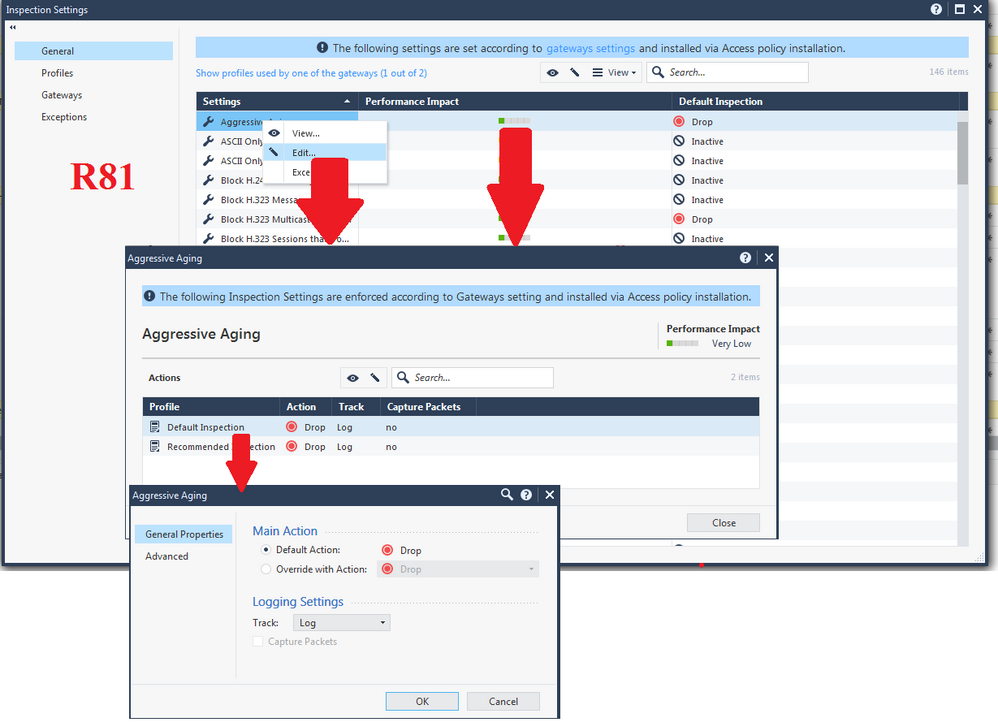
There appears to have been a recent change made in the SmartConsole GUI in how the configuration of an Inspection Settings protection can be overridden and it makes no sense to me. I have verified in the R81 SmartConsole GUI and early versions of the R81.10 SmartConsole GUI an Inspection Setting could be overridden by right clicking on the Settings or Performance Impact field of the protection and selecting Edit, then selecting Edit on the needed profile Default_Inspection to reach the proper screen to implement the override:
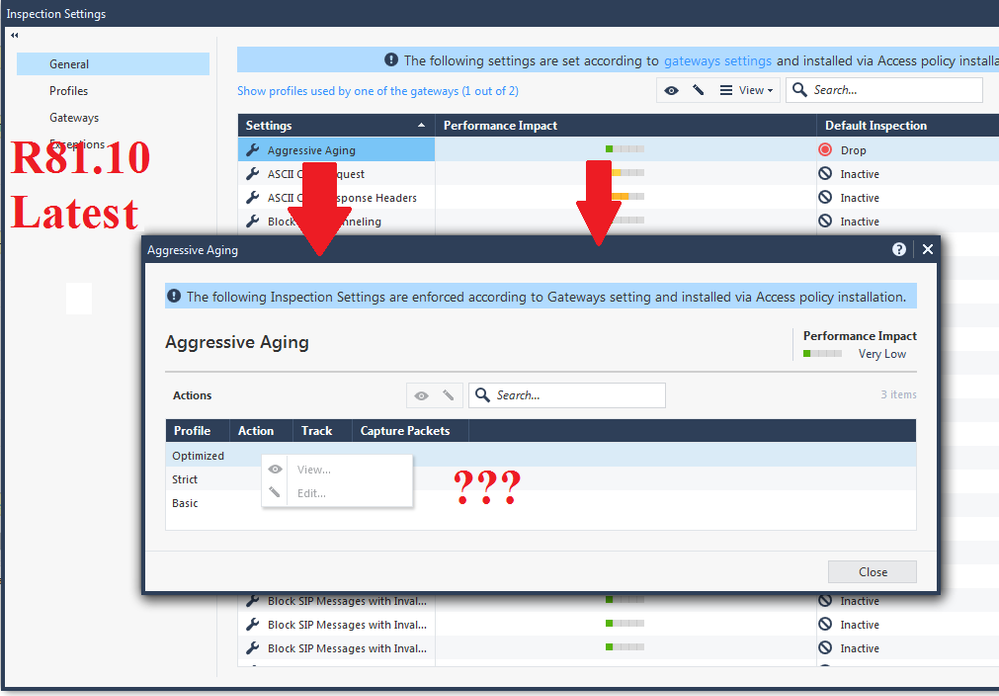
However in the latest versions of the R81.10 and R81.20 SmartConsoles, trying to do the same operation yields a useless popup screen at which you can't do anything, and appears to be making references to either Core Activations or regular Threat Prevention profiles, which have nothing to do with Inspection Settings and is very confusing:
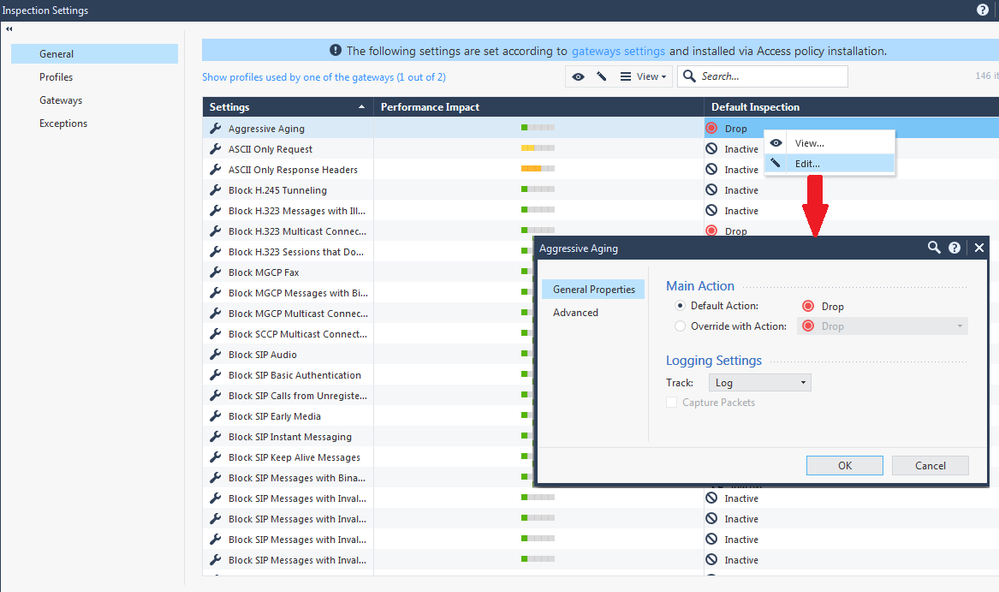
However in the latest SmartConsole releases if you right click on the Default Inspection profile action and click Edit, you can now properly implement the override (in the earlier SmartConsole releases if you tried to right-click here all available menu options would be greyed out):
If the intent was to eliminate an extra popup screen to make things less confusing, I'd say the goal was not accomplished and made things worse. It is hard enough to keep track of the difference between Inspection Settings, Core Activations, and IPS ThreatCloud protections, and this change that was slipped in to a Jumbo HFA for the SmartConsole GUI certainly did not help. @PhoneBoy
Glad you posted this, as I had client ask me exact same thing 2 weeks ago, I told them would look into it and totally forgot about it. I also verified the same in R81.20 console and yes, its exact same thing what you pasted, no difference. Lets see what the answer is.
Andy
From my lab:
Thanks for showing this - I was going mad and thought it was only me.
@Henrik_Noerr1 Definitely NOT just you...I wish they would put back options that were there in base R81, makes so much more sense.
I also see it. I'll ask relevant R&D owner to look into it.
Thanks
Tal
Thanks as always @Tal_Paz-Fridman for your quick feedback 🙌
Andy
Hi @Timothy_Hall , thanks for your input.
We already have a fix, and it is planned to be released on the next jumbo.
Dan
Leaderboard
Epsum factorial non deposit quid pro quo hic escorol.
| User | Count |
|---|---|
| 66 | |
| 19 | |
| 8 | |
| 6 | |
| 6 | |
| 4 | |
| 4 | |
| 4 | |
| 3 | |
| 2 |
Thu 02 Jul 2026 @ 06:00 PM (CST)
Revolucionando la Seguridad con IA Generativa: Prevención Inteligente en Tiempo RealThu 09 Jul 2026 @ 10:00 AM (CEST)
Schutz souveräner Workloads: Check Point & die AWS European Sovereign CloudThu 09 Jul 2026 @ 11:00 AM (CEST)
The Cloud Architects Series: Check Point Edge Protection SD-WAN & SASETue 14 Jul 2026 @ 10:00 AM (PDT)
AI Security Masters E11: READY OR NOT: Securing the AI Enterprise 3/5 - AI Workforce SecurityThu 30 Jul 2026 @ 10:00 AM (PDT)
AI Security Masters E12: READY OR NOT: Securing the AI Enterprise 4/5 - AI GatewayThu 20 Aug 2026 @ 10:00 AM (PDT)
AI Security Masters E13: READY OR NOT: Securing the AI Ent 5/5 - AI Research & Threat LandscapeTue 14 Jul 2026 @ 10:00 AM (PDT)
AI Security Masters E11: READY OR NOT: Securing the AI Enterprise 3/5 - AI Workforce SecurityThu 30 Jul 2026 @ 10:00 AM (PDT)
AI Security Masters E12: READY OR NOT: Securing the AI Enterprise 4/5 - AI GatewayThu 20 Aug 2026 @ 10:00 AM (PDT)
AI Security Masters E13: READY OR NOT: Securing the AI Ent 5/5 - AI Research & Threat LandscapeThu 02 Jul 2026 @ 06:00 PM (CST)
Revolucionando la Seguridad con IA Generativa: Prevención Inteligente en Tiempo RealAbout CheckMates
Learn Check Point
Advanced Learning
YOU DESERVE THE BEST SECURITY