- Products
- Learn
- Local User Groups
- Partners
- More

What's New in R82.10?
Watch HereWhen the Agents Attack
A Live Look at Agentic Exposure Validation
AI Security Masters E8:
Claude Mythos: New Era in Cyber Security
CheckMates Go:
CheckMates Fest
Hello All,
Btw currently im in development for testing ISP redundancy for our internal network using #CP 6900 R80.40 Cluster mode
as, documentation ISP redundancy is working with object using automatic hide nat. im already testing and its working for connection and swing between each ISP like bellow.
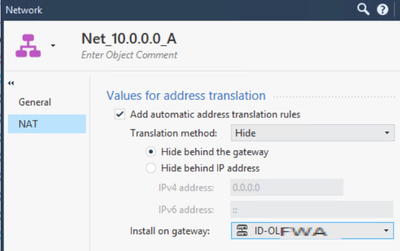
But somehow, we have plan to use Internet ISP on CP for direct internet user, so i try to use this hide nat for all internal net like bellow, but when i test connection on pc, the connection is not working
Is there anyone know, and maybe have some advice, how to set isp redundancy for outgoing connection for some subnet/network ? Thanks in advance
Manual NAT Hide rules will not work with ISP redundancy, this is mentioned in the documentation and also in sk61692. Define your NET_10.0.0.0 as an object (you did) and set up automatic NAT hide behind the GW for it.
Hi thanks @_Val_ thanks for your advice,
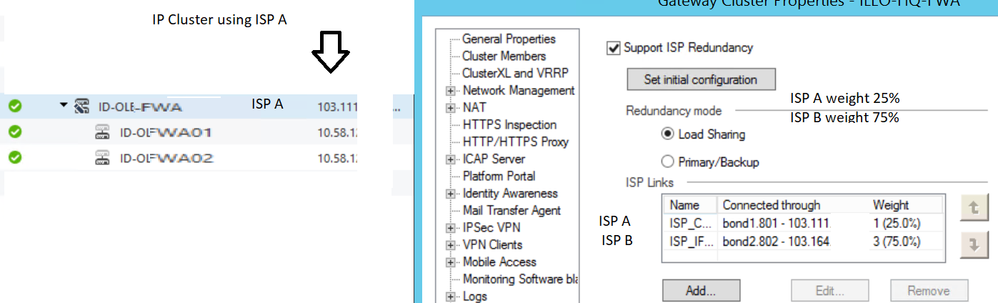
Btw im already set hide nat for the subnet , but, the connection only working with isp defined on IPv4 Cluster IPS, let say, ISP A with ip 103.111 , and im tes isp redundancy wih two isp, ISP A and ISP B # im setting ISP B, is high priority than ISP A, but when i check on user, client still connected to ISP A, and when i shutdown ISP A, the connection is down. Is there any additional configuration ? or should i set ISP A as primary, since i set IPv4 cluster public using ISP A. Thanks
###
###
Uh, you don't like simple life, you are running a Load Sharing config 🙂
Did you remove the manual NAT rule mentioned above? If yes, and if internet connectivity drops after turning of ISP1, check for any routes on the GW for NET_10 object. If you do not have those, open a TAC case, this should work as described above.
haha
Yes im running load load sharing due to we want to focus our internet user direct via ISP B, so we set 75% and 25% on ISP A for remote access users. for manual nat we already deleted too
and btw thanks for your time, we will check and test it again durring next mw
Also, look into sk105239, this is your simptom. Most probably a config issue.
Leaderboard
Epsum factorial non deposit quid pro quo hic escorol.
| User | Count |
|---|---|
| 75 | |
| 13 | |
| 7 | |
| 5 | |
| 5 | |
| 4 | |
| 4 | |
| 4 | |
| 4 | |
| 3 |
Thu 02 Jul 2026 @ 06:00 PM (CST)
Revolucionando la Seguridad con IA Generativa: Prevención Inteligente en Tiempo RealThu 09 Jul 2026 @ 11:00 AM (CEST)
The Cloud Architects Series: Check Point Edge Protection SD-WAN & SASETue 14 Jul 2026 @ 10:00 AM (PDT)
AI Security Masters E11: READY OR NOT: Securing the AI Enterprise 3/5 - AI Workforce SecurityThu 30 Jul 2026 @ 10:00 AM (PDT)
AI Security Masters E12: READY OR NOT: Securing the AI Enterprise 4/5 - AI GatewayThu 20 Aug 2026 @ 10:00 AM (PDT)
AI Security Masters E13: READY OR NOT: Securing the AI Ent 5/5 - AI Research & Threat LandscapeTue 14 Jul 2026 @ 10:00 AM (PDT)
AI Security Masters E11: READY OR NOT: Securing the AI Enterprise 3/5 - AI Workforce SecurityThu 30 Jul 2026 @ 10:00 AM (PDT)
AI Security Masters E12: READY OR NOT: Securing the AI Enterprise 4/5 - AI GatewayThu 20 Aug 2026 @ 10:00 AM (PDT)
AI Security Masters E13: READY OR NOT: Securing the AI Ent 5/5 - AI Research & Threat LandscapeThu 02 Jul 2026 @ 06:00 PM (CST)
Revolucionando la Seguridad con IA Generativa: Prevención Inteligente en Tiempo RealAbout CheckMates
Learn Check Point
Advanced Learning
YOU DESERVE THE BEST SECURITY