- Products
- Learn
- Local User Groups
- Partners
- More
Check Point WAF TechTalk:
Introduction and New Features
AI Security Masters E6: When AI Goes Wrong -
Hallucinations, Jailbreaks, and the Curious Behavior of AI Agents
Ink Dragon: A Major Nation-State Campaign
Watch HereAI Security Masters E5:
Powering Prevention: The AI Driving Check Point’s ThreatCloud
CheckMates Go:
CheckMates Fest
Hi experts,
I am having hard time in upgrading R77.30 to R80.40.
I have faced many errors which prevents many things, and with a lot of effort I finally successfully upgraded it.
However a lot of misgivings surround me, which I would love to make clear with your help!
Errors I have seen:
1. Unable to log in using SmartDashboard
After fresh install, I tried to check the default config of R77.30, only to know it says connection failed to be initiated.
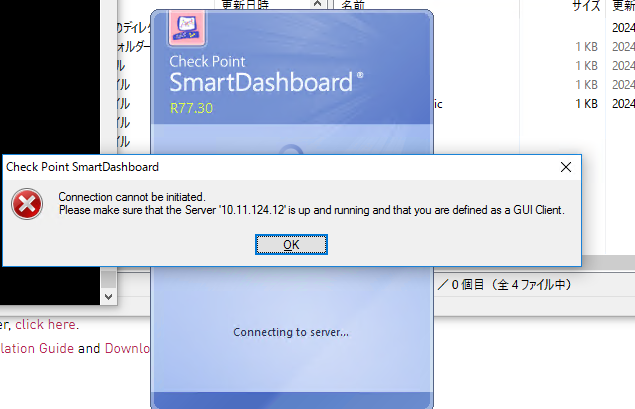
2. cpca_client lscert & initialization of internal CA fails for general error by cpconfig
cpca_client lscert returns below.
---------------------------------------------------------------------------
Operation failed. rc=-1
---------------------------------------------------------------------------
sk98432 does nothing in my case unfortunately.
3. "No response from CDK"
It appears when I try to check the status of DA after executing "rpm -Uhv --force CPda-00-00.i386.rpm".
rpm package itself looks good, but "show installer" commands return below.
Therefore I have no idea what is inside.
----------------------------------------------------------------------------
No response from CDK
WARNING: CliError( ) called without module or error code
----------------------------------------------------------------------------
Cprestart does no trick. Cold reboot does.
The thing is, the options following "XXX installer ~~" commands have got changed after reboot.
Any ideas on this phenomenon would highly be appreciated.
4. Importing R80.40 image from GAiA Portal fails
The progress bar reaches to the end, but nothing happens.
(However it succeeded at its job after a few try.)
5. Upgrading to R80.40 "partially" succeed, but suddenly reboots on the halfway, and revert to R77.30
After importing database, it reboots, and I can clearly confirm console prompt says GAiA R80.40,
and GAiA Portal login screen looks R80-style.
However for some reason open server starts rebooting process, resulting in version reverting.
What I have done in order to resolve errors respectively:
For 1. & 2.,
1. uploading license using cpconfig
2. set dates around Jan, 2018
3. generating internal CA with cpconfig
4. rebooting
For 3.,
Reboot as stated above.
For 4.,
Nothing but keeping trying.
No message appears apart from Importing the package.
The progress bar suddenly disappears and therefore I felt like the process failed.
At the end of the day Importing went right, but I do not know why.
For 5.,
Uploading license seems to make difference.
No failure observed while I let license installation in the procedure.
Even though I only have a few month experience, Never have I faced such errors when I touch R8Xs.
In order to understand what is going on, I am really in need of assistance of experts.
Just for reference, kindly share with me how you upgrade R77.30 machine to R80.40 if you WERE me... 😞
Saitoh
P.S. I have to test this for my customers environment. Otherwise I would rather not...
Dear @Tal_Paz-Fridman ,
Apologies for a late reply. This happens after clean installation of R77.30.
However, I figured this out myself by reading through release notes.
I used an old image which has the issue associated with ICA, that has already been resolved, and described in sk122612 .
Our ESXi server has that buggy image.
The issue stops happening after I start to use a newer one.
Saitoh
Honestly: I would not. StandAlone is a deployment i would not suggest, and R77.30 has been out of any support since September 2019 - so upgrade should have been made 5 years ago 😉 You do know that R80.40 is out of support since April 2024 ?
Hi @G_W_Albrecht ,
Yes same here, I would not do this unless our customer asks me an investigation:(
The target version is R81.20 btw. I do not talk about from R80 to R81 since it is as easy for me as using chopsticks.
Saitoh
1) Regarding SmartDashboard - for managing your database and policy you should use SmartConsole.
SmartDashboard can be launched directly from SmartConsole for older legacy actions.
2) Have you considered "Advanced Upgrade" where you import the database to a clean R80.40 in a lab scenario. This will allow you to fix issue and the upgrade to R81.20
And then to R81.20 you might use regular in place CPUSE
Dear @Tal_Paz-Fridman ,
Thanks for your answer.
1) As far as I read documents, I thought SmartConsole was not released at the time of R77,
and therefore several applications came into play then.
Am I getting it right, or is it possible to manage legacy ones such as R77 using newer SmartConsole?
I did not find the application named SmartConsole in R77.30 SmartConsole directory.
2) I thought I was going to test Advanced Upgrade after trying just upgrading a few times.
Receiving some comments from experts like you, I start to guess best not go upgrading but rather migrate DB...
Saitoh
SmartConsole is only available in R8X but also includes SmartDashboard for legacy work, for example QoS, HTTPS Inspections etc.
I was trying to understand if the failure to login was from R77.30 or after you upgraded to R80.40.
Dear @Tal_Paz-Fridman ,
Apologies for a late reply. This happens after clean installation of R77.30.
However, I figured this out myself by reading through release notes.
I used an old image which has the issue associated with ICA, that has already been resolved, and described in sk122612 .
Our ESXi server has that buggy image.
The issue stops happening after I start to use a newer one.
Saitoh
You might try upgrading R77.30 to the last JHF before attempting any upgrades: https://support.checkpoint.com/results/sk/sk106162
That should solve the issues with the ICA and system dates.
Dear @PhoneBoy ,
Thanks for your advice! I should have tried JHF to see if it does trick before asking question here...
Saitoh
Leaderboard
Epsum factorial non deposit quid pro quo hic escorol.
| User | Count |
|---|---|
| 62 | |
| 38 | |
| 23 | |
| 12 | |
| 12 | |
| 11 | |
| 10 | |
| 9 | |
| 9 | |
| 8 |
Thu 26 Mar 2026 @ 06:00 PM (COT)
Tegucigalpa: Spark Firewall y AI-Powered Security ManagementTue 07 Apr 2026 @ 06:00 PM (IDT)
Under the Hood: Check Point WAF and IO River: Multi-CDN Security in ActionTue 07 Apr 2026 @ 06:00 PM (IDT)
Under the Hood: Check Point WAF and IO River: Multi-CDN Security in ActionWed 08 Apr 2026 @ 10:00 AM (CEST)
The Cloud Architects Series: The Cloud Firewall with near 100% Zero Day prevention - In 7 LanguagesWed 08 Apr 2026 @ 07:00 PM (CST)
ERM al Descubierto: Amenazas Ocultas que Pondrán a Prueba tu Empresa en 2026Fri 10 Apr 2026 @ 10:00 AM (CEST)
CheckMates Live Netherlands - Sessie 45: Harmony SASE updateThu 26 Mar 2026 @ 06:00 PM (COT)
Tegucigalpa: Spark Firewall y AI-Powered Security ManagementTue 14 Apr 2026 @ 03:00 PM (PDT)
Renton, WA: Securing The AI Transformation and Exposure ManagementThu 30 Apr 2026 @ 03:00 PM (PDT)
Hillsboro, OR: Securing The AI Transformation and Exposure ManagementAbout CheckMates
Learn Check Point
Advanced Learning
YOU DESERVE THE BEST SECURITY
