- Products
- Learn
- Local User Groups
- Partners
- More

The State of Ransomware Q1 2026
Key Trends and Their Impact
Good, Better, Best:
Prioritizing Defenses Against Credential Abuse
AI Security Masters E7:
How CPR Broke ChatGPT's Isolation and What It Means for You
Blueprint Architecture for Securing
The AI Factory & AI Data Center
Call For Papers
Your Expertise. Our Stage
CheckMates Go:
CheckMates Fest
Hello,
I recently stood up a standalone R80.40 gateway in a lab environment to perform some testing for policy changes to support Office 365. I'm working through a scenario with a customer who has HTTPS inspection enabled globally, but I'm unable to get inspection working on my lab gateway. I've enabled HTTPS Inspection on the Gateway, have verified the HTTPS Inspection Policy is what I want, and have adjusted the Topology so respective interfaces are configured appropriately.
There's not much to configure here, so I'm beating my head against a wall trying to figure out why this appliance isn't inspecting outbound HTTPS traffic. Any help would be appreciated!
Here are a few screenshots of the configuration and I've followed the guide here when putting this in place.
Hi @DarrenR
A few more tips:
1) Did you import the outbound certificate correctly in the browser?
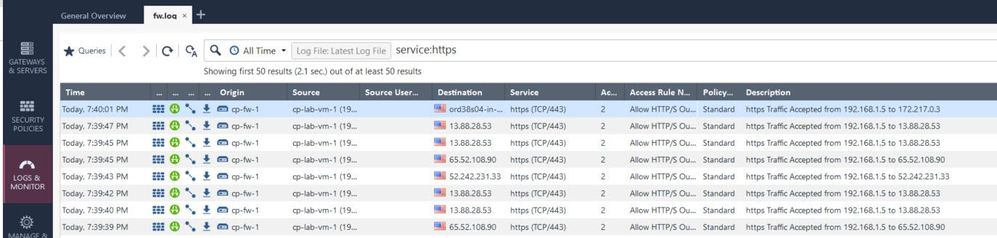
2) Are there log entries for https inspection? If so, please take a picture.
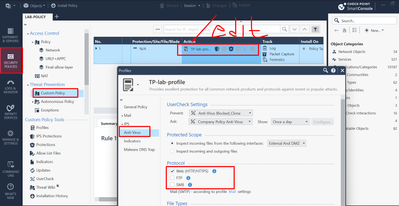
3) Is the https interception enabled in the protocol tab?
4) Set "Internet" instead of "all internet" in the destination:
Boom! I missed the enabling the protocol signature. Thanks!
Are you referring to the protocol setting in the Threat Prevention Profile editor?
Trying to extrapolate from the small screenshot, it looks like the setting that exists for the various Threat Prevention engines.
Indeed, it's possible to specify which protocols will be included in the scanning, but the default value for these profiles is to be "On" for HTTP/HTTPS. Most customers should not encounter this issue or have to touch this setting for HTTPS inspection to work.
Did you deactivate this in the past for your environment?
I'd like to better understand this case to make sure more customers don't encounter it.
Thanks!
Can you tell me where the config is in your step 3 ? Because i couldn't find it. Thank you.
Can somebody tell me, where can I find the protocol tab and setup the protocol signature feature? Is this a must config to work with HTTPS Inspection?
So without this feature the inspection not working? Thanks!
can't find it either. does it still exist in R81?
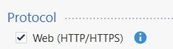
Where do you find that "Protocol" option with the checkbox for "Web (HTTP/HTTPS)"?
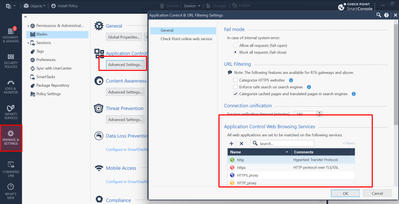
Thank you. This I knew for Threat Prevention. I was wondering if there was another similar configuration available under HTTPS shared policies > inspection settings.
Only one I know is this
Andy
Leaderboard
Epsum factorial non deposit quid pro quo hic escorol.
| User | Count |
|---|---|
| 34 | |
| 10 | |
| 9 | |
| 9 | |
| 9 | |
| 8 | |
| 8 | |
| 6 | |
| 5 | |
| 5 |
Tue 12 May 2026 @ 10:00 AM (CEST)
The Cloud Architects Series: Check Point Cloud Firewall delivered as a serviceWed 13 May 2026 @ 11:00 AM (EDT)
TechTalk: The State of Ransomware Q1 2026: Key Trends and Their ImpactThu 14 May 2026 @ 07:00 PM (EEST)
Under the Hood: Presentando Check Point Cloud Firewall como ServicioTue 12 May 2026 @ 10:00 AM (CEST)
The Cloud Architects Series: Check Point Cloud Firewall delivered as a serviceTue 19 May 2026 @ 06:00 PM (IDT)
AI Security Masters E8 - Claude Mythos: New Era in Cyber SecurityAbout CheckMates
Learn Check Point
Advanced Learning
YOU DESERVE THE BEST SECURITY