- Products
- Learn
- Local User Groups
- Partners
- More

AI Security Masters E7:
How CPR Broke ChatGPT's Isolation and What It Means for You
Call For Papers
Your Expertise. Our Stage
Good, Better, Best:
Prioritizing Defenses Against Credential Abuse
Ink Dragon: A Major Nation-State Campaign
Watch HereCheckMates Go:
CheckMates Fest
Hi, Group Selected Objects has been there since the first release of R80 (March 2016). It is available from a rule cells of security policies. Perhaps you were looking for it in another place?
In case you use the same set of objects in many places and would like to switch to a group instead, see How can I quickly move from many objects in many rules to a reusable group?
You can group multiple items via the "add-group" API command.
- https://sc1.checkpoint.com/documents/latest/APIs/index.html#gui-cli/add-group~v1.1%20
add group name "test-group" members.1 "testhost1" members.2 "testhost2" ...
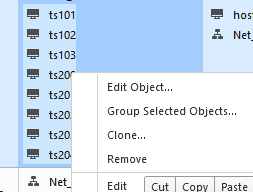
You can still group selected objects once they are added to the policy. Right-clicking on the selected objects still has the "group selected objects" option.
Seems to be there for us. Just select multiple objects and right-click

Doesn't seem to be there for me. Perhaps I'm running a different version of SmartConsole or there's a setting I'm unaware of. I don't see that when I right click multiple selected objects.
What is the version of the console? Send a screenshot of what options you see when you right-click.
991140024
New version pf R80.10 SmartConsole is being released each 1-2 months, would be better to install the latest one:
SmartConsole - General Availability Build 024 (07 Jan 2018)
PMTR-2385 "Group selected objects" option does not execute properly in certain scenarios.
small clarification: Group Selected Objects was always visible, but prior to that hotfix it had a bug when using it to group objects and quickly (but..really quickly) publishing the changes.
It's true that it's better to pick up the latest jumbo hotfixes especially since they are focused on stability fixes.
Hi, Group Selected Objects has been there since the first release of R80 (March 2016). It is available from a rule cells of security policies. Perhaps you were looking for it in another place?
In case you use the same set of objects in many places and would like to switch to a group instead, see How can I quickly move from many objects in many rules to a reusable group?
Yes exactly. I was trying to make use of this feature in object explorer, rather than a policy rule that has many objects I would like to group. In the R77 SmartDashboard we used the Objects List to do this. I now have build42 installed.
In build 42 version , Security policy > access control > policy > rules choose your objects and right click , there you go group selected objects.
Leaderboard
Epsum factorial non deposit quid pro quo hic escorol.
| User | Count |
|---|---|
| 76 | |
| 33 | |
| 17 | |
| 14 | |
| 14 | |
| 12 | |
| 11 | |
| 11 | |
| 9 | |
| 8 |
Tue 21 Apr 2026 @ 05:00 PM (IDT)
AI Security Masters E7: How CPR Broke ChatGPT's Isolation and What It Means for YouTue 28 Apr 2026 @ 06:00 PM (IDT)
Under the Hood: Securing your GenAI-enabled Web Applications with Check Point WAFTue 21 Apr 2026 @ 05:00 PM (IDT)
AI Security Masters E7: How CPR Broke ChatGPT's Isolation and What It Means for YouTue 28 Apr 2026 @ 06:00 PM (IDT)
Under the Hood: Securing your GenAI-enabled Web Applications with Check Point WAFTue 12 May 2026 @ 10:00 AM (CEST)
The Cloud Architects Series: Check Point Cloud Firewall delivered as a serviceThu 30 Apr 2026 @ 03:00 PM (PDT)
Hillsboro, OR: Securing The AI Transformation and Exposure ManagementAbout CheckMates
Learn Check Point
Advanced Learning
YOU DESERVE THE BEST SECURITY