- Products
- Learn
- Local User Groups
- Partners
- More

The Great Exposure Reset
24 February 2026 @ 5pm CET / 11am EST
CheckMates Fest 2026
Watch Now!AI Security Masters
Hacking with AI: The Dark Side of Innovation
CheckMates Go:
CheckMates Fest
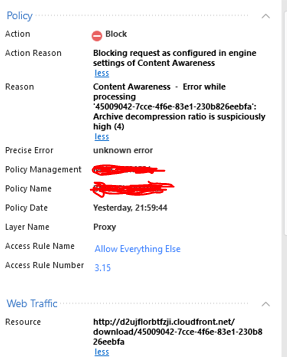
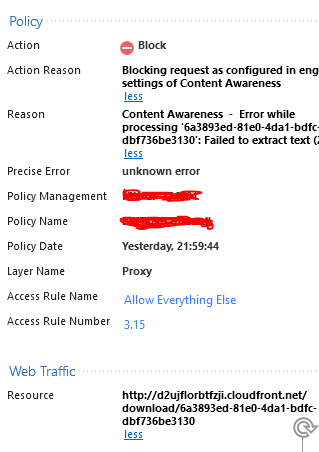
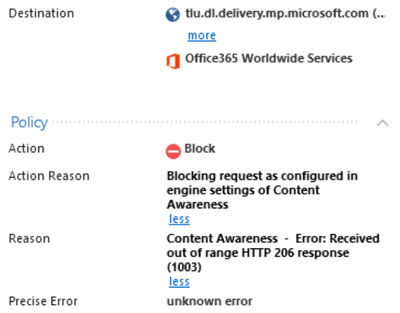
Content Awareness in R80.10 - A user is trying to download some packages from a program called Unity and some are failing to download. After looking through the logs I repeatedly see a log that is blocking and the reason is 'Blocking request as configured in engine settings of Content Awareness.
Reason 1 - Content Awareness - Error while processing 'Big long string of characters: Failed to extract text.
Reason 2 - Content Awareness - Error while processing 'Big long string of characters: Archive decompression ratio is suspiciously high.
My question is, where do I edit the Threat Prevention/Access Policy in order to allow this program to download all of it's packages?
Thanks
This traffic is being dropped because the Content Awareness engine is running into an error and you currently have the Fail Mode set to 'Fail Close'.
If you need this traffic to go through, you can switch the Fail Mode to 'Fail-Open.'

Hi Kyle,
Surely that is not a secure option to turn it to fail-open?
Is that the only way of getting around this?
Thanks
I can definitely understand the caution about the security impact. ![]()
If you want to stay in Fail-Close, there is an option to change the Content Awareness settings to avoid these errors. You can see this documented in SK11851.
Take note that changing these is not recommended unless you need to.
Thanks Kyle, I've put SK11851 into Google and CheckPoint site and nothing comes up? Please could you link me ![]()
Looks like I missed a digit -- sk118516.
thank you!
So my current value for # fw ctl set int fileapp_max_upload_file_size is 0, surely that can't be right if the default value is 10mb?
If I want to set this as 200mb for example, would I just enter # fw ctl set int fileapp_max_upload_file_size <200> ?
I'm going back and forth to our vendor, then to CheckPoint support and then back. I'm debating whether to turn on fail-open as this is just using up too much of my time and stopping a lot of users from uploading & downloading files. It seems there's some sort of limit at 200mb, although when running fw ctl get int fileapp_max_upload_file_size it = 0.
When in fail-open, if the gateway is unable to extract text does it still get analysed by all the other blades for malicious content?
Hello @Kyle_Danielson, thanks for your help and brief explanation, I just made this change and looks like it's working, but can you explain what are the differences between fail-open and fail-close options? Does it mean if there is an error with the content awareness system, it will "bypass" traffic and won't inspect it through content awareness?
I am having a similar issue, but in this case, our mode is set to fail-open.
That's a different problem that has a solution: https://support.checkpoint.com/results/sk/sk167173
Leaderboard
Epsum factorial non deposit quid pro quo hic escorol.
| User | Count |
|---|---|
| 52 | |
| 41 | |
| 15 | |
| 13 | |
| 12 | |
| 11 | |
| 11 | |
| 10 | |
| 9 | |
| 8 |
Thu 19 Feb 2026 @ 03:00 PM (EST)
Americas Deep Dive: Check Point Management API Best PracticesTue 24 Feb 2026 @ 11:00 AM (EST)
Under The Hood: CloudGuard Network Security for Azure Virtual WANThu 19 Feb 2026 @ 03:00 PM (EST)
Americas Deep Dive: Check Point Management API Best PracticesTue 24 Feb 2026 @ 11:00 AM (EST)
Under The Hood: CloudGuard Network Security for Azure Virtual WANAbout CheckMates
Learn Check Point
Advanced Learning
YOU DESERVE THE BEST SECURITY