- Products
- Learn
- Local User Groups
- Partners
- More

Step Into the Future of
AI-Powered Cyber Security
When the Agents Attack
A Live Look at Agentic Exposure Validation
Bridge the CAASM Gap
with Exposure Management
AI Security Masters E8:
Claude Mythos: New Era in Cyber Security
CheckMates Go:
CheckMates Fest
Hello everyone,
Currently, I'm introducing the Checkpoint FW product to a school.
Every feature is relevant until they want to check out Filtering feature:
- They are using the following website for testing: http://testfiltering.com/
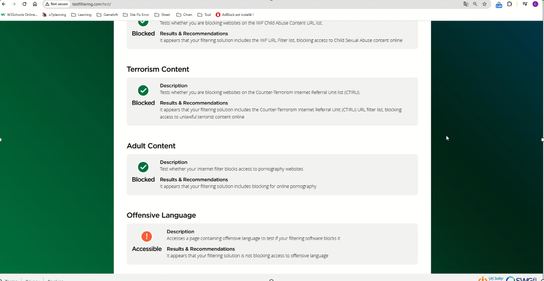
- I have implemented relevant categories, http/https inspection,..., however when performing "run test", the test results still do not prevent access to Offensive Language.
- I will leave the video with the configuration and perform the test below (video in file .pptx):
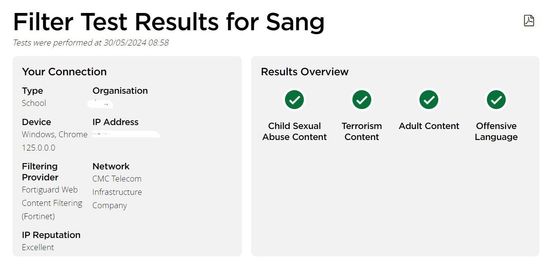
Now competitor Fortinet is also pitching to that school, and they passed the test, pictured below:
If our solution can pass this test, that school will be very likely to buy the solution, because they are more favorable towards Checkpoint than Fortinet.
So please help me, is there any way to configure and pass the test?
Thank you very much, everyone.
Best regards.
What do you configure in the policy to prevent those categories?
Hi _Val_,
You can check configure on the .pptx file attachment.
And what made you think I did not check it before asking a question?
You put there a video of the test. It is virtually impossible to see in the video how you configured your URLF policy.
Hi!
What blades you have enabled to achieve this goal? I assume you want to use URL filtering and application control?
At this moment I am not able to find a URL filtering category related to bad language. Is does also not make sense I think. For example if there is a bad word in a youtube video comment this video then needs to be blocked? Maybe this has education purposes. So I would reconsider to advise against blocking this category.
Also I found the DLP (data leak prevention) blade has an option for blocking bad language. Below screenshots as reference.
Logically, to me anyway, if you can find category that matches offensive language, you can add it to be blocked. I cant recall now what closest one to it would be, but its easy to tell once you hit plus sign to add them. Otherwise, I would confirm with TAC.
Andy
There are plenty, see below
Just logging in now to S1C for one customer, let me see.
Andy
@_Val_ I dont see inappropriate sites by default, I assume you added it yourself? Other ones are there...
Andy
Anyhow, make sure you add these categories to the block rule, and see if it makes any difference.
On top, I hope your HTTPS Inspection is on.
Leaderboard
Epsum factorial non deposit quid pro quo hic escorol.
| User | Count |
|---|---|
| 29 | |
| 15 | |
| 6 | |
| 6 | |
| 5 | |
| 5 | |
| 5 | |
| 4 | |
| 4 | |
| 3 |
Wed 10 Jun 2026 @ 01:00 PM (EDT)
Deep Dive: When the Agents Attack: A Live Look at Agentic Exposure ValidationThu 11 Jun 2026 @ 11:00 AM (EDT)
Tips and Tricks 2026 #8: Say Yes to AI Without Saying Yes to RiskFri 12 Jun 2026 @ 10:00 AM (CEST)
CheckMates Live Netherlands - Sessie 47: Continuous Threat Exposure ManagementTue 16 Jun 2026 @ 05:00 PM (CEST)
Under the Hood: Check Point SASE | Internet Access Optimization & Performance TuningWed 10 Jun 2026 @ 01:00 PM (EDT)
Deep Dive: When the Agents Attack: A Live Look at Agentic Exposure ValidationThu 11 Jun 2026 @ 11:00 AM (EDT)
Tips and Tricks 2026 #8: Say Yes to AI Without Saying Yes to RiskFri 12 Jun 2026 @ 10:00 AM (CEST)
CheckMates Live Netherlands - Sessie 47: Continuous Threat Exposure ManagementTue 16 Jun 2026 @ 05:00 PM (CEST)
Under the Hood: Check Point SASE | Internet Access Optimization & Performance TuningThu 18 Jun 2026 @ 10:00 AM (CEST)
The Cloud Architects Series: Check Point WAF - The Next Generation of AI powered protectionAbout CheckMates
Learn Check Point
Advanced Learning
YOU DESERVE THE BEST SECURITY