- Products
- Learn
- Local User Groups
- Partners
- More

Step Into the Future of
AI-Powered Cyber Security
When the Agents Attack
A Live Look at Agentic Exposure Validation
Bridge the CAASM Gap
with Exposure Management
AI Security Masters E8:
Claude Mythos: New Era in Cyber Security
CheckMates Go:
CheckMates Fest
To give another example, I present the following GW object, which has the following interfaces defined:
I used the following mgmt_cli command:
mgmt_cli -r true set simple-gateway name "R8120-GW" interfaces.1.name "eth0" interfaces.1.ipv4-address "10.6.5.210" interfaces.1.ipv4-network-mask "255.255.255.0" interfaces.1.topology "external" interfaces.2.name "eth1" interfaces.2.ipv4-address "192.168.100.1" interfaces.2.ipv4-network-mask "255.255.255.0" interfaces.2.topology "internal" interfaces.2.topology-settings.ip-address-behind-this-interface "network defined by the interface ip and net mask" interfaces.3.name "eth2" interfaces.3.ipv4-address "192.168.200.1" interfaces.3.ipv4-network-mask "255.255.255.0" interfaces.3.topology "internal" interfaces.3.topology-settings.ip-address-behind-this-interface "network defined by the interface ip and net mask"
The end result:
Note that you might need to pass more parameters to set the interfaces per your specifications.
However, that should be more than enough to get you started.
Yes, and this problem is addressed in R82 with the add-interface endpoint.
Continuing with the above object, let's say I wanted to add eth3.
My call would look something like this:
mgmt_cli -r true add interface name "eth3" gateway-uid "375bebfe-989b-4cd8-80c0-001d2736ccc1" ipv4-address "192.168.150.1" ipv4-mask-length "24" security-zone-settings.auto-calculated "false" security-zone-settings.specific-zone "WirelessZone" topology "internal" topology-settings.ip-address-behind-this-interface "network defined by the interface ip and net mask"
It looks something like this in SmartConsole:
FYI @Omer_Kleinstern when I tried to use ipv4-network-mask instead of ipv4-mask-length in the above, I got a validation error.
I assume this a bug?
Also, it seems that there is no option in the add-interface endpoint (or the set-interface one) to actually enable the specified security zone.
You're doing this from SmartConsole CLI, which is not where you need to enter this command.
Log into the gateway via SSH/console.
It seems like you're trying to use the clish command in the API to add this interface to the relevant network object.
That's not how to do it.
You must use the set simple-gateway API call and specify ALL the interfaces for that gateway object, including the one you want to add.
In R82, there is an add-interface endpoint where it appears you can add an interface to an existing gateway object.
Can you make it more clearly? When I use set simple-gateway with my gateway uid, I have parameter interfaces.i. I tried set simple-gateway uid "UID" interfaces.i. ... and it always show error.
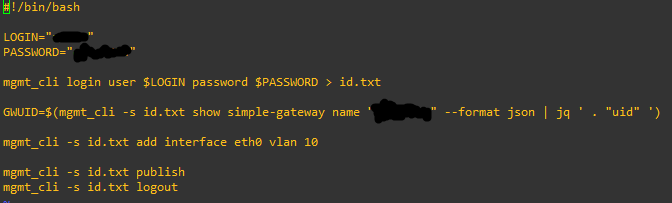
I just want to add vlan sub-interfaces, Im using R81.20. When I log into the gateway via console. I use "add interface eth0 vlan 10" and some "set interface ...", it work. I want to try to do it with expert mode (mgmt_cli) to add multiple vlans at once. Can I do it on R81.20?
As stated, you cannot just "add" an interfaces to an existing simple-gateway object.
Your API call must include ALL the interfaces (both existing and ones you wish to add).
This is specified in the API documentation:
See this thread for an example: https://community.checkpoint.com/t5/Management/How-to-Set-topology-on-a-simple-gateway-using-the-mgm...
To give another example, I present the following GW object, which has the following interfaces defined:
I used the following mgmt_cli command:
mgmt_cli -r true set simple-gateway name "R8120-GW" interfaces.1.name "eth0" interfaces.1.ipv4-address "10.6.5.210" interfaces.1.ipv4-network-mask "255.255.255.0" interfaces.1.topology "external" interfaces.2.name "eth1" interfaces.2.ipv4-address "192.168.100.1" interfaces.2.ipv4-network-mask "255.255.255.0" interfaces.2.topology "internal" interfaces.2.topology-settings.ip-address-behind-this-interface "network defined by the interface ip and net mask" interfaces.3.name "eth2" interfaces.3.ipv4-address "192.168.200.1" interfaces.3.ipv4-network-mask "255.255.255.0" interfaces.3.topology "internal" interfaces.3.topology-settings.ip-address-behind-this-interface "network defined by the interface ip and net mask"
The end result:
Note that you might need to pass more parameters to set the interfaces per your specifications.
However, that should be more than enough to get you started.
I see, so every time I add interface, I need to define the old interface and the new interface. I find that quite inconvenient. For example, if I already have 10 interfaces and want to add 10 new interfaces, I will use an API call for 20 interfaces. However, thanks for the helpful solution.
Yes, and this problem is addressed in R82 with the add-interface endpoint.
Continuing with the above object, let's say I wanted to add eth3.
My call would look something like this:
mgmt_cli -r true add interface name "eth3" gateway-uid "375bebfe-989b-4cd8-80c0-001d2736ccc1" ipv4-address "192.168.150.1" ipv4-mask-length "24" security-zone-settings.auto-calculated "false" security-zone-settings.specific-zone "WirelessZone" topology "internal" topology-settings.ip-address-behind-this-interface "network defined by the interface ip and net mask"
It looks something like this in SmartConsole:
FYI @Omer_Kleinstern when I tried to use ipv4-network-mask instead of ipv4-mask-length in the above, I got a validation error.
I assume this a bug?
Also, it seems that there is no option in the add-interface endpoint (or the set-interface one) to actually enable the specified security zone.
Leaderboard
Epsum factorial non deposit quid pro quo hic escorol.
| User | Count |
|---|---|
| 29 | |
| 15 | |
| 6 | |
| 6 | |
| 5 | |
| 5 | |
| 5 | |
| 4 | |
| 4 | |
| 3 |
Wed 10 Jun 2026 @ 01:00 PM (EDT)
Deep Dive: When the Agents Attack: A Live Look at Agentic Exposure ValidationThu 11 Jun 2026 @ 11:00 AM (EDT)
Tips and Tricks 2026 #8: Say Yes to AI Without Saying Yes to RiskFri 12 Jun 2026 @ 10:00 AM (CEST)
CheckMates Live Netherlands - Sessie 47: Continuous Threat Exposure ManagementWed 10 Jun 2026 @ 01:00 PM (EDT)
Deep Dive: When the Agents Attack: A Live Look at Agentic Exposure ValidationThu 11 Jun 2026 @ 11:00 AM (EDT)
Tips and Tricks 2026 #8: Say Yes to AI Without Saying Yes to RiskFri 12 Jun 2026 @ 10:00 AM (CEST)
CheckMates Live Netherlands - Sessie 47: Continuous Threat Exposure ManagementTue 16 Jun 2026 @ 05:00 PM (CEST)
Under the Hood: Check Point SASE | Internet Access Optimization & Performance TuningThu 18 Jun 2026 @ 10:00 AM (CEST)
The Cloud Architects Series: Check Point WAF - The Next Generation of AI powered protectionAbout CheckMates
Learn Check Point
Advanced Learning
YOU DESERVE THE BEST SECURITY