- Products
- Learn
- Local User Groups
- Partners
- More

What's New in Check Point SASE
Wednesday, 9 September @ 5pm CET / 11am EDT
The State of Ransomware Q2 2026:
This Quarter's Trends, and Their Impact on Your Defenses
AI Security Masters
Implementing the AI Security Trifecta
CheckMates Go:
Half is Not Enough
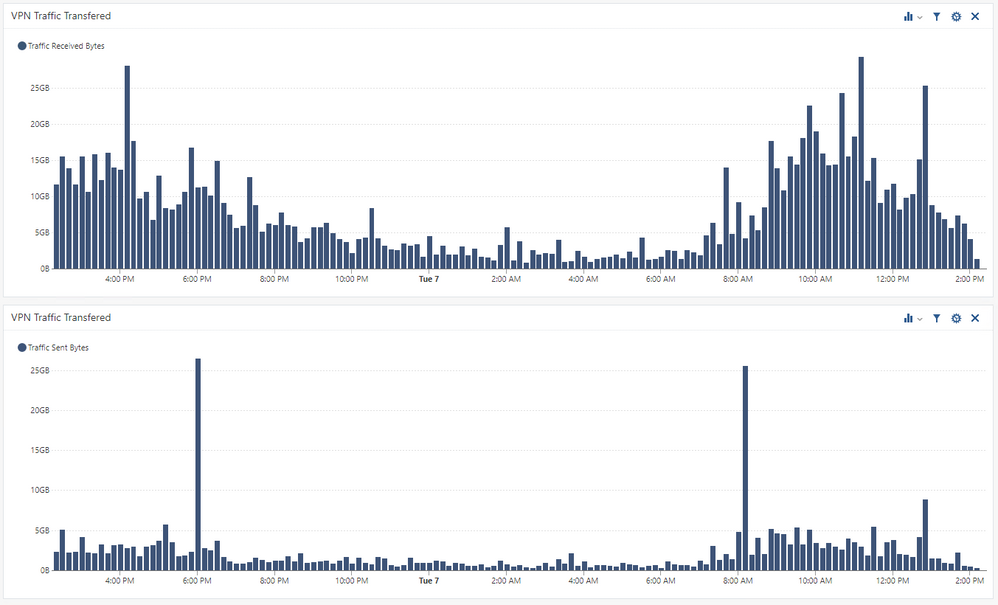
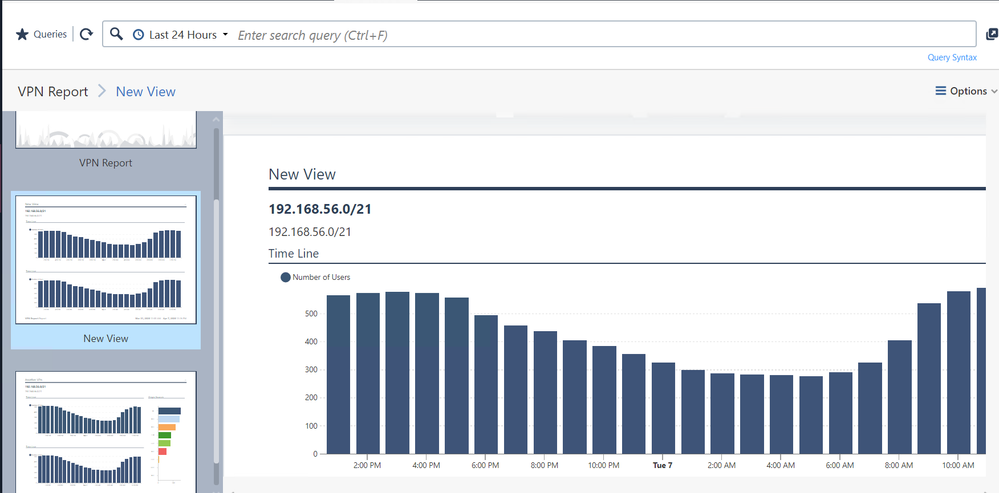
Since Covid-19 days lots of users are using remote access VPN and a common request coming from users regarding a status report which can show the actual concurrent VPN users numbers. please use the attached files by importing in smart event and check the report filter for source IP and you will be able to access a report like below.
an important step to take once you import this report/view from filter section remove teh existing IP's and Add VPN space for your own environment
Since Covid-19 days lots of users are using remote access VPN and a common request coming from users regarding a status report which can show the actual concurrent VPN users numbers. please use the attached files by importing in smart event and check the report filter for source IP and you will be able to access a report like below.
an important step to take once you import this report/view from filter section remove teh existing IP's and Add VPN space for your own environment
Since Covid-19 days lots of users are using remote access VPN and a common request coming from users regarding a status report which can show the actual concurrent VPN users numbers. please use the attached files by importing in smart event and check the report filter for source IP and you will be able to access a report like below.
an important step to take once you import this report/view from filter section remove teh existing IP's and Add VPN space for your own environment
Since Covid-19 days lots of users are using remote access VPN and a common request coming from users regarding a status report which can show the actual concurrent VPN users numbers. please use the attached files by importing in smart event and check the report filter for source IP and you will be able to access a report like below.
an important step to take once you import this report/view from filter section remove teh existing IP's and Add VPN space for your own environment
Nice one (:
Nice one (:
Nice one (:
Hello,
I am quite new to using reports and I was not able to get this working as shown in your screenshots.
I see the report and a view after importing the two files and editing the VPN ranges. This displays the number of users and looks really nice. Thanks for this!
But I am not able to see this "transferred data" view. In addition to the report I have a new view called "Test" and this also shows the number of users chart. Can you help me how to get the transferred data shown? Best would be to have it in the report as well. 🙂
Regards
Marco
Hello,
I am quite new to using reports and I was not able to get this working as shown in your screenshots.
I see the report and a view after importing the two files and editing the VPN ranges. This displays the number of users and looks really nice. Thanks for this!
But I am not able to see this "transferred data" view. In addition to the report I have a new view called "Test" and this also shows the number of users chart. Can you help me how to get the transferred data shown? Best would be to have it in the report as well. 🙂
Regards
Marco
Hello,
I am quite new to using reports and I was not able to get this working as shown in your screenshots.
I see the report and a view after importing the two files and editing the VPN ranges. This displays the number of users and looks really nice. Thanks for this!
But I am not able to see this "transferred data" view. In addition to the report I have a new view called "Test" and this also shows the number of users chart. Can you help me how to get the transferred data shown? Best would be to have it in the report as well. 🙂
Regards
Marco