- Products
- Learn
- Local User Groups
- Partners
- More

What's New in R82.10?
Watch HereWhen the Agents Attack
A Live Look at Agentic Exposure Validation
AI Security Masters E8:
Claude Mythos: New Era in Cyber Security
CheckMates Go:
CheckMates Fest
Just an FYI for anyone else trying this.
If you attempt to perform a Push Operation to add a VPN Site using [Login Option: "Standard"] and [Authentication Method: Username/Password] it will silently fail the operation on the client.
This is because it runs the following command on the remote machine:
create -s "REDACTED" -di "REDACTED" -lo "Standard" -a "username-password" -f "REDACTED_SIGNATURE"
The issue is that using the [-a ""] parameter with [-lo "standard"] results in the error "Standard: does not need authentication method"
The Infinity Portal needs to be reprogrammed to not sent the [-a "username-password"] parameter if [-lo "Standard"] is already specified.
Running this command manually on the workstation adds the VPN Site correctly:
create -s "REDACTED" -di "REDACTED" -lo "Standard" -f "REDACTED_SIGNATURE"
--------------
FIX:
When using Radius authentication you must use Custom Login Option and manually enter "RADIUS Logon Options" in the field below. The text is case sensitive.
Action: Add VPN Site
Server Name (or IP): 10.1.1.1
Use Custom Login Option: Checked
Login Option (Manually entered Case sensitive): RADIUS Logon Options
Authentication Method: Other
Fingerprint: LONG STRING OF WORD GOES HERE
Remote Access Gateway Name: Gateway_Name
Hi @Andrew_Scott,
Regarding the behavior.
Whether to specify the authentication method or not during the site creation command depends on gateway settings.
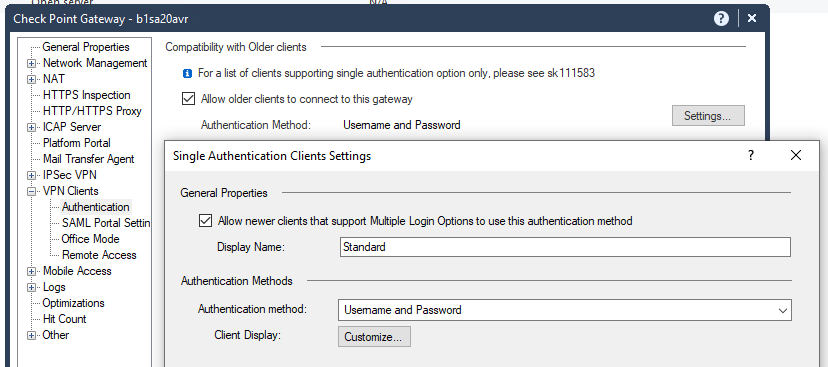
If for "Single Authentication Clients setting" the admin defines a specific authentication method, then you can not use the -a in the "trac create" command:
trac create -s "REDACTED" -di "REDACTED" -lo "Standard" -f "REDACTED_SIGNATURE"
But if the admin leaves the default value, then the authentication method parameter is required in the "trac create" command:
trac create -s "REDACTED" -di "REDACTED" -lo "Standard" -a "username-password" -f "REDACTED_SIGNATURE"
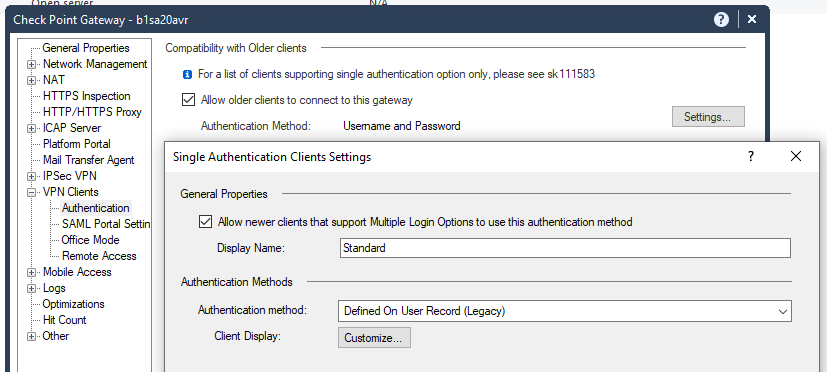
Since the Push Operation sends the full command, including the -a when choosing the "Standard" option, you need to make sure the gateway is configured to the default setting "Defined On User Record (Legacy)".
We are adding a clarification in the Harmony Endpoint EPMaaS Administration Guide.
I know exactly what you are talking about. I had not dealt with this myself in a while, but sounds familiar. Maybe ask if you can work with someone in Endpoint team, because if ticket went to firewall team, they most likely would not be familiar with this.
Best,
Andy
Hi @Andrew_Scott,
Regarding the behavior.
Whether to specify the authentication method or not during the site creation command depends on gateway settings.
If for "Single Authentication Clients setting" the admin defines a specific authentication method, then you can not use the -a in the "trac create" command:
trac create -s "REDACTED" -di "REDACTED" -lo "Standard" -f "REDACTED_SIGNATURE"
But if the admin leaves the default value, then the authentication method parameter is required in the "trac create" command:
trac create -s "REDACTED" -di "REDACTED" -lo "Standard" -a "username-password" -f "REDACTED_SIGNATURE"
Since the Push Operation sends the full command, including the -a when choosing the "Standard" option, you need to make sure the gateway is configured to the default setting "Defined On User Record (Legacy)".
We are adding a clarification in the Harmony Endpoint EPMaaS Administration Guide.
So we were using Radius settings. Here's the actual settings that works on the client side. The issue is that you have to manually enter "RADIUS Logon Options" in the Login Option field and it's case sensitive.
Fields are filled in with sample values.
Action: Add VPN Site
Server Name (or IP): 10.1.1.1
Use Custom Login Option: Checked
Login Option (Manually entered Case sensitive): RADIUS Logon Options
Authentication Method: Other
Fingerprint: LONG STRING OF WORD GOES HERE
Remote Access Gateway Name: Gateway_Name
Hi @Andrew_Scott,
This is by design according to the Harmony Endpoint EPMaaS Administration Guide:
|
Login Option |
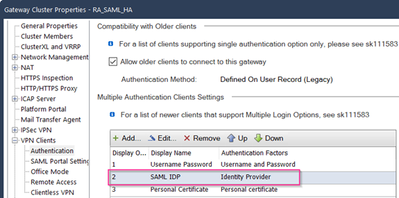
Login option for the server. By default, Standard login option is selected. To use a custom login option, select Use Custom Login Option checkbox, and enter the login option. This must match the Display Name specified in the GW properties > VPN Clients > Authentication > Multiple Authentication Clients Settings in the SmartConsole For example, SAML IDP. |
Leaderboard
Epsum factorial non deposit quid pro quo hic escorol.
| User | Count |
|---|---|
| 11 | |
| 6 | |
| 2 | |
| 2 | |
| 1 | |
| 1 | |
| 1 | |
| 1 | |
| 1 | |
| 1 |
Thu 02 Jul 2026 @ 06:00 PM (CST)
Revolucionando la Seguridad con IA Generativa: Prevención Inteligente en Tiempo RealThu 09 Jul 2026 @ 10:00 AM (CEST)
Schutz souveräner Workloads: Check Point & die AWS European Sovereign CloudThu 09 Jul 2026 @ 11:00 AM (CEST)
The Cloud Architects Series: Check Point Edge Protection SD-WAN & SASETue 14 Jul 2026 @ 10:00 AM (PDT)
AI Security Masters E11: READY OR NOT: Securing the AI Enterprise 3/5 - AI Workforce SecurityThu 30 Jul 2026 @ 10:00 AM (PDT)
AI Security Masters E12: READY OR NOT: Securing the AI Enterprise 4/5 - AI GatewayThu 20 Aug 2026 @ 10:00 AM (PDT)
AI Security Masters E13: READY OR NOT: Securing the AI Ent 5/5 - AI Research & Threat LandscapeTue 14 Jul 2026 @ 10:00 AM (PDT)
AI Security Masters E11: READY OR NOT: Securing the AI Enterprise 3/5 - AI Workforce SecurityThu 30 Jul 2026 @ 10:00 AM (PDT)
AI Security Masters E12: READY OR NOT: Securing the AI Enterprise 4/5 - AI GatewayThu 20 Aug 2026 @ 10:00 AM (PDT)
AI Security Masters E13: READY OR NOT: Securing the AI Ent 5/5 - AI Research & Threat LandscapeThu 02 Jul 2026 @ 06:00 PM (CST)
Revolucionando la Seguridad con IA Generativa: Prevención Inteligente en Tiempo RealAbout CheckMates
Learn Check Point
Advanced Learning
YOU DESERVE THE BEST SECURITY