- Products
- Learn
- Local User Groups
- Partners
- More

MVP 2026: Submissions
Are Now Open!
What's New in R82.10?
10 December @ 5pm CET / 11am ET
Improve Your Security Posture with
Threat Prevention and Policy Insights
Overlap in Security Validation
Help us to understand your needs better
CheckMates Go:
Maestro Madness
Hi,
I've deployed CheckPoint Endpoint Security a while ago with Intune, and now I need to update the software to a newer version with Intune again. When you manually remove the software from a computer, you get asked to fill in a password. How does Intune bypass the following password prompt to uninstall/re-install the software? Do I have to uninstall it from the CheckPoint Infinity Portal instead of pushing from intune, and then re-deploy new packages again from Intune? Perhaps I should do everything from the CheckPoint Infinity Portal.
I've tried the "Uninstall" option under the deployment app group in Azure and selected the group(s) to Exclude and pushed, but no update to be seen on the client side on a computer I'm testing on.
When i run the MsiExec.exe /X {xxx} string, I also get prompted for password.
If I can get guided to any documentation, that'd be great!
Thanks for any assistance!
Br
Magne
Hi,
If you need to update i do not see any need to uninstall the endpoints. You just need to go the deployment rules and change the agent version, all your endpoints on that rule will receive the instruction to update and will attempt to download/install the new version from the cloud.
If you want to uninstall the agent remotely with msiexec you need the uninstall password mandatory and must consider the XXX string is specific for each EPS.msi installer. You will need the .msi files you used to install the agents and use a different msiexec command for each installer. For example:
msiexec /x {XXX-1} /qn /norestart UNINST_PASSWORD="uninstall_password"
msiexec /x {XXX-2} /qn /norestart UNINST_PASSWORD="uninstall_password"
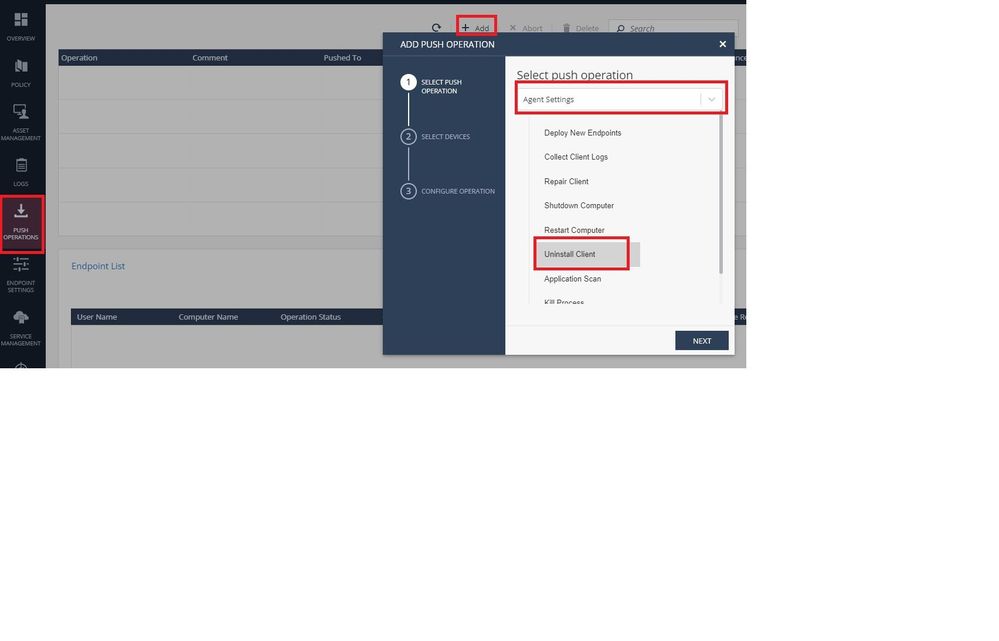
That will uninstall the agent without any message to the customer in silent mode. But if you have a cloud based endpoint management, i would use push operations to uninstall the agents.
I would recommend to do the upgrade/uninstall tasks from the infinity portal.
You can check the admin guide also:
Regards
Endpoint Security package has its own client uninstall password. You need to consult with your security administrator to know what it is.
Hi @_Val_
I have the uninstall password, but I still doesn't understand how to do it from Intune.
Use a local uninstaller with a password.
Hi,
If you need to update i do not see any need to uninstall the endpoints. You just need to go the deployment rules and change the agent version, all your endpoints on that rule will receive the instruction to update and will attempt to download/install the new version from the cloud.
If you want to uninstall the agent remotely with msiexec you need the uninstall password mandatory and must consider the XXX string is specific for each EPS.msi installer. You will need the .msi files you used to install the agents and use a different msiexec command for each installer. For example:
msiexec /x {XXX-1} /qn /norestart UNINST_PASSWORD="uninstall_password"
msiexec /x {XXX-2} /qn /norestart UNINST_PASSWORD="uninstall_password"
That will uninstall the agent without any message to the customer in silent mode. But if you have a cloud based endpoint management, i would use push operations to uninstall the agents.
I would recommend to do the upgrade/uninstall tasks from the infinity portal.
You can check the admin guide also:
Regards
@RS_Daniel just what I was looking for, thank you so much!!
Is there a way to bulk uninstall clients?
Leaderboard
Epsum factorial non deposit quid pro quo hic escorol.
| User | Count |
|---|---|
| 8 | |
| 3 | |
| 2 | |
| 2 | |
| 1 | |
| 1 | |
| 1 | |
| 1 | |
| 1 |
Fri 12 Dec 2025 @ 10:00 AM (CET)
Check Mates Live Netherlands: #41 AI & Multi Context ProtocolTue 16 Dec 2025 @ 05:00 PM (CET)
Under the Hood: CloudGuard Network Security for Oracle Cloud - Config and Autoscaling!Fri 12 Dec 2025 @ 10:00 AM (CET)
Check Mates Live Netherlands: #41 AI & Multi Context ProtocolTue 16 Dec 2025 @ 05:00 PM (CET)
Under the Hood: CloudGuard Network Security for Oracle Cloud - Config and Autoscaling!Thu 18 Dec 2025 @ 10:00 AM (CET)
Cloud Architect Series - Building a Hybrid Mesh Security Strategy across cloudsAbout CheckMates
Learn Check Point
Advanced Learning
YOU DESERVE THE BEST SECURITY