- Products
- Learn
- Local User Groups
- Partners
- More

MVP 2026: Submissions
Are Now Open!
What's New in R82.10?
Watch NowOverlap in Security Validation
Help us to understand your needs better
CheckMates Go:
Maestro Madness
According to the following SK, silent installations are possible:
That works just fine, but what about upgrades to an existing installation?
When I try that, going from E86.20 to E86.30, I am stopped by a GUI element asking me to enter a password, where I have to enter the password configured in the "Client Settings" policy.
Is there a way to supply that password at the command line? I had a dig around in the .pkg but didn't find anything.
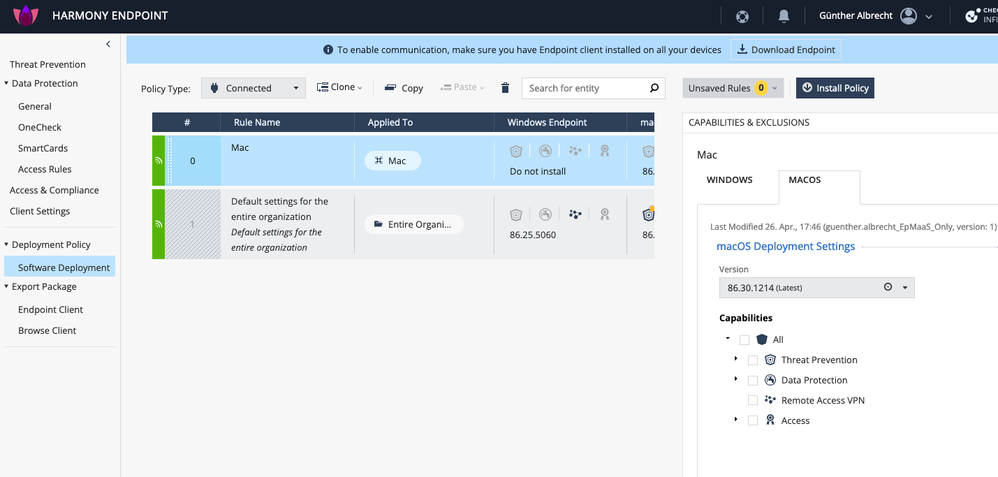
The CP portal Endpoint Management has the Tiny client EPS_TINY.zip for download (only for OS X > 10.14!) and the Mac deployment:
But yes, this will only be available in R81.20 for On Premise EPSS.
Why not use Automatic Client Upgrade from the Security Gateway instead ? See how to do that on the last pages of Endpoint Security VPN for macOS E86.30 Release Notes
We have two management servers. One manages our firewalls, the other is the standalone Endpoint server. The Endpoint Global Properties doesn't have a "Remote Access" section, but the firewall manager obviously does.
I assume this would work in that instance as the files are actually copied to the firewalls themselves?
The one thing we would lose here is the ability to schedule those upgrades. We want to manage this via Altiris, where we can push the upgrade tasks out manually, or via a policy attached to a group that we drop computers in to.
But that's an interesting feature I have not looked at before, so thanks.
For Endpoint Servers see https://sc1.checkpoint.com/documents/E86.30/EN/CP_E86.30_Endpoint_Security_Client_for_macOS_Release_...
Thanks again. I'm just now looking at the web interface.
According to the R81.10 documentation the Mac specific functionality appears to be planned:
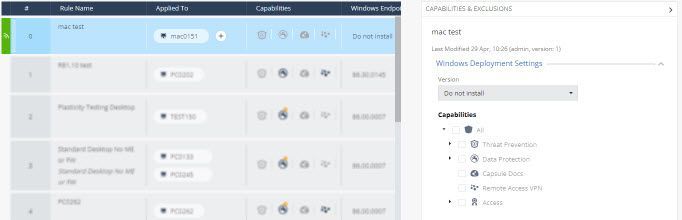
I am able to create a deployment rule, but there are no Mac specific features as yet, and you cannot chose whether it is a Mac or Windows deployment rule.
I assume this will come with R81.20, and it will probably do exactly what we want. I hope that would also come with a version of the new Tiny client, which I will look to switch over to as well from our current Initial Client builds.
Interesting times ahead.
The CP portal Endpoint Management has the Tiny client EPS_TINY.zip for download (only for OS X > 10.14!) and the Mac deployment:
But yes, this will only be available in R81.20 for On Premise EPSS.
Leaderboard
Epsum factorial non deposit quid pro quo hic escorol.
| User | Count |
|---|---|
| 8 | |
| 4 | |
| 2 | |
| 2 | |
| 1 | |
| 1 | |
| 1 | |
| 1 | |
| 1 | |
| 1 |
Fri 12 Dec 2025 @ 10:00 AM (CET)
Check Mates Live Netherlands: #41 AI & Multi Context ProtocolTue 16 Dec 2025 @ 05:00 PM (CET)
Under the Hood: CloudGuard Network Security for Oracle Cloud - Config and Autoscaling!Fri 12 Dec 2025 @ 10:00 AM (CET)
Check Mates Live Netherlands: #41 AI & Multi Context ProtocolTue 16 Dec 2025 @ 05:00 PM (CET)
Under the Hood: CloudGuard Network Security for Oracle Cloud - Config and Autoscaling!Thu 18 Dec 2025 @ 10:00 AM (CET)
Cloud Architect Series - Building a Hybrid Mesh Security Strategy across cloudsAbout CheckMates
Learn Check Point
Advanced Learning
YOU DESERVE THE BEST SECURITY