- Products
- Learn
- Local User Groups
- Partners
- More

MVP 2026: Submissions
Are Now Open!
What's New in R82.10?
Watch NowOverlap in Security Validation
Help us to understand your needs better
CheckMates Go:
Maestro Madness
Hello Mates!
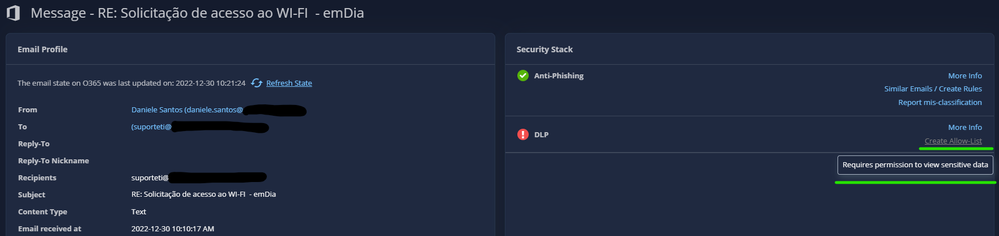
I'm trying to configure a allow list for Harmony Email DLP, but I have some issues and doubts about it. For example: When I open the DLP event and try to create an allow list directly from the event, I can't do it:
The link to create allow list seems to be disabled and the notification of requires permission is shown. I know that I have full permission on all products from the portal, look below:
I try to create with others admin users and the same occurs.
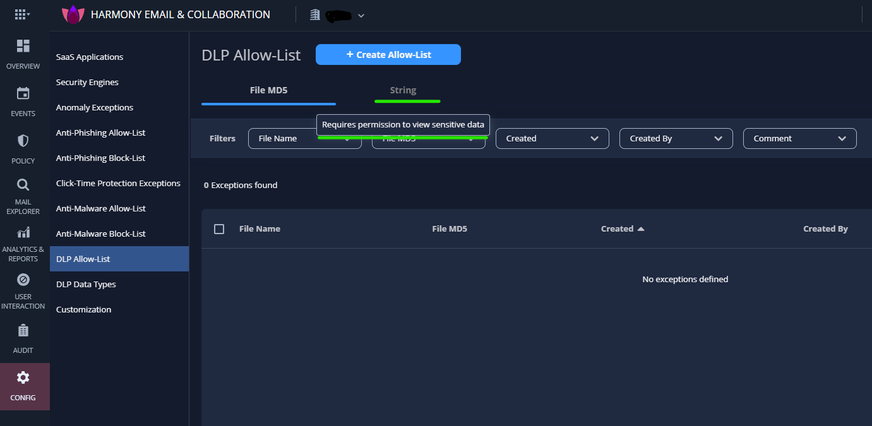
Another thing is as follows:
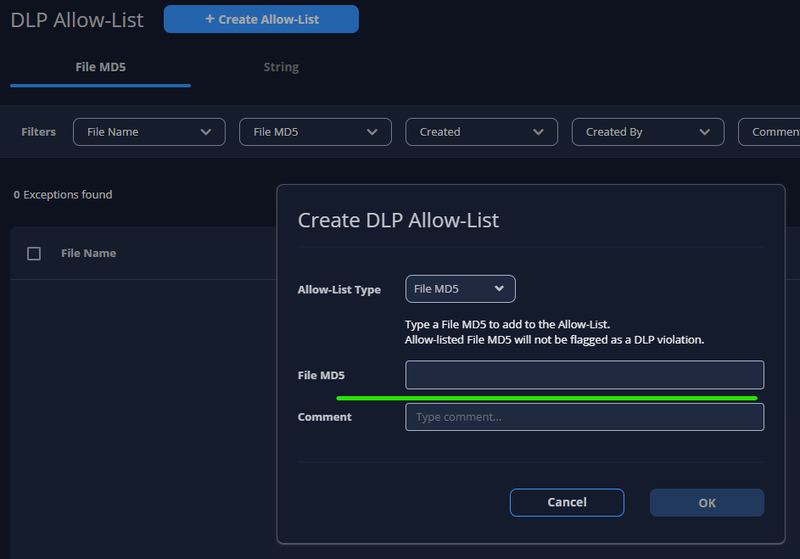
When I try to add an allow-list from the config>DLP allow-list as shown in the documentation (Harmony Doc ), the string option seems to be disabled as well and the same "required permission" message is shown when the mouse cursor is over there.
Now, my question is how can I add an allow-list from this option file MD5? Where can I find this MD5 hash to put on this field?
To summarize, basically what I need is that domain "A" can send e-mails to domain "B" without the DLP inspection like it was the same company because it was now indeed.
Thank you!
Hey @Bernardes ,
Apologies first of all, as I rarely ever work with this product, so will try my best to help. Happy New Year first of all! So, I see what you are referring to below, but looks like what I pointed out would let you filter for md5 strings, but maybe someone else can confirm for sure.
Andy
Hello @the_rock Have a Happy New Year! I appreciate your help, but this field, if I'm not wrong brings the exceptions that have already been created. If you have many exceptions created you use the filter to find a specific one. But I'm not sure about how to create one by MD5 or why I can't create a string and I can't create from the link of the event.
If you hover with your mouse where it says "string", does it let you click on it?
Hi there @Bernardes
Downloading emails and files and viewing their content are reserved for users with higher permissions than the standard Admin.
You can read all about it in our admin guide (relevant chapter). There you will see the additional required permission (View sensitive data).
This permission also allows admins to manage string-based exceptions.
Hello @Jonathango I gave permission to see sensitive data:
Now I can see the String option and add an exception from the event's link.
But is there any way to add 2 different emails domains to bypass the DLP inspection? This way to add exceptions by string or MD5 is poor and totally manual.
Hi @Bernardes .
There are strong use cases for every type of allow-listing.
We plan to enhance our allow-list capabilities in the short term and to add the ability to allow-list a recipient domain from being inspected for DLP.
Make sure you subscribe to our product updates blog, so you are always caught up with the latest releases.
@Jonathango ...I learned something new today...never seen those options before for sensitive data you pointed out. I always assumed that admin would have access to everything, so thank you for mentioning it.
Tue 16 Dec 2025 @ 05:00 PM (CET)
Under the Hood: CloudGuard Network Security for Oracle Cloud - Config and Autoscaling!Thu 18 Dec 2025 @ 10:00 AM (CET)
Cloud Architect Series - Building a Hybrid Mesh Security Strategy across cloudsTue 16 Dec 2025 @ 05:00 PM (CET)
Under the Hood: CloudGuard Network Security for Oracle Cloud - Config and Autoscaling!Thu 18 Dec 2025 @ 10:00 AM (CET)
Cloud Architect Series - Building a Hybrid Mesh Security Strategy across cloudsAbout CheckMates
Learn Check Point
Advanced Learning
YOU DESERVE THE BEST SECURITY